Create Holo-Themed Demo Overlays with ShowcaseView

Posted by Unknown on Saturday, August 31, 2013

Create Holo-Themed Demo Overlays with ShowcaseView

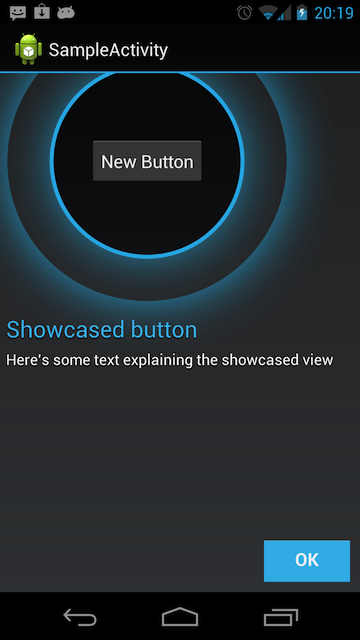
One week ago, we featured a guide by XDA Senior Member marty331 posted in our App Development forums aimed at helping application developers create in-app usage tutorials using transparent demo overlays atop application activities. However, not everybody is a designer able to create aesthetically appealing overlays. Luckily, XDA Senior Member nikwen discovered the open source ShowcaseView library by Alex Curran, which makes it easy to generate Holo-themed demo overlays with ease.

In addition to describing the Apache 2-licensed library, nikwen also put together a quick guide that teaches developers how to showcase views, views in fragments, and parts of the action bar. He also describes how to add listeners to the library to trigger the event, as well as add animations such as a virtual finger that performs a gesture.

As we stated before, one of the keys to getting users comfortable and happy with your application is to show them how to use it. Head over to the guide thread to get started.

Google+

Via xda-developers.com

More aboutCreate Holo-Themed Demo Overlays with ShowcaseView

BStats Brings Powerful Battery Tracking to Gingerbread

Posted by Unknown

BStats Brings Powerful Battery Tracking to Gingerbread

With our ever expanding screen sizes, exponentially faster processors, and marginally slimmer device profiles; there is one thing that still seems to still be stuck in the stone age: battery life. Often the limiting factor in determining just how much productivity is possible when on the go, we are still at the mercy of the almighty milliamp-hour at the end of the day. It is said that knowing thy enemy is the first step, and with that in mind, it's a good idea to know exactly what causes your battery to buckle.

One of the most important features in recent Android builds is the highly detailed battery stats panel. Giving you information about resource-intensive apps, graphs of usage over time, and more, it comes in quite handy when tuning your power profile. However, there are those for whom even this is not enough. Furthermore, not everyone is on Ice Cream Sandwich or later, and thus may not have access to all of the battery tracking fun.

XDA Forum Member onesrv created BStats to give users even more visualization options when determining which apps quench their power thirst most liberally. BStats can track power usage both over time and by application. And best of all, this works on all devices running Android 2.3.3 and greater!

Head over to the application thread to get tracking.

Google+

Via xda-developers.com

More aboutBStats Brings Powerful Battery Tracking to Gingerbread

Jordan Interviews XDA:DevCon 2013′s Elite Sponsor, Oppo – XDA Developer TV

Posted by Unknown

Jordan Interviews XDA:DevCon 2013′s Elite Sponsor, Oppo – XDA Developer TV

Jordan Interviews XDA:DevCon 2013′s Elite Sponsor, Oppo – XDA Developer TV

We've already seen XDA Developer TV Producer Jordan talk to our Senior Sponsors. Also, Elite Recognized Developer AdamOutler unboxed the Oppo Find Mirror (R819) the XDA way live at XDA:DevCon. Then after he got home, AdamOutler did an XDA Unboxing of his swag from the XDA:DevCon.

As we said on Thursday, XDA:DevCon would not have happened without the help of our excellent sponsors. While at the event, Jordan took some time to chat with one of our largest sponsors: the developer friendly manufacture Oppo. They talked about why they got involved with DevCon and spoke of the future with developers and Oppo. Pull up a chair and check out what they had to say.

Elite Sponsor

OPPO-Logo_New_Color_338px

Oppo

Also, be sure to check out other great video's on XDA Developer TV.

Google+

Via xda-developers.com

More aboutJordan Interviews XDA:DevCon 2013′s Elite Sponsor, Oppo – XDA Developer TV

Wanam Xposed Brings Many Tweaks to Stock Samsung ROMs

Posted by Unknown

Wanam Xposed Brings Many Tweaks to Stock Samsung ROMs

Let's face it. Sometimes, there isn't quite as much time for device modification as we would ordinarily prefer. This lack of time, combined with simply not knowing about all the available tweaks, inevitably results less device customization than desired.

Thankfully, XDA Recognized Developer wanam compiled quite a few tweaks into one easily installable Xposed Module that works on Samsung devices running a stock TouchWiz ROM. And best of all, wanam's compilation is installable via the versatile and powerful Xposed framework by XDA Recognized Developer rovo89. Due to the installation method of choice, applying the module is incredibly simple. Conversely, you can easily disable the modification in the event that something goes wrong.

Head over to the module thread to get started. The entire feature list can be found below:

  • Call Recording
  • 4 Ways Reboot (Reboot, Recovery, Hotboot, Download)
  • Full Color/Transparency customization for Status bar and Notification drawer elements
  • Secure Samsung Keyboard
  • Option to keep "Add Call" button with Call recording menu
  • Disable Camera shutter sound (+Screen Capture)
  • Flashlight trough volume button UP
  • Skip Music with Volume buttons
  • Save Call Logs View
  • Enable Keyboard Symbols
  • Enable Hangouts Calls trough cellular
  • Enable Camera while calling
  • Unlimited and Customizable Multi-View support
  • Bypass Exchange Lock check
  • Notification Panel Customization
  • Long Home key behavior
  • Long Back key to kill App (+ white list)
  • Disable increasing ringtone
  • Messaging Tweaks (raise limits and conversion)
  • Disable Scrolling cache
  • Enable Full rotations
  • White Circle Battery
  • Removed Camera permission
  • Transparent Notifications panel
  • Customize Clock format and size
  • Customize Battery text helper size
  • Customize Quick Settings buttons number per row
  • White themed Quick Settings buttons
  • Collapse Quick Settings after toggle
  • 2 line formatted date on the panel header
  • Dark themed Multi-Window
  • Disable Boot sound
  • Customize Two line date header format
  • White/Black Email App background (Supported on some devices)
  • Transparent Quick Settings buttons background
  • Default hidden SMS logs
  • Add Call button to Logs and Contacts list
  • Disable Accounts icons on Contacts list
  • Custimize Wifi AP Clients number
  • Disable Launcher page rotation
  • Add Exit button to browser
  • SMS Automatic input mode
  • Disable Call number formatting
  • Enable unlimited Contacts joining
  • Enable Gallery Rotation trough button
  • Set default Browser view to Desktop
  • Hide Wireless charging popup
  • And much more to come
Google+

Via xda-developers.com

More aboutWanam Xposed Brings Many Tweaks to Stock Samsung ROMs

Easily Command Your Device with ADB GUI

Posted by Unknown

Easily Command Your Device with ADB GUI

While most power users have more than a firm grasp on using the Android Debug Bridge, using a command line interface may be intimidating to new users looking to get into basic device modification. While we greatly encourage learning the commands, it doesn't hurt to also have a GUI for the most commonly used operations.

Now thanks to XDA Forum Member sandix, there is a streamlined Windows utility aimed at delivering many ADB functions through a graphical interface. ADB GUI supports quite a few operations including rebooting (to recovery, bootloader, and fastboot), logcat, remounting, flashing images, rooting (certain devices), pushing files, installing APKs, obtaining system information, and more. The program supports Windows XP and up, and requires for .NET 4.5 or later to be installed. It is compatible with devices running Ice Cream Sandwhich or later, though it may also work on Gingerbread.

Head over to the original thread to get started. If you wish to learn from his source code or build upon this application, visit the project's Github.

Google+

Via xda-developers.com

More aboutEasily Command Your Device with ADB GUI

Get Back the Floating Remote on Xperia Tablet Z AOSP ROMs

Posted by Unknown on Friday, August 30, 2013

Get Back the Floating Remote on Xperia Tablet Z AOSP ROMs

Sony Xperia Tablet Z users who have made the AOSP switch may have noticed the consequential disappearance of Sony's Small Apps suite. One of these small apps is the mini remote control, a floating remote that has no doubt proven its worth to many folks in living rooms on lazy Sunday afternoons. So for those missing its multitasking functionality, you can now get it back with TSRemote.

Thanks to XDA Senior Member lowtraxx, Xperia Tablet Z users will now be able to multitask on their tablet while watching soap operas on lazy afternoons once again. What lowtraxx has done to regain this functionality wass incorporate XDA Recognized Developer Apache14's open source IR Blaster library as the backend and XDA Senior Member PingPongBoss' StandOut library as the floating front end.

The end result is a floating remote control much like the small app that works with any AOSP-derived ROM such as CyanogenMod 10.1. As of right now, however, the only way for the tablet to recognize your television is by manually learning the IR commands with your remote. However, lowtraxx is planning to work on bringing in remote databases in the future.

If you would like to learn more, you can do so in the application thread. Its source code is also available at the project's Github.

Google+

Via xda-developers.com

More aboutGet Back the Floating Remote on Xperia Tablet Z AOSP ROMs

Streamline Your App Theming with BatchAPKTool

Posted by Unknown

Streamline Your App Theming with BatchAPKTool

If you fancy creating and applying themes for your applications, you no doubt have become well acquainted with APKTool. The application, originally created by XDA Recognized Developer Brut.all has become a staple in application modification on Android. It enables the modification of app resources by allowing users to easily decompile and recompile applications.

We've recently featured a few tools aimed at streamlining the APKTool experience, as well as a few guides on the subject. However, sometimes a script with some optimized use-cases can useful as well. This is where XDA Senior Member dfkt_ and his script BatchAPKTool come in.

BatchAPKTool isn't intended to take care of every need for every user. Rather, it's intended to perform a limited subset of tasks extremely efficiently. These tasks include decompiling the application resources into a dedicated subfolder, deleting all files other than image resources, optimizing the images, compiling the NinePatch PNGs, rebooting to recovery, and performing various tasks such as pushing the newly themed app.

While BatchAPKTool isn't a general purpose script geared at satisfying everyone's needs, it is useful for those looking to perform certain types of application theming more efficiently. Head over to the original thread to get started.

Google+
Via xda-developers.com

More aboutStreamline Your App Theming with BatchAPKTool

Moto X Kernel Source Out, SIM Unlock and Dual Boot AT&T Galaxy S4 – XDA Developer TV

Posted by Unknown

Moto X Kernel Source Out, SIM Unlock and Dual Boot AT&T Galaxy S4 – XDA Developer TV

The Moto X kernel source is out. That and much more news is covered by Jordan, as he reviews all the important stories from this week. Included in this week's news is an article about dual booting on the Samsung Galaxy S 4 and Sony Xperia ZL.

Jordan talks about the other videos released this week on XDA Developer TV. XDA Developer TV Producer Kevin released a video showing you how to control your lights with Tasker, Then, he controlled his lights with voice and NFC tags. Later, Jordan interviewed the XDA:DevCon Senior Sponsors. Pull up a chair and check out this video.

Links to stories mentioned:

  • Kernel Source Available for the Moto X
  • Easily SIM-Unlock Your AT&T Samsung Galaxy S 4
  • Dual Boot Achieved on the Samsung Galaxy S 4
  • Dual Boot on the Sony Xperia ZL
  • Migrate from Eclipse to Android Studio
  • How to Use Google Play Services Library with Android Studio
  • Tablet UI Mod for the 2013 Nexus 7 on Stock, Rooted JSS15Q
  • Control Your Lights with Your Android Phone – XDA Developer TV
  • Control Your Lights with NFC Tags or Your Voice – XDA Developer TV
  • Jordan Interviews XDA:DevCon 2013′s Senior Sponsors – XDA Developer TV

Check out Jordan's YouTube Channel and Jordan's Gaming YouTube Channel

Google+

Via xda-developers.com

More aboutMoto X Kernel Source Out, SIM Unlock and Dual Boot AT&T Galaxy S4 – XDA Developer TV

Rethink the Way You Text with Emu Messenger

Posted by Unknown

Rethink the Way You Text with Emu Messenger

Most standard messaging apps do a pretty decent job. Yes they're quite plain and featureless, often consisting of a simple conversation panel and a text box. But hey, what else does a text messaging app need? Well, quite a bit, according to XDA Forum Member gummihaf.

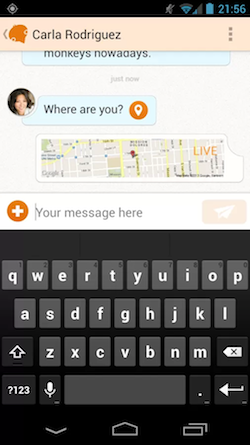
The developer behind Emu Messenger, gummihaf, made sure that the app packs a couple of fresh new features and functions that you would not normally see on your conventional messenger. What do I mean? Well for one, Emu Messenger has a 'Marco-Polo' feature, which allows you to share your location via Google Maps with your friend. This is a much easier alternative to giving directions over the phone. Furthermore, if you're in a situation where typing may not be very convenient, Emu Messenger allows you to dictate your message and send it to your recipient. Additionally, if you received an untimely message and would like to view it at another time, swiping the message to the left in the conversation panel will allow you to resend the message at a later time as a reminder.

Emu Messenger, with its novel functions and features, is definitely a unique approach to the text messaging experience. If you've ever felt your current messenger is lacking in some way, you may want to give Emu Messenger a whirl. If this is the case, head over to the application thread for more information.

Google+

Via xda-developers.com

More aboutRethink the Way You Text with Emu Messenger

Android APKTool v2 Released, Massive Overhaul

Posted by Unknown on Thursday, August 29, 2013

Android APKTool v2 Released, Massive Overhaul

A couple of months ago, we wrote about a tool that allows users to easily decompile and recompile APKs. Similar in functionality to the legendary APKTool (thread) by XDA Recognized Developer Brut.all, Android APKTool by XDA Forum Member Flextrick made the process extremely user friendly by adding a simple and easy-to-use GUI.

In the time since our last posting, Flextrick's utility has been given a major overhaul in its upgrade to version 2. As before, it runs on Windows computers with Java and .Net framework installed. A temporary quirk, however, is that only the Windows 8 version of the app has been updated to version 2. The Windows 7 version is still on 1.2. Luckily, the Windows 8 version runs just fine on Windows 7, with the exception of a somewhat broken layout.

According to the developer, version 2 lands with a complete code rework, along with a folder structure for a better overview. Furthermore, modified files will appear in their own folder, and buttons were added to select between JAR and APK files. Finally, some additional UI changes were made, as well as other miscellaneous changes across the board.

If you're looking to easily (and graphically) modify your APKs, head over to the original thread to get started.

Google+

Via xda-developers.com

More aboutAndroid APKTool v2 Released, Massive Overhaul

View Your Notifications over Bluetooth with Botifier

Posted by Unknown

View Your Notifications over Bluetooth with Botifier

Have you ever received a notification while driving, only to wish you had a way of easily (and safely) viewing its contents? Since many of us own Bluetooth-enabled car radios that support AVRCP 1.3, they can receive quite a bit of information from your mobile device.

Now thanks to some clever thinking by XDA Forum Member grimpy, you can now use this interface to send your notifications to your car stereo or any other AVRCP 1.3 device. Botifier sends all of your notifications to your Bluetooth receiver.

Application name shows up as "artist," and a notification summary shows up as "album." You can also show the full notification text as the track title, and this can be split across multiple "songs" with a user-specified maximum length. What about additional notifications? You can view them too. You can use the previous and next track buttons to cycle through notifications and the play/pause button to dismiss a notification.

Best of all, the application is fully open source. Head over to the application thread to get started. And if you're thinking of forking, head over to grimpy's Github.

Google+

Via xda-developers.com

More aboutView Your Notifications over Bluetooth with Botifier

Jordan Interviews XDA:DevCon 2013′s Senior Sponsors – XDA Developer TV

Posted by Unknown

Jordan Interviews XDA:DevCon 2013′s Senior Sponsors – XDA Developer TV

Jordan Interviews XDA:DevCon 2013′s Senior Sponsors – XDA Developer TV

XDA:DevCon has come and gone. We've already seen XDA Developer TV Producer Jordan talk about his experience at XDA:DevCon. Later, Elite Recognized Developer AdamOutler unboxed the Oppo Find Mirror (R819) the XDA way live at XDA:DevCon. Then after he got home, AdamOutler did an XDA Unboxing of his swag from the XDA:DevCon.

As much fun as was had by all those in attendance, and as awesome as all the presenters were, XDA:DevCon would not have happened without the help of our excellent sponsors. While at the event, Jordan took some time to chat with some of our Senior Sponsors. Pull up a chair and check out what they had to say.

Senior Sponsors

image001

Startapp

logo-ubuntu_su-orange-hex

Ubuntu

09-cpanel_company_logo

cPanel

 Also, be sure to check out other great video's on XDA Developer TV.

Google+

Via xda-developers.com

More aboutJordan Interviews XDA:DevCon 2013′s Senior Sponsors – XDA Developer TV

Kernel Source Available for the Moto X

Posted by Unknown

Kernel Source Available for the Moto X

Just 14 days ago, we announced that we had given the Moto X a home here on our forums. While the device may not exactly pack the highest specced internals, it offers several software perks enabled by its low power ancillary cores. Now, we are a happy to report that GPL-compliant kernel source has finally been released for the device.

Source is currently available for the T-Mobile (XT1053), AT&T (XT1058), and Sprint (XT1056) models. Curiously, the Sprint model was included, despite not yet being available for purchase. This is in contrast to the Verizon model, for which source code is not available despite its imminent launch.

This is the first important step towards aftermarket development on the Moto X, and we can't way to see the custom kernels that will come from this. Head over to the Moto X Sourceforge page to get the sauce, and head over to the Moto X forums to share in the development work that will inevitably follow.

[Via: Android Police]

Google+

Via xda-developers.com

More aboutKernel Source Available for the Moto X

Revitalize Your Nexus 4′s Display with Nexus 4 Display Control

Posted by Unknown

Revitalize Your Nexus 4′s Display with Nexus 4 Display Control

Did you join the Internet masses in picking up a Nexus 4 now that its price has dropped to a mere $199 and $249 for the 8 and 16 gig models, respectively? If so, I can't blame you. In fact, I'll just come out and say it: The Google Nexus 4 is an utterly fantastic smartphone. However, that's not to say that it's perfect.

In my opinion, the Nexus 4 most accurately represents the phrase, "the whole is greater than the sum of its parts." After all, it has an underwhelming camera, the processor is beginning to show its age (at least in comparison with the latest generation of flagships), and most of all, its screen lacks the vibrance and saturation of better panels. Luckily this last point can be alleviated thanks to XDA Recognized Developer franciscofranco.

Franciscofranco's Nexus 4 Display Control app does exactly what its name states. It allows you to tune both the color and gamma, as well as backup and restore color profiles. While this won't fix the bad viewing angles or magically give the Nexus 4 a 1080p display, the app will certainly help you make the most of the hardware. One thing to keep in mind is that as of Android 4.2.2, module injection was disabled by Google so you must be running franco.Kernel in order to use the gamma interface.

Normally, the application sells for $1.99 on Google Play. However, franciscofranko has so generously provided the application free of charge to XDA community members. Head over to the application thread to get started.

Google+

Via xda-developers.com

More aboutRevitalize Your Nexus 4′s Display with Nexus 4 Display Control

Dual Boot on the Sony Xperia ZL

Posted by Unknown on Wednesday, August 28, 2013

Dual Boot on the Sony Xperia ZL

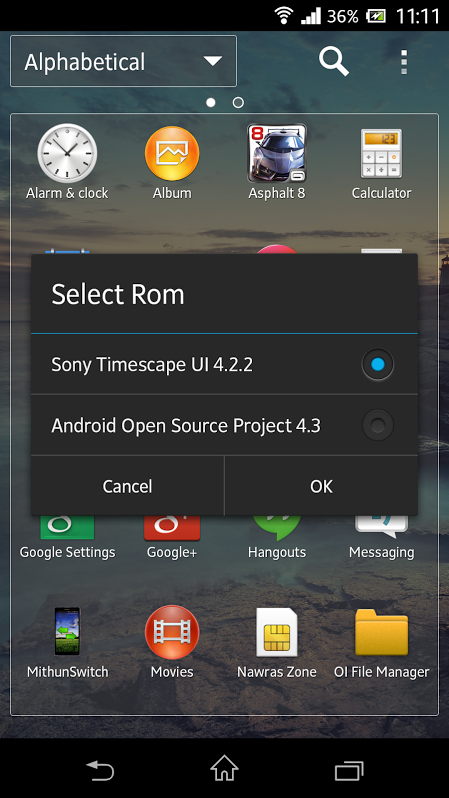
In the past week, two prominent devices gained dual boot functionality. Aside from giving you the option of playing around with separate, otherwise incompatible builds, dual boot is just plain "cool." Now, this functionality has been added to the Sony Xperia ZL with ROMSwitcher.

Developed by XDA Recognized Contributor mithun46 (and a host of others cited in the thread), ROMSwitcher allows you to switch between Timescape and any AOSP-based ROM at will.

There are a few caveats with the installation. For starters, the primary ROM must be stock Timescape with any kernel. The secondary ROM can be any AOSP-based ROM, but it must use mithun46′s modified CyanogenMod 10.1 kernel. The secondary ROM ends up being installed in /cache, and /data and /cache are then stored in /data/dualFinally, ROMSwitcher is still in its alpha stage. That said, it should be stable enough for daily driver status, so long as you're careful during the initial setup.

As with any major modification, make sure you read the instructions thoroughly before getting started. Once you're ready to take the plunge and expand your ROM horizons, head over to the development thread.

Google+

Via xda-developers.com

More aboutDual Boot on the Sony Xperia ZL

Kernel Lighter Loads Kernels on Tegra 3 One X Away from PC

Posted by Unknown

Kernel Lighter Loads Kernels on Tegra 3 One X Away from PC

Up until recently, loading kernels onto the Tegra 3-powered HTC One X has been a relatively difficult affair. This was due to the fact that unlike its Qualcomm Snapdragon-powered cousin (originally called the HTC One XL), the Tegra 3 variant has not received S-Off. While not everyone would be bothered by needing to be stationed at a traditional computer in order to proceed with kernel flashing via fastboot, it can't hurt to have these restrictions lifted.

In order to get around the issue, XDA Recognized Developer Thunder07 first looked to kexec. The name should sound familiar, as it has been used countless times to bypass various security measures or add additional functionality to unlocked devices. However, this came with some problems, as managing online hardware proved a tad problematic. Thunder07, however, came up with another way. Named kexec-hardboot, it works by, "loading the kernel into memory and force restarting the phone with new kernel." In other words, it's quite similar to standard kexec, but with the addition of a forced hardware restart.

Installation is simple. First you install a controller APK. Next, you use fastboot (and a connected PC) to flash a provided boot image. Finally, you flash another provided file through recovery, and you should be good to go. Instructions are provided in the thread for loading alternate kernels, and they are similarly straightforward.

It is important to keep in mind that with any major modification such as this, there is always the possibility that something can go terribly wrong, so read the directions carefully several times, and make sure you are willing to deal with the consequences if the flash doesn't go as planned. If you've pined over the idea of loading aftermarket kernels away from your PC, head over to the original thread to get started.

Google+

Via xda-developers.com

More aboutKernel Lighter Loads Kernels on Tegra 3 One X Away from PC

Dual Boot Achieved on the Samsung Galaxy S 4

Posted by Unknown

Dual Boot Achieved on the Samsung Galaxy S 4

Dual booting on a device, be it a phone or tablet, brings forth some pretty substantial benefits. In addition to simultaneously and effortlessly switching between two ROMs, you also no longer have to wipe everything in order to try a new one. This, in and of itself, allows for more fun and experimentation to be had. After seeing dual boot on the Note 2, it was only a matter of time before something similar would pop up on the Galaxy S 4.

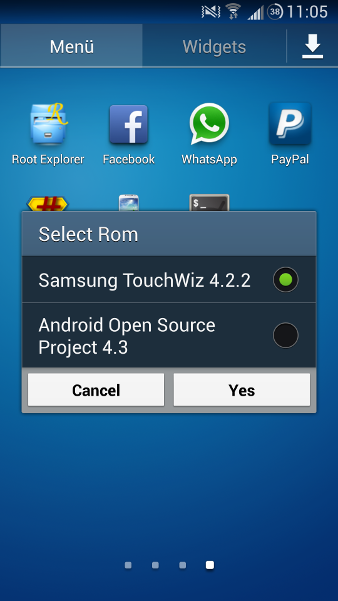
Thanks to the initiative of XDA Senior Member Grarak, a mod has been created that allows you to dual boot ROMs without having to wipe any data or make any backups. The primary ROM must be stock TouchWiz, while any AOSP-based ROM can fill in the second spot. By default, you should be running the Persius Kernel, which the aforementioned Note 2 owners may be familiar with. However, this can be changed later. As explained by Grarak, the method is reliant on the mod switching between the two kernels that you will have installed.

It can't be said that the initial setup of the dual boot method is a particularly easy process. However, it is relatively straightforward, and most folks wouldn't experience much trouble when following the instructions posted. The mod is still in alpha stage, but Grarak is claiming that it is stable enough for everyday use.

If you've been looking to dual boot on your Galaxy S 4, head over to the development thread for more information and discussion.

Google+

Via xda-developers.com

More aboutDual Boot Achieved on the Samsung Galaxy S 4

Control Your Lights with NFC Tags or Your Voice – XDA Developer TV

Posted by Unknown

Control Your Lights with NFC Tags or Your Voice – XDA Developer TV

Yesterday, XDA Developer TV Producer Kevin, a.k.a. The Tech Ninja, showed us how to control our lights with Tasker triggers. If the amount of videos out there on this topic is any indication, there are still many different ways to do home automation. Everything from build your own to some of the methods Kevin has found.

In today's video, XDA Developer TV Producer Kevin shows you how to turn off and on your lights with NFC Launcher and AutoVoice. This means Kevin can use NFC tags or his voice to automate items in his home. With the help of a WEMO device, IFTTT and other tools, the possibilities are endless. Check this video out.


Resource Links:

Be sure to check out other great XDA Developer TV Videos and Kevin's other videos.

Check out Kevin's YouTube Channel

Google+

Via xda-developers.com

More aboutControl Your Lights with NFC Tags or Your Voice – XDA Developer TV

Easily SIM-Unlock Your AT&T Samsung Galaxy S 4

Posted by Unknown

Easily SIM-Unlock Your AT&T Samsung Galaxy S 4

If you value device freedom, you almost certainly either already have a SIM-unlocked device or intend on unlocking your phone in the near future. The reasons for doing this are numerous, even if you're happy with your current carrier. After all, it feels nice to be able to use whichever carrier works for you, and not be tied down—contracts notwithstanding. Thankfully, XDA Forum Member sush143555 shared a method to SIM-Unlock the AT&T Galaxy S 4.

Now before you head over and try this on your own device, keep in mind that such a procedure is inherently risky. While the steps are extremely easy, and have even been tested by XDA Elite Recognized Developer AdamOutler, there is always an inherent risk of bricking your device when dealing with radio hardware. In other words, proceed only with extreme caution.

The method posted by sush143555 essentially consists of accessing the device's service menu, entering the service mode page and debug screen, and then disabling the network lock. After that is done, you rebuild the NV data. And since the NV data controls the radio hardware on Samsung devices, this is the most inherently dangerous step. As stated by Adam himself, "On Samsung devices, a bad nvdata will mean no network access and an annoying box on the screen that won't go away until you fix the problem."

Head over to the original thread to liberate your device. If you find that you've gotten yourself in trouble, visit Adam's CASUAL thread, which may prove useful when restoring your radio data. Just be sure to read all of the steps extremely carefully and make sure that you're ready to face the consequences if things do go wrong.

[Many thanks to Elite Recognized Developer AdamOutler for the tip!]

Google+

Via xda-developers.com

More aboutEasily SIM-Unlock Your AT&T Samsung Galaxy S 4

Migrate from Eclipse to Android Studio

Posted by Unknown on Tuesday, August 27, 2013

Migrate from Eclipse to Android Studio

Recently, we've been talking quite a bit about the Android Studio IDE. Launched originally at Google I/O 2013, Android Studio aims at replacing Eclipse + Android Developer Tools, and bringing a few niceties such as live code rendering for different layouts.

As with any big change, some developers have experienced a few growing pains ranging from differences in handling external libraries to pains during initial setup. Aside from problems, just learning a new way of doing things can also be a hassle. Luckily, XDA Forum Member JoshieGeek has a guide in our App Development Forums geared at helping developers make the move to Android Studio.

The guide begins by giving a brief overview of the IDE, as well as pros and cons when making the switch. Then, JoshieGeek covers installation across three platforms (Linux, Mac, and Windows), as well as creating your first project. Next, he covers the differences in exploring your project when compared to Eclipse, as well as how to view your app in different layouts. Finally, the guide covers how to generate a signed APK.

Head over to the guide thread to get started. Alternatively, this guide has also been incorporated into our XDA-University project. You can view its XDA-U page here.

Google+

Via xda-developers.com

More aboutMigrate from Eclipse to Android Studio

Gesture Control Your Calls with Smart Call Accept

Posted by Unknown

Gesture Control Your Calls with Smart Call Accept

We've featured quite a few apps here on the XDA Portal that allow you to answer the phone with just a wave over your device's proximity sensor. But with the vast amounts of customization that Android affords its users, having more options is always better. XDA Senior Member toi1em hopes to emulate the Air Call-accept feature found in the Samsung Galaxy S 4, as well as add a few more tricks.

What exactly can you do with Smart Call Accept? You can do quite a bit, actually. For starters, you can accept and reject calls. You can also set the app to automatically send an SMS when a call is rejected. You can also activate silent mode, as well as enable speakerphone functionality.

Unlike most other solutions that emulate the SGS4′s native gesture functionality, you can accept, reject, and silence calls with your voice in addition to gestures over the proximity sensor. The app is extremely user friendly, and the developer has big plans for future versions including disabling speakerphone when it detects that the phone is near your face and enabling speakerphone when it is removed from your chubby cheeks.

If you've been looking for ways to incorporate gesture control in your own phone, Smart Call Accept's versatility may make it an ideal choice. Head over to the application thread to give it a shot.

Google+

Via xda-developers.com

More aboutGesture Control Your Calls with Smart Call Accept

Open Source Android SMS and MMS Library

Posted by Unknown

Open Source Android SMS and MMS Library

In our continuing coverage of the App Development forums here at XDA, we've featured various open source libraries that  enable you to quickly add in functionality into your app-in-progress without having to reinvent the wheel. These libraries have streamlined app development in topics ranging from UI design and data visualization  to application updates and everything in between.

Now, thanks to XDA Senior Member klinkdawg, there is an open source library for SMS and MMS messaging. After gaining knowledge while creating his own messaging app, klinkdawg released his library with the intention of helping other developers create their own SMS and MMS apps.

In addition to simply sharing the code, the developer has also written a brief guide in the thread that should cover basic usage. Currently, Google Voice is not supported, but that is on the way in a future revision. Additionally, this library is in beta, and uses non-final APIs.

Despite the beta status, this library could be of use if you've been planning on adding text messaging to your app. Head over to the library thread and knlinkdawg's Github to get started.

Google+

Via xda-developers.com

More aboutOpen Source Android SMS and MMS Library

Control Your Lights with Your Android Phone – XDA Developer TV

Posted by Unknown

Control Your Lights with Your Android Phone – XDA Developer TV

XDA Developer TV Producer Kevin, a.k.a. The Tech Ninja, is a bit of an phone automation expert. You can check out his Tasker Series to see all the great things he's automated with Tasker and other automation apps. He's done everything from basics such as turning off WiFi at work to controlling his Android device by voice. But that is not all he can do!

In today's video, Kevin shows you how to turn on and off your lights with Tasker Automation and IFTTT. With the help of a WEMO device, Kevin shows you how to set up IFTT rules and Tasker task automation to have your lights turn on when you get home. Check this video out.


Resource Links:

Be sure to check out other great XDA Developer TV Videos and Kevin's other videos.

Check out Kevin's YouTube Channel

Google+

Via xda-developers.com

More aboutControl Your Lights with Your Android Phone – XDA Developer TV

Samsung Opens Registration for Inaugural Developer Conference

Posted by Unknown

Samsung Opens Registration for Inaugural Developer Conference

Samsung officially began accepting registrations for its inaugural Developers Conference, which is scheduled for Oct. 27-29 in San Francisco. Although most of the 40+ topics have yet to be revealed, Samsung promises registrants the opportunity to "engage with industry leaders, collaborate with fellow developers, and learn about new Samsung tools and SDK's." Technical sessions and presentations by industry leaders will cover such topics as integrating NFC into your app, cross platform development, and how to implement an advanced user interface into your design. There are also several sessions slated for discussion about Samsung's first smartphone running Tizen.

While Samsung is predominantly known for its smartphones and tablets, the electronics giant will also be holding development sessions for other technologies including Smart TV. Earlier this year at Mobile World Congress, Samsung Media Solution Center president Dr. WonPyo Hong said, "Samsung is committed to growing its smartphone ecosystem in close collaboration with our developer and service partners. Our focus is on continually innovating across a diverse range of products and services that meet the needs of users, and we are committed to providing developers with the latest tools and resources to enable that."

Developers can register on the conference website for a registration fee of $299.

Google+

Via xda-developers.com

More aboutSamsung Opens Registration for Inaugural Developer Conference

How to Use Google Play Services Library with Android Studio

Posted by Unknown on Monday, August 26, 2013

How to Use Google Play Services Library with Android Studio

We've written about Android Studio a few times in the past. Google's would-be replacement for Android Developer Tools first made its appearance at Google I/O 2013. Based on Jetbrains IntelliJ, Android Studio offers many benefits over the older ADT such as live code rendering to see how your app will look across a variety of devices and layouts, as well as the ability to easily add any Android API into your app's code. However, the transition hasn't been without its share of growing pains.

One such issue that has popped up isn't an issue per se, but rather a difference in how things are done. Since Android Studio is based on Gradle-build, the way it references external libraries (such as Google Play Services) is a bit different. Luckily, XDA Forum Member JoshieGeek has already gone through the process of learning how this is done, and has shared it in our App Development forums.

If you're a developer looking to make the switch to Android Studio but you've either held back due differences in external library support or have just been waiting for the growing pains to subside, JoshieGeek's guide will likely be of use. Make your way over to the tutorial thread to get started.

Google+

Via xda-developers.com

More aboutHow to Use Google Play Services Library with Android Studio

Optimize Your Mono Coding with Some Command Shortcuts

Posted by Unknown

Optimize Your Mono Coding with Some Command Shortcuts

Are you a developer using Mono for Android to develop pseudo-cross platform code using C# or .Net? If so, you may wish to save a few keystrokes for commonly executed commands.

XDA Senior Member ScatteredHell has created a DLL that works with Mono for Android to execute various commands. Originally, it supported obtaining system uptime, as well as some commonly used root-level commands such as mounting and unmounting the system as Read/Write and Read-Only, Rebooting, Setting Permissions, and Playing a Boot Animation. Now in its second version, it adds Get Date, Get Time, and Get Folders in a Specified Path to the list of supported commands. Example code is also given in the thread, demonstrating its usage.

While these shortcuts won't save you massive amounts of time, the shortcuts will add up over time. Head over to the original thread to get started and streamline your Mono usage.

Google+

Via xda-developers.com

More aboutOptimize Your Mono Coding with Some Command Shortcuts

Toolkits for HTC One and Oppo Find 5 Available, Nexus Android 4.3 Images Updated – XDA Developer TV

Posted by Unknown

Toolkits for HTC One and Oppo Find 5 Available, Nexus Android 4.3 Images Updated – XDA Developer TV

With a new set of Nexus factory images, the Nexus 7 (2013) multi-touch and GPS issues have been eased. That and more are covered by Jordan, as he reviews all the important stories from this weekend. Included in this week's news is an article about dual booting on the HTC Pico and the guide to compile TWRP for your device.

Jordan talks about the other videos released this weekend on XDA Developer TV. XDA Developer TV Producer Jayce released a video talking about how to choose a killer app idea, and later he released a video talking about the smart way to price your app. Pull up a chair and check out this video.

  • Nexus Factory Images Updated to JSS15Q and JWR66Y, 2013 Nexus 7 Multi-Touch and GPS Issues Fixed
  • Dual Boot On the HTC Pico
  • Compile TWRP for Your Device
  • Multi-Purpose Tool for the Oppo Find 5
  • All-in-One Toolkit for the HTC One
  • How To Choose a Killer App Idea – XDA Developer TV
  • The Smart Way to Price Your Mobile App – XDA Developer TV

Check out Jordan's YouTube Channel and Jordan's Gaming YouTube Channel

Google+

Via xda-developers.com

More aboutToolkits for HTC One and Oppo Find 5 Available, Nexus Android 4.3 Images Updated – XDA Developer TV

Build ClockworkMod Recovery the Old Fashioned Way

Posted by Unknown

Build ClockworkMod Recovery the Old Fashioned Way

Yesterday, we covered a guide by XDA Recognized Developer Dees_Troy on compiling TWRP recovery. As powerful, user friendly, and customizable as TWRP is, some people still prefer other recoveries such as the popular ClockworkMod Recovery.

Yes, we're aware that there's the automated CWM Recovery Builder, which turns the whole affair into a point-and-click affair. But let's face it: The truly nerdy like doing things the old fashioned, hands-on way. It builds character, teaches us a little about development, and is just plain rewarding to do. So once you've decided that you wish to compile CWM the old fashioned way, how exactly do you go about doing so? Depending on your current knowledge level, there are a few places where you can begin.

If you're an absolute beginner, you'll probably need help setting up a build environment, syncing sources, and so on. If this applies to you, first visit a simple and straightforward guide created by Senior Member buffo1987. The guide, while originally intended for the Samsung Galaxy S i9000, can be easily reworked to apply to newer devices. It starts out with installing the needed libraries, creating directories, installing the repo, and syncing. It then continues all the way to compiling the recovery. And as mentioned earlier, there would be some small tweaks that you have to make along the way to get it working on other devices.

If, however, you are a bit more advanced and don't need help with the initial steps involved in building, visit this guide by Recognized Developer Shaaan. His guide forgoes the build environment setup and syncing and is quite a bit more general, so it can easily apply to any number of devices.

Wherever you start, keep in mind that half of the fun in mobile hacking is the journey. Good luck building.

Google+

Via xda-developers.com

More aboutBuild ClockworkMod Recovery the Old Fashioned Way

Running Ubuntu Touch? Check out the Unofficial XDA App

Posted by Unknown

Running Ubuntu Touch? Check out the Unofficial XDA App

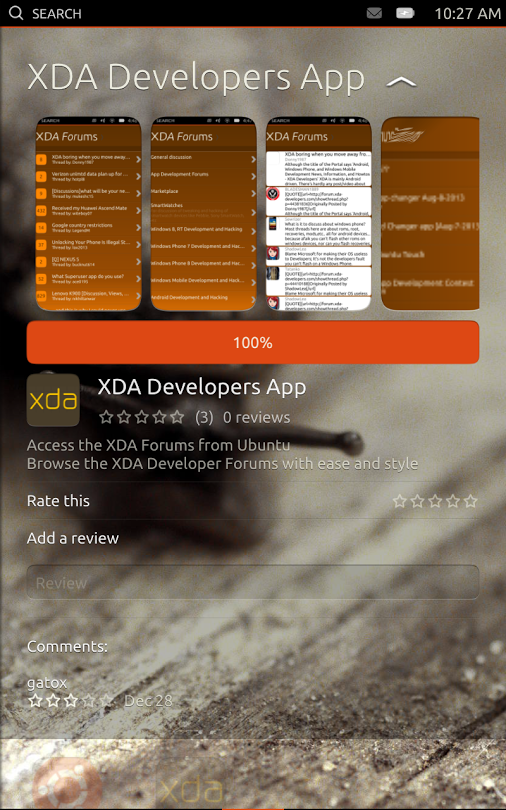
We've talked a little bit about Ubuntu Touch in the past. If you've got the operating system loaded onto your device, you may wish to check out the unofficial XDA-Developers app created by Michael Hall over at Canonical, who gave a talk during XDA:DevCon 2013.

The application, which is available from the Dash, is available to anyone running the latest version of Ubuntu Touch. Currently the application all0ws you to browse the forums in a streamlined manner. More importantly, however, all of the code is available on the project's LaunchPad so you can see how they made the app and build from this in your own app.

If you have a device loaded with Ubuntu Touch, give the unofficial XDA app a shot. While you're at it, visit Michael Hall's Google+ post on the subject as well.

[Thanks to XDA Elite Recognized Developer AdamOutler for the tip!]

Google+

Via xda-developers.com

More aboutRunning Ubuntu Touch? Check out the Unofficial XDA App

Tablet UI Mod for the 2013 Nexus 7 on Stock, Rooted JSS15Q

Posted by Unknown on Sunday, August 25, 2013

Tablet UI Mod for the 2013 Nexus 7 on Stock, Rooted JSS15Q

With the launch of the original Google Nexus 7 well over a year ago, we saw the first appearance of the interface affectionately known as "Phablet UI." Not quite the standard 10″ tablet layout that we had first seen in Honeycomb and certainly not the phone layout; this new layout was essentially a combination of the two depending on orientation, application, and so on. Many have grown to tolerate and even favor the layout on the 7″ form factor, and there is certainly good rationale behind the shift. However, this isn't the whole story, as its effects on SystemUI.apk also caused the Android soft keys and notification area to become separated and thus require more display space on an already cramped screen.

Ever since Paranoid Android appeared some time ago, we've been easily able to swap both layouts and dpi on a per-app basis. This meant that if we wanted to, we could easily keep all applications at default, and only modify SystemUI.apk to show up in tablet layout. This allows us to combine the notification and softkey areas, while leaving everything else untouched. However, there are those who would prefer to stay as close to stock as possible, and they would have previously been out of luck.

Now, thanks to XDA Forum Member Caldair and previous work done by a host of other developers cited in his thread, you can get Tablet UI for SystemUI.apk on the 2013 Nexus 7 running stock, rooted JSS15Q. The modification is not without its faults, though. For starters, applying the mod seems to not play nicely with the stock launcher, so users must install an aftermarket launcher. Secondly, the quick toggles will no longer work when the modification is applied. Despite the flaws, however, many will be eager to make the most of the limited screen real estate and switch to Tablet UI. Best of all, the developer has provided restore files for those who may have forgotten to create a backup of the original files before flashing.

Head over to the modification thread to get started. And those looking to get even more control of their layouts on a per-app basis should give the excellent Paranoid Android a shot.

Google+

Via xda-developers.com

More aboutTablet UI Mod for the 2013 Nexus 7 on Stock, Rooted JSS15Q

AROMA App Package Creator Given Substantial Update

Posted by Unknown

AROMA App Package Creator Given Substantial Update

Just yesterday, we covered a couple of guides aimed at helping developers get started with XDA Recognized Developer amarullz's powerful AROMA installer. While versatile in that the guides help developers use the AROMA installer for customizing ROM installs, this isn't all that AROMA can be used for.

Another popular use of AROMA is to create custom app packages, in which users can pick and choose which apps to install. We previously talked about a utility for creating these app packages with AROMA installer functionality. Well, some time has passed since then, and the AROMA App Package Creator has received several substantial updates.

Created by XDA Senior Member commandersafi, AROMA app package creator runs on Windows and requires users to have Java 6 or higher installed. Just as before, the utility allows users to easily insert and categorize APKs that can be selected from using the AROMA installer interface. Unlike before, however, the AROMA codebase is now 2.56, so device-specific calibration is no longer needed. Furthermore, you are now able to install apps to /system/app/, zips can be signed, multiple APKs can be chosen when adding apps to the installer, and various other tweaks have been made.

Head over to the utility thread to get started making your own custom app packages.

Google+

Via xda-developers.com

More aboutAROMA App Package Creator Given Substantial Update

The Smart Way to Price Your Mobile App – XDA Developer TV

Posted by Unknown

The Smart Way to Price Your Mobile App – XDA Developer TV

There are a lot of free apps in the Google Play store. If that's true, how do developers make money for their hard work? Banner Ads? Freemium? Begging? What if I make a break for the pack and charge for my app. How do I pick what to charge?

In today's video, Jayce talks about choosing the price for your mobile app smartly. He talks about the history of software pricing. Jayce gives some great information from across the web. Links to these stories are below. Check out this video to see what he has to say.

Resource Links:

Be sure to check out other great XDA Developer TV Videos.

Check out Jayce's HowToBecomeTV YouTube Channel

Google+

Via xda-developers.com

More aboutThe Smart Way to Price Your Mobile App – XDA Developer TV

Compile TWRP for Your Device

Posted by Unknown

Compile TWRP for Your Device

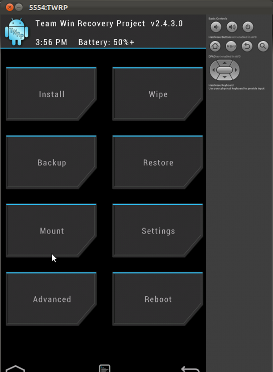
We've talked quite a bit about Team Win Recovery Project in the past. After all, having a nice touch-based recovery with a graphical and user-friendly interface makes the root and modification process easier and much less error prone. And ever since TWRP2 saw the light of day, it has offered some of the best functionality and undoubtedly the most user-friendly interface in the sea of custom recovery choices.

What do you do if you want to use TWRP but there isn't an official build for your device? Well, thanks to XDA Recognized Developer (and Team Win lead developer) Dees_Troy, there is now an official porting guide.

The guide walks users through the make process as well as what all of the parameters in the BoardConfig.mk file mean and how to adjust them. After the image is created, it shows you how to make sure that it works by booting it in an emulator, thus protecting your device from potential damage.

I'm not going to lie to you; while it isn't overly complicated, the process to build TWRP for your own device isn't simple. In other words, you'll definitely want to grab a cup of coffee or two before sitting down and getting started. However, those who put in the effort will be rewarded by having a working build of TWRP.

To get started with the recovery building fun, head over to the guide thread. Just make sure to grab a few cups of Joe before getting started.

Google+

Via xda-developers.com

More aboutCompile TWRP for Your Device

All-in-One Toolkit for the HTC One

Posted by Unknown

All-in-One Toolkit for the HTC One

So you've got yourself a shiny new HTC One, and you want to get started playing with it. Obviously you'll want to do things like apply Revolutionary Team's Revone S-Off. You'll probably also want to then flash a custom recovery, and then root your device. All of this will ordinarily take a moderate amount of time and effort, right? Not anymore, thanks to XDA Senior Member squabbi and his GUI-driven toolkit for the One.

Squabbi's extremely user-friendly toolkit allows Windows users to do basically everything they'd need to get started playing around with their new device. It lets users start out by installing the requisite drivers, and provides methods for unlocking the bootloader with HTC Unlock or using the much more powerful Revone. It then also allows you to change the device CID, flash a custom recovery of your choice (you can select from CWM, CWM Touch, TWRP, or even upload your own), root the device, flash an image to a specific partition, and execute basic ADB commands for commonly used functions and sideloading apps.

If you're looking for an easy and streamlined way of getting started with your new HTC One and are a sucker for well organized and user-friendly interfaces, squabbi's toolkit may be up your alley. Head over to the utility thread to get started with the user-friendly modifications.

Google+

Via xda-developers.com

More aboutAll-in-One Toolkit for the HTC One

Primer on Using AROMA Installer with Your Development Work

Posted by Unknown on Saturday, August 24, 2013

Primer on Using AROMA Installer with Your Development Work

By now, you should all be familiar with AROMA Installer by XDA Recognized Developer amarullz. As a brief primer for the uninitiated, AROMA installer is a powerful GUI that is accessible via most modern aftermarket recoveries such as TWRP and CWM.

The main purpose of AROMA Installer is to allow you to customize the installation of whatever tweaks, ROMs, kernels, and mods you may be installing. A popular example of this in practice is the popular ElementalX kernel for a range of devices by Recognized Developer flar2. Rather than simply installing when selected in your custom recovery of choice, this kernel gives users a host of options including max clock speed, GPU overclocking, thermal settings, governor options, and much more. In fact, these options (along with the kernel's generally superb performance and features) have earned a loyal user out of this particular 2013 Nexus 7 device owner.

So how do you go about using the AROMA Installer with your own development work? XDA Senior Member pankaj88 has created a brief guide showing you exactly how to get started quickly and efficiently. However, this is only a brief guide that doesn't cover much of AROMA's customization power. For that, XDA Recognized Contributor Dblfstr has created a separate tutorial thread that covers AROMA, as well as various other questions related to the Edify language and updater-scripts in general.

Head over to pankaj88′s primer thread to get started. Then once you've learned the basics and want to get a little more in depth into the power of AROMA, visit Dblfstr's tutorial thread.

Google+

Via xda-developers.com

More aboutPrimer on Using AROMA Installer with Your Development Work

Create App Usage Tutorials with Transparent Demo Pages

Posted by Unknown

Create App Usage Tutorials with Transparent Demo Pages

We've all seen those in-app usage tutorials before. You know, I'm talking about the ones that use transparency to show you what the app's buttons do, or how you go about accomplishing a certain task. It's just good practice to show your users upon first launch how to use your app, and since most people learn best by example, walking them through visually with an in-app usage tutorial is optimal.

After learning how to add an in-app demo to his own app, XDA Senior Member marty331 decided to create a guide in our App Development forums detailing exactly how he went about doing it. He starts with creating a transparent PNG at a recommended size and then continues by showing you how to create an XML layout to display the image, as well as deciding when to show it.

Head over to the tutorial thread to get started showing users how to use your app. All of the code is available in the thread, as well as on his Github.

Google+

Via xda-developers.com

More aboutCreate App Usage Tutorials with Transparent Demo Pages

How To Choose a Killer App Idea – XDA Developer TV

Posted by Unknown

How To Choose a Killer App Idea – XDA Developer TV

Everyone has an idea for the next killer app. However, these ideas are often like armpits: Everyone has one, and they all stink. Yet, there are ways to think about the needs of the market and make an app to fill them. But how can you come up with a killer app idea?

In today's video, Jayce talks about choosing a killer app idea. He talks about how to look at the market and evaluate what's already done and what is not. Jayce gives some great information for people looking to create the next killer app. Check out this video to see what he has to say.

Be sure to check out other great XDA Developer TV Videos.

Check out Jayce's HowToBecomeTV YouTube Channel

Google+

Via xda-developers.com

More aboutHow To Choose a Killer App Idea – XDA Developer TV

Easily Add Animated Lists with ListViewAnimations

Posted by Unknown

Easily Add Animated Lists with ListViewAnimations

If you're creating an application that displays a list, you will likely want to use a ListView. Now if you wish to make it look nice with animations and additional features such as different view types and expandable items, you would ordinarily have to do the hard work and add in the functionality yourself.

Thankfully, XDA Forum Member Niekfct shared his latest library for application developers in our relatively new App Development forums. So what functionality is available with this library? Currently, it offers list- and grid-view animations, and it also supports swipe to dismiss, expandable data points, and more. And to ensure compatibility with older devices, the library uses the NineOldAndroid library on devices running versions of Android older than Honeycomb.

If you wanted to easily add a ListView in your app and want it to have some snazzy animations, head over to the library thread to get started. Naturally, the library is open source, with the code available at the developer's Github. Example code is available on the developer's project page.

Google+

Via xda-developers.com

More aboutEasily Add Animated Lists with ListViewAnimations

Dual Boot On the HTC Pico

Posted by Unknown

Dual Boot On the HTC Pico

Now that we're in the latter half of 2013, it seems that the majority of the tech world has left older devices in the dust. With a plethora of new devices from various manufacturers, more devices are coming our way before the year's close. Along with this, previous devices are being pushed further and further back into the archives. So it's wonderful to see that this is certainly not the case for a few aged devices, as we have seen previously with the (almost) entire Xperia line of 2011.

Now we can add the HTC Pico to the list, as XDA Recognized Contributors -JohnCarter- and -NickHalden- have discovered a method to dual boot two ROMs on the 2011 device. The method largely consists of creating three SD-EXT partitions. This allows you to have two ROMS, a primary and a secondary, installed at the same time. Switching ROMs can be done with a simple custom app developed by Recognized Contributor galaxyfreak, and no data wipe or backup is required.

As of now, CyanogenMod Beta 6 is the only rom that can be installed as the primary ROM, while the secondary ROM can include any that does not use SD-EXT partitions, such as CM 9, CM 10, and stock firmware.

If you are interested in dual booting on your HTC Pico or are curious about the development, check out the original thread for more information.

Google+

Via xda-developers.com

More aboutDual Boot On the HTC Pico

Multi-Purpose Tool for the Oppo Find 5

Posted by Unknown on Friday, August 23, 2013

Multi-Purpose Tool for the Oppo Find 5

Oppo is proving to be a developer-friendly manufacturer of Android devices. Not only was it a Senior Sponsor for the XDA Dev-Con event a couple of weeks ago, but it has also shown much love and acceptance for the open source development community on their flagship Oppo Find 5.

With this spotlight shining upon Oppo, it is with no surprise that it has attracted a great number of users, new and experienced, to the development prospects and potential it has to offer. To help both novice and end-users ease into the flow of things with the Find 5, XDA Recognized Developer benjamin.j.goodwin has developed Simple Tool. A multi-purpose tool for the PC, Simple Tool does some of the more frequently performed ADB and Fastboot actions in a simple and straightforward manner, including:

  • Rebooting the device
  • Rebooting to recovery
  • Rebooting the bootloader
  • Flashing a recovery
  • Flashing a boot image
  • Wiping the cache

A handy and brief FAQ has also been posted answering to some of the more common issues users may encounter. Benjamin.j.goodwin also has plans to update Simple tool with additional actions such as one-click rooting and support for additional devices.

If you would like to find out more, visit the original thread for more information.

Google+

Via xda-developers.com

More aboutMulti-Purpose Tool for the Oppo Find 5

ResXploit Allows Theming without Decompiling APK Files

Posted by Unknown

ResXploit Allows Theming without Decompiling APK Files

I'm not even going to bother explaining the benefits and overall awesomeness of the Xposed Framework. I'm quite sure that you are all well aware of it by now. There are a huge number of modules out there for the framework, capable of making a vast number of modifications to your device, quite a few of which involve altering the aesthetics of the UI.

Hot off the heels of his previous module, XDA Senior Member WisdomSky has come up with yet another way from to alter the appearance of your device in the form of ResXploit. This module allows you to make modifications to various APK files on the device without the need to extract, decompile, modify, recompile, and push back to the device. Doing it the old fashioned way can be a tedious process when all you want to do is make a simple change.

ResXploit has two parts, a terminal (where the commands are entered) and an engine (which processes the commands). This configuration allows the end user to make changes here and there on the fly, and also allows developers to make changes and remove the terminal from their ROMs meaning no further changes can then be made. The values that can be altered using ResXploit are drawable, string, and boolean, assuming you know the name of the target APK file and the change you wish to make, This can be achieved in a matter of seconds, all on the device itself.

Check out the original thread for more information and a detailed guide on using the module.

Google+

Via xda-developers.com

More aboutResXploit Allows Theming without Decompiling APK Files

Tutorial on Including Apps in Your Settings Menu

Posted by Unknown

Tutorial on Including Apps in Your Settings Menu

As you may all be aware, plenty of mods are available for the picking that offer customized settings menus. Usually, they include the addition of the standard CPU frequency settings, on-screen buttons, and a bit of shifting here and there of the settings layout. However, it'll still be nice to know the process behind such mods, either for curiosity's sake or because the available offerings are just not clicking with what you had in mind.

Well, XDA Recognized Themer RomWiz brings you one step closer with a guide teaching folks how to customize the settings menu with the addition of shortcuts to apps on an Android 4.0+ device. Requiring APKtool and Notepad++ ready at hand, RomWiz guides you through the way with clear, understandable steps, from the initial decompilation of the settings.apk, to including a custom app icon, and the recompilation.

Visual learners will be glad to know that the tutorial is very much visually orientated, with each step accompanied by screenshots and points of interest. Furthermore, RomWiz has even created and attached the guide in video form to make sure you don't miss a beat when you're going through the procedure yourself. A generic zip file has also been conveniently provided, which when you have placed your customized settings.apk in it, can be flashed to the appropriate directory through a custom recovery.

If you would like to learn more, head over to the original thread for both the written and video guide.

Google+

Via xda-developers.com

More aboutTutorial on Including Apps in Your Settings Menu

Chromecast Local Playback and ADB, XDA Tablet Z Competition Results! – XDA Developer TV

Posted by Unknown

Chromecast Local Playback and ADB, XDA Tablet Z Competition Results! – XDA Developer TV

You can now play almost any video on your Google Chromecast. That and much more Chromecast stories are covered by Jordan, as he reviews all the important stories from this week. Included in this week's news is an article about Google's first party app updates and using Fling to view your local media on your Chromecast.

Jordan talks about the other videos released this week on XDA Developer TV. XDA Elite Recognized Developer AdamOutler released an unboxing of the Oppo Find Mirror (R819), and then he unboxed XDA:DevCon. Later, TK gave us an Android App Review of Floating Toucher. Pull up a chair and check out this video.

Links to stories mentioned:

  • Major Updates for Select First Party Google Apps
  • Play Almost Any Video on Your Chromecast with AirCast
  • Fling Brings Local PC Media Files to Your Chromecast
  • Turn Your Extra Android Device into a Chromecast Receiver with CheapCast
  • Simple Guide for Using ADB on the Google Chromecast
  • Forum Added for the Motorola Droid Ultra
  • XDA App Now on BlackBerry – Easily Port APKs to BlackBerry 10 [Sponsored]
  • XDA Tablet Z Development Competition Results Are In
  • Oppo Find Mirror (R819) Unboxed the XDA Way – XDA Developer TV
  • XDA:DevCon 2013 Unboxed the XDA Way – XDA Developer TV
  • Android App Review: Quick Shortcuts with Floating Toucher – XDA Developer TV

Check out Jordan's YouTube Channel and Jordan's Gaming YouTube Channel

Google+

Via xda-developers.com

More aboutChromecast Local Playback and ADB, XDA Tablet Z Competition Results! – XDA Developer TV

Detect Proxy Settings in Your App with Android Proxy Library

Posted by Unknown

Detect Proxy Settings in Your App with Android Proxy Library

Over the years, the process for connecting Android devices to proxy servers has changed dramatically. Originally only supporting global configuration, now configurations can be set on a per access point basis. Furthermore, applications such as OpenVPN can work globally on devices running Ice Cream Sandwich and later.

So what do you do if you're building an application and you want your to know a user's proxy configuration? Up until now, this would be a pretty difficult task. Luckily, XDA Forum Member lechuckcaptain has already gone through the hassle so that you don't have to. He has created a library to do this for you, regardless of the user's Android version supporting from 1.x through 4.x. The library began with determining current proxy configuration, but has now grown to also ascertaining proxy status and other relevant information.

Head over to the library thread and visit lechuckcaptain's Github to get started.

Google+

Via xda-developers.com

More aboutDetect Proxy Settings in Your App with Android Proxy Library

Nexus Factory Images Updated to JSS15Q and JWR66Y, 2013 Nexus 7 Multi-Touch and GPS Issues Fixed

Posted by Unknown on Thursday, August 22, 2013

Nexus Factory Images Updated to JSS15Q and JWR66Y, 2013 Nexus 7 Multi-Touch and GPS Issues Fixed

Not too long ago, we brought you news of the Nexus 7 (2013) Factory Image situation and the drama that ensued. Luckily, it wasn't too long before the world was made right once again, and the factory images and driver binaries for the device were released. For those keeping track, this was build JSS15J for the 2013 Nexus 7 and JWR66V for the rest of the current Nexus stable. Now, a new build has emerged, and it is build JSS15Q for the 2013 Nexus 7 and JWR66Y for the others.

So what does this update bring? This is essentially a minor revision for the Nexus 4, 2012 Nexus 7, Nexus 10, and the GSM Galaxy Nexus. Aside from a security fix and some camera, NFC, and auto-brightness tweaks, not much has been changed. However, if you're currently using the 2013 Nexus 7, you're in for a treat. In addition to the above changes, the latest update supposedly fixes the GPS and multi-touch issues experienced by certain users. Also of note is that driver binaries are now available for the Verizon Galaxy Nexus running 4.3 JWR66Y, which bodes well for a firmware update in the near future.

To learn more about the changes made on the 2013 Nexus 7 build, head over to XDA Recognized Contributor sfhub's original thread. To get the goods on your own Nexus device without the wait, head over to the Nexus Factory Images page. Finally, if you wish to build your own ROMs from source for your Nexus device(s) and want the latest driver binaries, head over to the Nexus Driver Binaries page.

Did this update fix your 2013 Nexus 7′s GPS woes and erratic multi-touch? Let us know what you think of the updates in the comment box below!

Google+
Via xda-developers.com

More aboutNexus Factory Images Updated to JSS15Q and JWR66Y, 2013 Nexus 7 Multi-Touch and GPS Issues Fixed

Massive Xposed Module Collection

Posted by Unknown

Massive Xposed Module Collection

You've most likely already heard about XDA Recognized Developer rovo89's incredibly versatile Xposed Framework. We've talked about it quite a few times here on the XDA Portal, starting with a primer on its versatility and power and continuing to quite a few articles covering the plethora of modifications that the framework enables.

With the ease of use and added safety that the framework enables, it's no wonder that the framework is so popular. However, because of the extremely large number of modules available, it's sometimes a bit difficult to find exactly the ones you want. Wouldn't it be great if someone created a compilation thread of some of the various tweaks that the modification enables? Well, somebody has, and that's Senior Member cities516.

Cities516′s list covers dozens upon dozens of Xposed module modifications, all categorized by supported platform, as well as modification category. The list begins hierarchically with ROM compatibility (either All ROMs, AOSP-based, Sense-based, TouchWiz-based, or Xperia-based). Within each category, the modules are listed based on modification type. For example, in the All ROMs category, Security modules are lumped together, as well as various other categories of modifications.

While this list naturally cannot possibly contain every single Xposed module in existence, it more than likely has quite a few modifications that may be of interest to you. To get started, head over to the compilation thread and download to your heart's content. The list is being constantly updated with new and exciting modules, so be sure to check back frequently!

Google+

Via xda-developers.com

More aboutMassive Xposed Module Collection