App Ops Brings Granular Permissions Control to Android 4.3

Posted by Unknown on Wednesday, July 31, 2013

App Ops Brings Granular Permissions Control to Android 4.3

Say it with me: It's about time! While not officially released yet (and although similar functionality has been possible via root in the past) granular permissions management is unofficially on its way to stock Android. In fact, if you're willing to take a few seconds to create a custom shortcut, an incredibly easy task on most aftermarket launchers, you can access it now from any Android 4.3 device. There's even a simple option for those more content with the stock Android 4.3 launcher as well.

Thanks to some sleuth work done by Ron Amadeo over at Android Police, App Ops was discovered in the current build of Android 4.3 (JWR66v). Getting it to work is as simple as creating a custom shortcut that points to the activity: Settings -> App Ops. While this technically offers nothing that wasn't already possible via root, it's great that Google is on its way to allowing unrooted users control their privacy so granularly.

As described in the source article linked below, however, the feature is far from perfect. Currently, the permissions that can be toggled only populate after each is used. This is both less intuitive and less functional than simply accessing the list of declared permissions from the app's AndroidManifest.xml file. Furthermore, there is no user-visible alert when a permission is denied, which would ease troubleshooting if denying a particular permission leads to application issues down the line. That said, it is nice that App Ops allows you to see the last time each permission was used.

While making a shortcut to a specific activity from custom launcher is no big deal, doing so on the stock Android 4.3 launcher is not possible. However, Senior Member mrx8836350 created an installable APK that creates the requisite shortcut for you without the need for a custom launcher. More information on this feature can be found in XDA Recognized Contributor Disturbed™'s Android 4.3 general information thread. To get the shortcut on the stock launcher, visit mrx8836350′s application thread.

Source: Android Police

[Thanks to XDA Senior Member nikwen for the tip!]

___________________

[Join us August 9-11, 2013 in beautiful Miami, FL for XDA:DevCon. Read here to find out more.]Google+

Via xda-developers.com

More aboutApp Ops Brings Granular Permissions Control to Android 4.3

Nexus 7: Old versus New – XDA Developer TV

Posted by Unknown

Nexus 7: Old versus New – XDA Developer TV

Yesterday, XDA Developer TV Producer Kevin showed you how to root your New Nexus 7 (2013). With everyone excited about the new version of the Nexus 7 device and a version of Android 4.3 available for the Old Nexus 7, Kevin thought he would compare the two. Two Nexus 7 devices enter the cage; only one will exit.

Kevin presents side-by-side comparisons of the New Nexus 7 (2013) versus the Old Nexus 7. Kevin compares gaming performance, web browsing performance, video performance, and more. Check this video out to find out whose cuisine reigns supreme.

Be sure to check out other great XDA Developer TV Videos and Kevin's other videos.

Check out Kevin's YouTube Channel

___________________

[Join us August 9-11, 2013 in beautiful Miami, FL for XDA:DevCon. Read here to find out more.]Google+

Via xda-developers.com

More aboutNexus 7: Old versus New – XDA Developer TV

Yet Another Reason to Update to Android 4.3: TRIM Support

Posted by Unknown

Yet Another Reason to Update to Android 4.3: TRIM Support

Android 4.3′s launch last week has been nothing short of an almost resounding success. Why "almost?" Well, aside from a few issues with copy/paste, most users seem to be quite happy with the latest iteration of Jelly Bean. This level of user satisfaction is to be expected, as the latest flavor of Jelly Bean brings added performance, improved API support, additional functionality, and a few other features. One of these "other features," however, is quite important for those of us who frequently transfer massive amounts of data to our devices such as media content and other large files.

Of course, as you might expect, I'm talking about how 4.3 also brings TRIM support to all Nexus devices. Anyone who has ever experienced a massive device slowdown after transferring large quantities of data to and from a NAND device knows what I'm talking about. For a very practical example, one need only look at Google's original Nexus 7. Back when it first came out, reviews for the popular device nearly unanimously praised it for its high level of performance. However as time went on, most users seemed to notice a rather sharp I/O performance decline. This lead to an overall feeling of sluggishness when using the device, making the once fast tablet almost unusably slow for some. This issue seemed to affect those with lower capacity models more severely, or at least more quickly, than those with the 32 GB model. As you would expect, this was largely due to TRIM not being enabled in previous builds. This then prevented the scheduling of NAND blocks for garbage collection, making rewriting data to these blocks significantly slower. (Note: Traces of TRIM were added back in the Nexus 7 4.1.2 builds, but the current consensus is that it wasn't actually enabled until 4.3.)

Looking into the Android Git, one can readily find the modifications to Android's volume daemon (VOLD) to enable fstrim. The next step is determining when exactly fstrim runs. As exposed by some detective work by Brian Klug over at Anandtech:

I've learned a bit more on the conditions underlying when Android 4.3 will TRIM filesystems, as it wasn't completely clear before. The Android framework will send out a "start idle maintenance window" event that the MountService listens for, and then invokes vold to fstrim filesystems when a few conditions have been met – the device hasn't been touched for over an hour, no idle maintenance window event has been sent in 24 hours, and the device is either off-charger with 80% battery or on-charger with 30% battery. The goal is to have fstrim run roughly once every 24 hours if you're in the habit of plugging the device in to charge every night.

Fstrim sends the FITRIM ioctl() command to all writable filesystems when invoked, which discards (TRIMs) blocks on the eMMC not used by the filesystem. Without TRIM the controller will track blocks that have data deleted by the filesystem, but the controller still believes has data it needs to track. TRIM is the signaling pathway through which the filesystem and OS can tell the controller that it can now consider those blocks unused and for garbage collection – different controllers will behave differently since it's their prerogative to decide what happens next however.

In other words, if your device is idle and plugged in for over an hour, it will run the "start idle maintenance window" event. However, this will only take place if the "start idle maintenance window" event hasn't been sent in the past 24 hours, and if your battery level is either greater than 80% or you are plugged in and have greater than 30% battery. Another way to invoke TRIM is to use a frontend for the fstrim utility and force TRIM to be executed using an app such as XDA Senior Member AuxLV's Lagfix application.

All of this is unimportant without tangible performance gains. So what can you expect from 4.3 in terms of I/O performance? Over the next couple of days, I set to find out on two daily use devices. I'm going to be running tests using Androbench Storage Benchmark before and after upgrading from official JDQ39 (4.2.2) to official JWR66V (4.3) on my personal Nexus 7 (8 GB) and Nexus 10 (16 GB). Both devices have received heavy usage, with much data being transferred to and from the devices, and about as many deletions. After the "after" tests are run, I will then root the devices and use the LagFix fstrim frontend to force TRIM manually and rerun the benchmarks. Stay tuned and keep checking the Portal for updates!

___________________

[Join us August 9-11, 2013 in beautiful Miami, FL for XDA:DevCon. Read here to find out more.]Google+

Via xda-developers.com

More aboutYet Another Reason to Update to Android 4.3: TRIM Support

Reclaim Productivity and Lose the Distractions with Time Ruler

Posted by Unknown

Reclaim Productivity and Lose the Distractions with Time Ruler

Let's face it: Certain calls and texts are simply more important than others. And while your friends who enjoy sharing their latest ermahgerd may not realize it, you don't always have the time for such diversion. So turn off your ringer, right? Wrong. By simply disabling your ringer and notification sounds, you'll also miss those rare important messages.

To get past this limitation, XDA Forum Member ToddWigginsSoftware created an app called Time Ruler. This app allows you to enable a number of restrictions at certain times of your choosing. The main functions are to enable and disable the following functions: Ringer Type and Volume, Notifications, System Sounds, Alarms, Media, WiFi, Mobile Data, and Bluetooth.

In addition to setting rules such as enabling or disabling network connectivity and modifying ringer volumes during these times, you are able to set up three different groups of callers with white, grey, and black lists with regards to the call blocking function. People who are blacklisted are, as you would expect, blocked from calling you at all times, regardless of condition. Likewise, whitelisted individuals are immune from any restrictions at all times.

To give this a go and get back your productivity, head over to the application thread.

___________________

[Join us August 9-11, 2013 in beautiful Miami, FL for XDA:DevCon. Read here to find out more.]Google+

Via xda-developers.com

More aboutReclaim Productivity and Lose the Distractions with Time Ruler

Focal Added to CyanogenMod 10.2 Nightlies

Posted by Unknown on Tuesday, July 30, 2013

Focal Added to CyanogenMod 10.2 Nightlies

Thanks to the hard work of CyanogenMod's development team, a slew of devices are now able to run Project Nemesis Phase 1: Focal. CyanogenMod developer Guillaume Lesniak (XDA Recognized Developer XpLoDWilD) announced July 29 that the new camera application was pushed to the official CyanogenMod repositories, and to CM-10.2 builds. Although possible to build Focal for CM-10.1, Lesniak said the team will not be supporting it due to their significant progress with 10.2.

Even though Focal still has quite a few bugs to work out, the new features will surely whet your appetite until it is 100 percent stable. Lesniak said they are aware of all bugs and asked that users not report their findings until otherwise notified.  He also said they will not be providing support to unofficial builds and those that are not running CyanogenMod.

While there are no plans to publish Focal on the Play Store, many XDA users have already extracted the APK in order to make it available to everyone. Since its release, device-specific threads containing the Focal.apk file have been popping up all over XDA.

To download Focal and to add your feedback on the application, visit XDA Recognized Contributor Garner's thread or any other device-specific thread.

___________________

[Join us August 9-11, 2013 in beautiful Miami, FL for XDA:DevCon. Read here to find out more.]Google+

Via xda-developers.com

More aboutFocal Added to CyanogenMod 10.2 Nightlies

Major Update to the Android Everything Tool

Posted by Unknown

Major Update to the Android Everything Tool

A little over a month ago, we brought you news about the Android Everything Tool. The tool, made by XDA Senior Member ricky310711, really did as its title would lead you to believe, and automated a good number of tasks such as changing your LCD density parameter and performing custom recovery functions such as backing up your device and advanced wipes.

As with all things, however, ricky310711′s tool grew up a bit in the last month and has donned an impressive new feature set aimed at saving you even more keystrokes, so you can get in and get out without too much time lost. Just as before, it still saves you from a lot of work in recovery and adb. However, it's most important new features are the ability to install Open SSL and Curl (a topic we've covered in the past), as well as access device information. Furthermore, the update now also allows you to download the app as a disk image.

Head over to the utility thread to get started. For those interested, below is the full feature list as stated by the developer. HTC Sensation XL users have an even longer list that adds S-Off, force update, flashing a custom radio, and more.

Get device information
Install Curl
Install OpenSSL
Install Busybox
Hot Reboot
Compress Backup
Integrated Lcd Density Changer
Fixes Permissions
Show oem token code
Flash oem token
Flash recoveries
Flash recovery themes
My GraffStyleZ TWRP Theme Included
Enable root permissions
Flash any .zip file
Flash a rom
Create a coloured logcat
Show CID
Write superCID
Backup device
Restore device
Relock bootloader
Reboot options
Advanced wipe Options
Pulls Files From Server
Manual Adb And Fastboot
Wipe Data
Wipe Cache
Wipe System
Wipe Dalvik Cache
Wipe Android Secure
Wipe Recovery
Wipe Boot img
Wipe Data,Cache
Wipe Data,Cache,System,Dalvik
Fix Low battery error
Automatically Kills adb Upon Completion Of Task
Unlock bootloader guide
Install custom recovery guide
Install recovery theme guide
Enable root permissions guide
Install roms or .zip files guide
Restore device to defaults guide

___________________

[Join us August 9-11, 2013 in beautiful Miami, FL for XDA:DevCon. Read here to find out more.]Google+

Via xda-developers.com
More aboutMajor Update to the Android Everything Tool

How to Root the New Nexus 7 (2013) – XDA Developer TV

Posted by Unknown

How to Root the New Nexus 7 (2013) – XDA Developer TV

In this episode, XDA Developer TV Producer Kevin shows you how to root your New Nexus 7 (2013). To go along with Android 4.3, Google announced that they had refreshed the Nexus 7. Ever since, the Internet has wet its pants in excitement. Everyone is excited about the new device. As usual at XDA, we must root all the things.

Kevin presents step-by-step instructions on how to gain root access on your New Nexus 7 (2013) using tools from the XDA Forums. First, Kevin shows you how to unlock the device. Then, he shows you how to install TWRP custom recovery, and finally gain root access. So take a moment and check this video out.

Links:

Be sure to check out other great XDA Developer TV Videos.

Check out Kevin's YouTube Channel

___________________

[Join us August 9-11, 2013 in beautiful Miami, FL for XDA:DevCon. Read here to find out more.]Google+

Via xda-developers.com

More aboutHow to Root the New Nexus 7 (2013) – XDA Developer TV

Keep Tabs on Your Phone’s Juice with Battery Buddy

Posted by Unknown

Keep Tabs on Your Phone's Juice with Battery Buddy

Have you ever wanted a very strange way of keeping track of whether or not your phone is plugged in and charging? We're guessing the answer to that is probably not. However, for those who like standing out, Battery Buddy by XDA Forum Member CurlyY may provide the requisite entertainment.

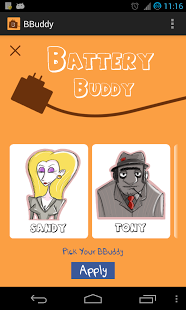
Battery Buddy is literally just that. It is a "buddy" that says certain things to you when you plug and unplug your battery. There are various voice options available such as a mobster, a turkey, a sheep, and a sultry female.

Despite the application's not so serious attitude and intentions, it actually could have a very practical benefit as well for those with less than ideal micro USB connectors or inconstant power conditions (such as a car's cigarette lighter). After all, nothing's worse than setting your phone to charge, only to realize that it wasn't actually charging at all. Yes, you could actually look for the change in your notification bar's power icon, but ain't nobody got time for dat. After all, that's probably why several OEM skins incorporate similar functionality, albeit with slightly more tasteful sounds.

Those who want a little bit of a greeting every time their device is given some juice can get the goods in the application thread.

___________________

[Join us August 9-11, 2013 in beautiful Miami, FL for XDA:DevCon. Read here to find out more.]Google+

Via xda-developers.com

More aboutKeep Tabs on Your Phone’s Juice with Battery Buddy

Replacement Lock Screen Enables Shortcuts, Keeps Pattern Unlock

Posted by Unknown on Monday, July 29, 2013

Replacement Lock Screen Enables Shortcuts, Keeps Pattern Unlock

We've all seen those nifty replacement lock screens out there—you know, the ones that prominently feature app shortcuts, widgets, and more to provide you with at-a-glance information and easy access to some of your favorite key applications. However, the majority of them have one tragic flaw: To enable the quick app launcher, you must disable lock screen security or at least go through a cumbersome procedure to have both a password and a quick launch area.

Thankfully, XDA Forum Member GoodAppsTeam hopes to solve this with LockScreen One Touch for All. The app keeps you safe from casual snooping by requiring a pattern to unlock the device, but it does so without removing the quick launch functionality.

So how does it work? Upon first startup, the app asks for device administrator status in order to control your lock screen settings. Once granted, you can get to work by customizing its list of apps. Calling the app you wish to launch from the lock screen is as simple as entering your pattern to unlock the phone and then "landing" on the app you wish to open.

Looking to save time while retaining a pattern unlock? This ingenious idea to keep both security and convenience may be up your alley. To give it a shot, head over to the application thread!

___________________

[Join us August 9-11, 2013 in beautiful Miami, FL for XDA:DevCon. Read here to find out more.]Google+

Via xda-developers.com
More aboutReplacement Lock Screen Enables Shortcuts, Keeps Pattern Unlock

New Controls for XDA’s Mention/Quote Tracking System

Posted by Unknown

New Controls for XDA's Mention/Quote Tracking System

A few months ago, we announced XDA's new mention and quote tracking system for our community members. We've been excited to see the system used tens of thousands of times per day. Earlier today, we rolled out a new controls that are available in the Mention System Settings page. You can now hide mention and quote notifications that you yourself make. This way, you can make sure you're only notified when other users are quoting or mentioning you.

___________________

[Join us August 9-11, 2013 in beautiful Miami, FL for XDA:DevCon. Read here to find out more.]Google+

Via xda-developers.com

More aboutNew Controls for XDA’s Mention/Quote Tracking System

Xposed Module Offers Simple Status Bar Customization

Posted by Unknown

Xposed Module Offers Simple Status Bar Customization

The status bar is an Android UI element that many seem to have minor (and sometimes major) issues with. It is one of the most commonly requested customizations out there, and can often be quite a fiddly and time consuming process. While there is certainly no shortage of ways to swap out things like battery and connectivity icons that cover multiple ROMs and devices, changing the color of the bar itself and elements such as the clock are not quite as readily available. Furthermore, doing so manually can be confusing for the average user.

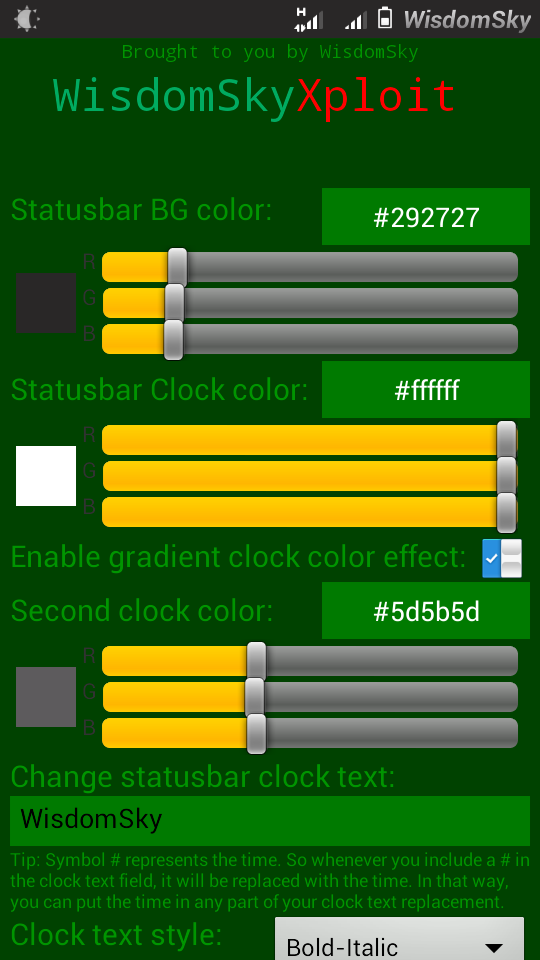
XDA Forum Member WisdomSky made an attempt to address that issue with his eponymously titled Xposed Framework module. The module currently offers the ability to alter the color of the status bar itself and apply two different shades to the clock, these can also be applied as a gradient if you wish. In addition to altering the colors, you can replace the clock entirely with some custom text of your choice and adjust its font to your liking.

While these might only be simple changes, they are quite commonly requested by a lot of people. The flexibility of the Xposed Framework makes this a viable option for a wide range of devices. If you feel your status bar could do with a splash of color, be sure to check out the original thread.

___________________

[Join us August 9-11, 2013 in beautiful Miami, FL for XDA:DevCon. Read here to find out more.]Google+

Via xda-developers.com

More aboutXposed Module Offers Simple Status Bar Customization

Google Chromecast Exploited and Rooted, Taking Photos with the Proximity Sensor on Xperia Z – XDA Developer TV

Posted by Unknown

Google Chromecast Exploited and Rooted, Taking Photos with the Proximity Sensor on Xperia Z – XDA Developer TV

The just-released Chromecast device has a secure boot exploit and has been rooted. That and more are covered by Jordan, as he reviews all the important stories from this weekend. Included in this week's news is an article about the new Android 4.3 update process and news about taking photos with the proximity sensor on the Sony Xperia Z. Also, be sure to check out Jordan's video on the Chromecast device.

Jordan talks about the other videos released this weekend on XDA Developer TV. XDA Developer TV Producer Jayce released a video talking about practical practices of developers. Later, he released a video getting Confessions from newly hired developers. Pull up a chair and check out this video.

Links to stories mentioned:

  • Sony Explains Improved Software Update Process for 4.3
  • Take Photos with the Proximity Sensor on the Sony Xperia Z
  • Jordan's Google Chromecast Unboxing, Setup, and First Impressions
  • Chromecast Secure Boot Exploit and Root
  • Forum Added for the Nexus 7 (2013)
  • Practices of Practical Developers – XDA Developer TV
  • Confessions of Newly Hired Developers – XDA Developer TV

Video Courtesy of Twildottv

Check out Jordan's YouTube Channel and Jordan's Gaming YouTube Channel

___________________

[Join us August 9-11, 2013 in beautiful Miami, FL for XDA:DevCon. Read here to find out more.]Google+

Via xda-developers.com
More aboutGoogle Chromecast Exploited and Rooted, Taking Photos with the Proximity Sensor on Xperia Z – XDA Developer TV

Increase Productivity while YouTubing with Popup Player

Posted by Unknown

Increase Productivity while YouTubing with Popup Player

Over the years, we've featured various floating apps of different kinds on the XDA Portal. We've even featured a library to help developers incorporate floating app functionality into their own creations. After all, one need only try a floating app to realize that this class of app enables a far greater degree of multitasking than the traditional full screen approach. If the next application you were hoping to add to your floating app arsenal is a floating YouTube player, XDA Forum Member digitalportal has an interesting solution with his new app Popup Player.

The app's core functionality is (obviously) to allow users to watch YouTube videos in a window that hovers over all other running applications. Much more than simply a video viewer, the app also integrates YouTube video search results within the app. Furthermore, it listens for YouTube links that you click, and it allows you to open videos in the player directly from websites and even Google's own YouTube app (with a simple click of the share button). Popup Player allows windows to be resized by simply using the pinch-zoom gesture. And there's even a continuous playback mode, which plays the entire search list back-to-back.

To get started, simply head over to the application thread and give it a whirl. This may be exactly what you need to sneak in some diversion while doing an otherwise tedious task.

___________________

[Join us August 9-11, 2013 in beautiful Miami, FL for XDA:DevCon. Read here to find out more.]Google+

Via xda-developers.com

More aboutIncrease Productivity while YouTubing with Popup Player

CyanogenMod Team Introduces Nemesis Stage 1: Focal

Posted by Unknown on Sunday, July 28, 2013

CyanogenMod Team Introduces Nemesis Stage 1: Focal

Coinciding with the release of Android 4.3 and and an updated stock camera, stage one of the CyanogenMod team's top secret "Project Nemesis" was finally unveiled on July 26.  According to the development group's weekly wrap-up on www.cyanogenmod.org, the goal of this project is to bring users the best custom operating experience possible. As such, Focal, a feature-packed camera application, was announced as the first component geared towards reaching that goal. CyanogenMod developer Guillaume Lesniak (XDA Recognized Developer XpLoDWilD) posted details about the new camera on Google +, explaining almost a dozen new and improved features that were integrated into the Open Source app.

Focal Features

Included in the announcement was a video showing Focal in action. It's no doubt that you have all heard the expression, "being in the right place at the right time." CyanogenMod has expanded on that by claiming Focal will provide you with "the right pixel, look, path, spark, and feeling at the right time." There are two key components at work within the UI that help backup that claim: a side bar and personable widgets within the sidebar. With a simple swipe, widgets can be reordered and hidden depending on your preference. When the screen is rotated, all widgets and the sidebar stay in place to avoid cluttered distractions while trying to take a picture. "It just feels natural," said Lesniak. Doubling tapping on the viewfinder will turn it into a Quick Capture mode that allows you to take pics no matter where you tap on the screen. By use of a "rule of thirds" grid that helps frame your shots, you can achieve a more professional looking photo with Focus.

Those who have a tendency to take "selfies" will love the timer and burst mode features, which are sorely lacking in the stock camera. Not only does the timer allow you to set up a delay after pressing the shutter button, but it also has a built-in voice trigger that snaps your mug as soon as you say, "cheese," "cid," or "whiskey." The burst mode takes a series of shots in increments of 5, 10, 15, or more without the need to press the shutter button multiple times.

Light metering is a major component to getting the proper exposure of your subject. With the addition of a meter ring alongside the standard focus ring, your subjects will be less likely to turn out too bright or too dark. Depending on your device, different metering modes are available including frame average, spot metering, and weighted point.

A swipe-enabled review drawer has been implemented for quick reference to your recent photos. Wherever you are in the app, swiping down in portrait mode of left in landscape will allow for easy access to your pics. When shooting in burst mode, a mini review drawer is available in real time. You can also take a picture while the drawer is open and it will slowly fade out of view. Like stock, swiping gestures also allow you to instantly delete unwanted photos; and tapping on a photo will automatically open it up in gallery.

The ability to take video snapshots while recording is now available to all devices by simply double-tapping the screen or pressing the volume up key. By using the volume down key or tapping the screen, Focus also allows you to refocus your video. Different effects can be added/changed while shooting by keeping the corresponding widget open while recording.

Google's new "auto-awesome" feature has been extended to Focus by adding an automatic picture enhancement system. Within five seconds of taking a picture, Focus will automatically enhance all new pictures you take. Panorama mode has also been enhanced so your pictures come out better than ever! Rather than the previous 160 degree panoramic, the new app allows you up to 360 degrees of landscape.

The CM team has also created a better software HDR algorithm that according to Lesniak, first matches the shots before blending them together and then applies them as a real tone-mapping. "It takes a little bit more time to process than our previous implementation, so you might not want to use it on all your pictures, but it's definitely worth it on your special occasions," he said.

One of the great new features added to the Android 4.2 stock camera was Photo Sphere. Unfortunately, not every device is compatible with it, and those who really wanted to use it had to exchange all CM enhancements in order to use it. With Focal, a similar feature called PicSphere has been introduced. PicSphere is an opensource replacement for Google's PhotoSphere, and allows for complete 360 degree panoramas.

What next?

While Focus is not available quite yet, the team promises to publish the source along with its official repositories as soon as the last few bugs are worked out. Once the source has been released, you can expect to find it in subsequent CM nightlies. The source code is split into two different repositities: android_packages_apps_Focal and android_external_Focus. As an open source app written under version two of the General Public Licence, the android community is being strongly encourage to contribute to the success of Focal by adding new widgets and settings. Lesniak said that this is to "achieve the final goal of the app" which is to "have a complete camera software, opensource, that is both powerful and compatible with every device."

As this is only the first phase of the Nemesis project, Steve Klondik said in a Google + post that there will be much more to follow. "My goal for CM has always been to break open these mostly proprietary mobile devices so we can turn them into the product we really want…What's most important to me is that anyone can get the code, hack on it and change whatever you want, build it, and flash it to your device." he said. "Nemesis is our plan to improve the user experience in the right places. The new camera app, Focal, is just the start. Without giving too much away, invoking teaser videos, or giving ETAs, I can confidently say that awesome things are going to keep coming."

___________________

[Join us August 9-11, 2013 in beautiful Miami, FL for XDA:DevCon. Read here to find out more.]Google+

Via xda-developers.com

More aboutCyanogenMod Team Introduces Nemesis Stage 1: Focal

Optimize Your Build Environment Setup Procedure

Posted by Unknown

Optimize Your Build Environment Setup Procedure

If you're new to the world of Android development or simply want to reformat and start from scratch, one of the first things you are going to want to do after installing your choice of *nix flavor is to setup a working build environment.

Setting up a working build environment manually isn't a particularly hard task, requiring only the knowledge of which packages to install and a little bit of configuration. However, part of the fun of coding is making the mundane simpler and more enjoyable, and that's exactly what XDA Senior Member nolinuxnoparty and his collaborators have done with the Build Environment Setup Automater Script.

So what do you get when you use the script?  It installs Python, JDK, GNU Make, Git, the Android SDK ADT Bundle, and the required packages for the Android Build Environment. This works on any x86 Linux PC, and obviously requires a healthy Internet connection. Using the script is remarkably simple. Just go to the download directory, chmod 755 the script, and ./execute it.

So far the script has been tested on Ubuntu 13.04, but it should work on virtually any distro. Head over to the utility thread to get started.

___________________

[Join us August 9-11, 2013 in beautiful Miami, FL for XDA:DevCon. Read here to find out more.]Google+

Via xda-developers.com

More aboutOptimize Your Build Environment Setup Procedure

Confessions of Newly Hired Developers – XDA Developer TV

Posted by Unknown

Confessions of Newly Hired Developers – XDA Developer TV

Continuing on the general topic of yesterday's video about the Practices of Practical Developers or what they did to get started doing development, XDA Developer TV Producer Jayce now gets some more information from them. Sometimes when you ask people about how they got from a starting developer to the creator of many apps, they will answer with one line. We all know it takes more than "reading a book" to become an experienced developer.

In today's episode, Jayce talks about what you can do to get from being a new developer to being a seasoned pro.  Jayce interviews three software developers in the video: Colby Callahan, JT Webman, and Darren Huang.  Check out this video to see what they have to say.

Be sure to check out other great XDA Developer TV Videos.

Check out Jayce's HowToBecomeTV YouTube Channel

___________________

[Join us August 9-11, 2013 in beautiful Miami, FL for XDA:DevCon. Read here to find out more.]Google+

Via xda-developers.com

More aboutConfessions of Newly Hired Developers – XDA Developer TV

Chromecast Secure Boot Exploit and Root

Posted by Unknown

Chromecast Secure Boot Exploit and Root

The Google Chromecast is shaping up to be quite a popular device. Largely due to its price point, adoption of Google's latest media streamer has been so high as to exhaust Google's free Netflix promotion. As exciting as the new device is, it's hard to disagree that the included feature set could be a bit better. However, as with all limited devices, it was only a matter of time before someone rooted it, and that's exactly what the folks over at GTV Hacker have done.

So how does it work? You first must get your device into USB boot mode, which is accomplished by holding down the single button as the device powers on. Then you use a powered mini USB OTG cable to provide the device with a signed image at a specific address on the USB drive. This firmware is passed along to the device's cryptography hardware to be verified. However, due to problems with the device's image signature verification, return code is simply not checked. Thus, you are able to run your own code at will. One thing to keep in mind, though, is that this security hole could be closed with any update at any time, so it's likely not to be available for too long.

So what can you do with this? Right now, not a whole lot. In fact, if you're not thinking of developing for the device, we'd recommend not doing this due to the inherent risks. However, the groundwork has been laid for future developments that will build upon this and add more functionality to the admittedly spartan device. I mean after all, who wouldn't want Miracast support on the Chromecast? Seems like a match made in heaven.

To learn more head over to the GTV Hacker Wiki and also read their coverage of the exploit. And when you're ready to get in on the Chromecast fun yourself, be sure to head over to the newly created Google Chromecast forum.

___________________

[Join us August 9-11, 2013 in beautiful Miami, FL for XDA:DevCon. Read here to find out more.]Google+

Via xda-developers.com

More aboutChromecast Secure Boot Exploit and Root

Help Your Less Tech Savvy Friends with Zikk Remote Android Setup

Posted by Unknown

Help Your Less Tech Savvy Friends with Zikk Remote Android Setup

We've all done it before… You know, served as tech support for our friends and family. After all, there's no reason not to. What use is knowing about technology if you can't help others use it more effectively?

Whatever your intentions, circumstances often make helping others with their tech needs a bit more difficult than they need to be. What if, for instance, your parents purchase a new smartphone or tablet and ask you to help them set it up? If you happen to live a ways away, you would ordinarily be subjected to the torturous pains of over-the-phone tech support. There is, however, a better way.

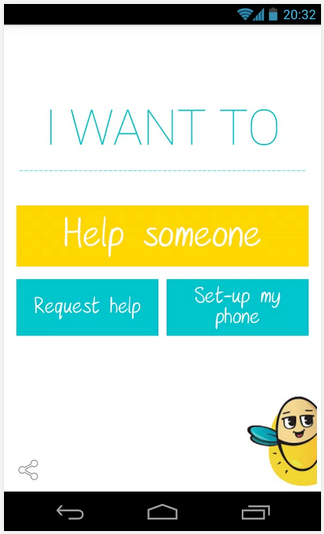
Zikk Remote Android Setup by XDA Forum Member zikkapp hopes to solve this. By allowing you to remotely setup a friend's phone, you can do what you need from the comfort of your own phone, wherever you may be. The app allows you to remotely download apps, change WiFi settings, modify sound and display settings, set a wallpaper, and much more.

If you're constantly hounded for help by your friends and loved ones, this could prove quite useful—unless, of course, you don't wish to perpetually be their tech support hotline. Head over to the application thread to get started.

___________________

[Join us August 9-11, 2013 in beautiful Miami, FL for XDA:DevCon. Read here to find out more.]Google+

Via xda-developers.com
More aboutHelp Your Less Tech Savvy Friends with Zikk Remote Android Setup

Daydream Screen Saver for Pre-Jelly Bean Devices

Posted by Unknown on Saturday, July 27, 2013

Daydream Screen Saver for Pre-Jelly Bean Devices

While the Internet is still recovering from the excitement that came from the release of Android 4.3, Android's 4.2 Jelly Bean upgrade this past October ushered in many new features. One of these features was Daydream, a pseudo-screen saver for your mobile device that could display certain items after some period of inactivity.

Ideally, we'd all be running 4.2 or greater. However, due to OEM and carrier laziness, not everyone is so lucky as to be on a recent firmware build. But as we all know, things that are intended for one OS build always end up trickling their way down to older versions thanks to equivalent apps and clever coding.

XDA Forum Member vijai2011 intended to bring Daydream-like functionality to devices running Froyo or later, and he has done so with his new app aptly titled Daydream. So what does the screen saver display? It shows the current date and time, with date display style being fully configurable in the app's options. And to keep things interesting, the text is displayed with more than 20 randomized movements. Also configurable through the app's settings menu are controls for when the app should run.

If you'd like to set up a screen saver on your pre-Jelly Bean device, this app may be what you're looking for. Head over to the original thread to get some Daydream action on your pre-Jelly Bean devices.

___________________

[Join us August 9-11, 2013 in beautiful Miami, FL for XDA:DevCon. Read here to find out more.]Google+

Via xda-developers.com

More aboutDaydream Screen Saver for Pre-Jelly Bean Devices

Take Photos with the Proximity Sensor on the Sony Xperia Z

Posted by Unknown

Take Photos with the Proximity Sensor on the Sony Xperia Z

Taking pictures underwater is probably something that not many people have attempted. Of course, not only are the physical and hardware limitations preventing people from doing so, expect for a select 'few' devices, but physics tells us that capacitive touch screens will have a hard time registering any taps and swipes when under water. A physical camera button may remedy this issue on the Sony Xperia Z, but how about the proximity sensor?

In answer to a question along similar lines, XDA Forum Member AGGevorgyan has developed an that allows Xperia Z owners to easily take photos with the proximity sensor. Designed to rid users of the aforementioned problem, Aqua Z Camera will snap up pictures every time you tap the proximity sensor—simple as that. The sensor sensitivity, being the duration you have your finger covering the proximity sensor, can be adjusted within the app. The great thing is that it doesn't require root access, meaning its a viable alternative to the physical camera button mod. Despite being in the early alpha stages, AGGevorgyan has already included camera options native to the original camera app, including:

  • Change camera resolution
  • Auto focus
  • Auto white-balance
  • Flash
  • Front and back camera compatibility
  • Color effects

With four versions currently under the belt, AGGevorgyan warns that Aqua Z Camera may be unstable for some, and will not work with any other device. To learn more, check out the original thread.

___________________

[Join us August 9-11, 2013 in beautiful Miami, FL for XDA:DevCon. Read here to find out more.]Google+

Via xda-developers.com

More aboutTake Photos with the Proximity Sensor on the Sony Xperia Z

Practices of Practical Developers – XDA Developer TV

Posted by Unknown

Practices of Practical Developers – XDA Developer TV

A lot of people have an idea for the next great app. Some people even do research into what building an app actually takes. They contact people, they read up on the forums, they even watch XDA Developer TV. However, very few actually follow through and become App Developers.

In today's episode, XDA Developer TV Producer Jayce talks about why he is wearing a green hat in the thumbnail, and he talks to people who actually walk the walk. Jayce interviews three software developers in the video: Colby Callahan, JT Webman, and Darren Huang.  Check out this video to see what they have to say.

Be sure to check out other great XDA Developer TV Videos.

Check out Jayce's HowToBecomeTV YouTube Channel

___________________

[Join us August 9-11, 2013 in beautiful Miami, FL for XDA:DevCon. Read here to find out more.]Google+

Via xda-developers.com

More aboutPractices of Practical Developers – XDA Developer TV

Read Build.prop Values from Your App without Root

Posted by Unknown

Read Build.prop Values from Your App without Root

We've featured plenty of tools in the past that allow an end-user to modify his or her own build.prop. We've also featured a set of tools for app developers to incorporate that allow applications to modify the file. These (obviously) all require root access, as you're modifying system settings. However, to date we haven't featured a method of reading the build.prop from an app.

There are plenty of reasons why an app developer would want read-only access a device's build.prop. Be it to know about its software or hardware configuration, or simply to peek into some system settings, looking into this treasure trove of information is potentially quite useful for an app developer. However, requiring root access to do so is unnecessary from both user hassle and security standpoints.

In a quest to access the build.prop from his own app without resorting to root, XDA Forum Member torpedo mohammadi wrote a couple of lines of code and shared it with the community. The way he goes about it can be summarized in his explanation:

1. Make a process which executes "getprop" from the "/system/bin/getprop" directory and initialize the String which we want to get (ro.board.platform in example).
2. Make a BufferedReader which gets the value (String) by retrieving the data from a inputStreamReader().
3.Convert the BufferedReader to String.

Head over to the original thread to get started, copy the code, and get it implemented into your app.

___________________

[Join us August 9-11, 2013 in beautiful Miami, FL for XDA:DevCon. Read here to find out more.]Google+

Via xda-developers.com

More aboutRead Build.prop Values from Your App without Root

Remove Buttons with the Puzzle Game Buttons and Scissors

Posted by Unknown

Remove Buttons with the Puzzle Game Buttons and Scissors

Tired of common puzzle games? Think you've basically tried every type there is? Well, you'd likely be mistaken, as XDA Forum Member knutson created a pretty unique new game called Buttons and Scissors. It's sort of like Connect 4, but with (you guessed it) buttons and scissors.

Differing from the aforementioned Connect 4, only two buttons required to eliminate pieces, and the game pieces don't shift after others have been removed. Furthermore, the buttons don't have to be contiguous in order to be eliminated.

OK, so the game's concept isn't entirely new. However, how it is presented is undoubtedly unique. Plus, the graphics are crisp (with resolutions supported from QVGA all the way up to 1080p), and there are varying levels of difficulty thanks to different grid sizes (5×5, 6×6, and 7×7). This leads to a game that has you coming back again and again. Another cool feature is the cloud save and leader board support. And if you decide you've had enough, the game can also give you solutions or at least unlimited undo actions.

If you're looking to get snipping, head over to the game thread and give Buttons and Scissors a shot. You may just find that the game cuts it—in more ways than one.

___________________

[Join us August 9-11, 2013 in beautiful Miami, FL for XDA:DevCon. Read here to find out more.]Google+

Via xda-developers.com

More aboutRemove Buttons with the Puzzle Game Buttons and Scissors

Sony Explains Improved Software Update Process for 4.3

Posted by Unknown on Friday, July 26, 2013

Sony Explains Improved Software Update Process for 4.3

Roughly two years ago, Sony Developer World released a story that outlined the process of pushing out an Ice Cream Sandwich-based firmware upgrade for the Xperia line, from source code release to software upgrade. Back then, the process consisted of OEMs waiting for source code release, at which time all of the work would begin. This would naturally lead to extended delays in firmware release, since manufacturers would have no time to prep the firmware release in advance of source code release.

Fast forward two years, and things have changed for the better, at least according to Sony mobile. Thanks to the Android Platform Development Kit (PDK), select OEMs are given access to certain source files and compiled binaries a few weeks in advance of source release in order to help spur the release process. The PDK also includes the Android Compatibility Test Suite (CTS) and information regarding Hardware Abstraction Layer (HAL) integration. A closer relationship with Qualcomm further enables the company to push out the firmware releases faster.

To get the full story, be sure to head over to Sony Developer World. It's good to see Google and OEM partners making progress in the quest towards timely firmware releases. It's still far from perfect, but baby steps are better than no steps.

___________________

[Join us August 9-11, 2013 in beautiful Miami, FL for XDA:DevCon. Read here to find out more.]Google+

Via xda-developers.com

More aboutSony Explains Improved Software Update Process for 4.3

Easily Display Graphs and Charts in Your App with HoloGraphLibrary

Posted by Unknown

Easily Display Graphs and Charts in Your App with HoloGraphLibrary

It's no secret that visual aids such as charts and graphs help in effectively disseminating numerical information. After all, who really wants to read an essay of numbers? That feeling is only exacerbated when the reading is done on a small cell phone screen. Thankfully, as apps are becoming more and more visually enriched, dull data visualization is nearly a thing of the past.

To help developers better display exactly the data they need in their apps, XDA Senior Member Androguide.fr created HoloGraphLibrary. Forked from a separate base library by developer Daniel Nadeau, Androguide.fr's offering builds on the original by adding support for various unit display types and compatibility with Android Studio and Gradle.

In addition to providing his forked library, Androguide.fr has also included a comprehensive guide on how to use the library in his thread. So what are you waiting for? Don't display numbers as text; it's not pretty. Head over to the library thread to get started.

___________________

[Join us August 9-11, 2013 in beautiful Miami, FL for XDA:DevCon. Read here to find out more.]Google+

Via xda-developers.com

More aboutEasily Display Graphs and Charts in Your App with HoloGraphLibrary

Forum Added for the Nexus 7 (2013)

Posted by Unknown

Forum Added for the Nexus 7 (2013)

To say that the Internet has fallen in love with Google's Nexus 7 refresh would be quite the understatement. After all, the new device is a healthy upgrade over its predecessor, packing a vastly improved screen and a faster processor in a slimmer and sleeker design.

The refresh features an IPS panel at 1080p resolution. At 7″, this equates to an impressive 323 ppi, making it the sharpest 7″ tablet currently on the market. The processor was upgraded as well, now featuring a quad-core Snapdragon S4 Pro running at 1.5 GHz, just like the Nexus 4.

Because of these upgrades at a still affordable price point, it's no wonder that we received overwhelming demand to give the Nexus 7 refresh a place in our forums. Well, you asked for it, and now you've got it. Head over to the newly created Nexus 7 (2013) forum to get in on the discussion.

___________________

[Join us August 9-11, 2013 in beautiful Miami, FL for XDA:DevCon. Read here to find out more.]Google+

Via xda-developers.com

More aboutForum Added for the Nexus 7 (2013)

Android 4.3 Released, Nexus 7 Updated, Google Chromecast Released, Non-Nexus 4.3 Build Available! – XDA Developer TV

Posted by Unknown

Android 4.3 Released, Nexus 7 Updated, Google Chromecast Released, Non-Nexus 4.3 Build Available! – XDA Developer TV

After a couple of leaked versions hit the wild, Google finally announced Android version 4.3 for Nexus devices. That and more are covered by Jordan, as he reviews all the important stories from this week. Included in this week's news is an announcement that the first AOSP-based 4.3 build for non-Nexus devices and some forum additions for many devices, including Chromecast.

Jordan talks about the other videos released this week on XDA Developer TV. XDA Developer TV Producer Kevin released a video talking about sharing your WiFi quickly with InstaWifi, TK showed us some XDA mods for the Samsung Galaxy S 4, and TK then showed us how to install some security patches for our device. Pull up a chair and check out this video.

Links to stories mentioned:

  • Android 4.3 Announced and Rolling Out to Nexus Devices, Images Available
  • First AOSP 4.3 Build for a Non-Nexus Device
  • Forum Added for the Samsung Galaxy S 4 Mini
  • It's a Camera! It's a Phone! Forums Added for the Galaxy S 4 Zoom
  • Forums Added for the Google Chromecast and Galaxy Tab 3
  • Connect to WiFi Instantly with InstaWiFi – XDA Developer TV
  • Great XDA Mods for Your Samsung Galaxy S 4 – XDA Developer TV
  • Secure Your Android Device with Master Key Dual Fix – XDA Developer TV

Check out Jordan's YouTube Channel and Jordan's Gaming YouTube Channel.

___________________

[Join us August 9-11, 2013 in beautiful Miami, FL for XDA:DevCon. Read here to find out more.]Google+

Via xda-developers.com

More aboutAndroid 4.3 Released, Nexus 7 Updated, Google Chromecast Released, Non-Nexus 4.3 Build Available! – XDA Developer TV

Keep Up to Date with the Latest Programming News with Ken

Posted by Unknown

Keep Up to Date with the Latest Programming News with Ken

There are plenty of viable options for keeping up to date with the latest happenings in your sphere of interests, such as Feedly, Pulse, Rockmelt and the now decommissioned and sorely missed Google Reader. For programmers and developers out there, they may serve the purpose of keeping you up to date with the latest development news, serving up the newest tutorials on Javascript and Python, or drawing inspiration for your next app or site design.

For such users, XDA Forum Member mlakkadshaw may have developed just the app for you. Ken is a free app that serves as a news platform delivering the most recent news, reports, tutorials and op-eds from every corner of the Interwebs. Articles are drawn and categorized into predetermined interests, which can be navigated with simple horizontal swipes. Interests include:

  • Android
  • Javascript
  • Python
  • PHP
  • Ruby
  • Java
  • UI for mobiles and sites

Articles that have caught your attention can either be viewed in your web browser or natively on Ken. A zoom function is available, and if you reckon your friends would be interested in certain articles you've come across, the app also allows you to share articles on various social networking sites and other platforms.

Mlakkadshaw is accepting suggestions for sites to be included in Ken, and all credit for the articles go to their respective site and  author. Light in size, simple in design, and great in practicality, Ken may be an app you'd like to check out. If this is so, you can find more information and download in the original thread.

___________________

[Join us August 9-11, 2013 in beautiful Miami, FL for XDA:DevCon. Read here to find out more.]Google+

Via xda-developers.com

More aboutKeep Up to Date with the Latest Programming News with Ken

Unlock Your Device Using a Hover Gesture with Magic Unlock

Posted by Unknown on Thursday, July 25, 2013

Unlock Your Device Using a Hover Gesture with Magic Unlock

Have you ever wanted to automate the unlock procedure of your device? We've featured a few interesting ways of turning off and on your device using sensors in the past. However, these solutions predominantly dealt with replicating smart cover functionality on devices lacking the appropriate magnetic sensors.

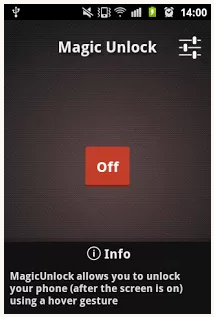
What do you do if you'd rather not have your device's screen turn on and off automatically, but would rather like it to unlock with a simple hover of your hand? This is what XDA Forum Member bmbogdan is hoping to achieve with his new app Magic Unlock.

As alluded to by the app's title, Magic Unlock unlocks your device. The way it does so is by using the proximity sensor on your device to sense when you hover over the display. Upon detecting the hover gesture, the screen is unlocked. Magic Unlock is only activated when your screen is on, and it does so by listening for the ACTION_SCREEN_ON/OFF intents. Because of this, you shouldn't expect much (if any) drain on your battery.

The app can run in three modes: low, medium, and high priority. Low Priority runs in the background. High Priority runs in the foreground, placing a visible notification in the notification bar. Medium Priority runs in the background (just like low) when there's enough memory, but then runs in the foreground (similar to high) when low memory is detected.

If this interests you, head over to the application thread to get started

___________________

[Join us August 9-11, 2013 in beautiful Miami, FL for XDA:DevCon. Read here to find out more.]Google+

Via xda-developers.com
More aboutUnlock Your Device Using a Hover Gesture with Magic Unlock

Forums Added for the Google Chromecast and Galaxy Tab 3

Posted by Unknown

Forums Added for the Google Chromecast and Galaxy Tab 3

If the release of Android 4.3 and the new Nexus 7 didn't do quite enough for you, yesterday's Google event also marked the release of Google's new Chromecast. The diminutive media streamer will work with many apps to deliver seamless media streaming from services like Netflix and Pandora. It also can mirror tabs that you have open on any desktop instance of Chrome. And at just $35, it may well be quite the steal, but that depends largely on third-party development to support streaming to the device. To help spur things along, we've given it a home here on the XDA forums.

The Galaxy Tab 3 family is comprised of three variants of differing screen sizes: 7″, 8″, and 10.1″. The 7″ and 8″ are relatively similar to their predecessors. However, the Galaxy Tab 3 10.1, which now sports the speedy dual-core Intel Atom Z2560 processor running at 1.6 GHz. The 8″ and 10.1″ models sport a resolution of 1280×800, while the 7″ model runs at 1024×600.

Have you already ordered your Chromecast? Do any of the Galaxy Tab 3 variants make you excited? Is the Intel Atom in the 10.1 wasted on such a low density screen? Let us know what you think in the comments below, and make sure to visit the newly created forums to get in on the action:

___________________

[Join us August 9-11, 2013 in beautiful Miami, FL for XDA:DevCon. Read here to find out more.]Google+

Via xda-developers.com

More aboutForums Added for the Google Chromecast and Galaxy Tab 3

Secure Your Android Device with Master Key Dual Fix – XDA Developer TV

Posted by Unknown

Secure Your Android Device with Master Key Dual Fix – XDA Developer TV

Whether you want to admit it or not, Android is not always as secure as it could be. But thankfully, good people find the security flaws and report them. Google then patches the vulnerabilities. Then, we hit a roadblock. If you are on a stock ROM, you usually have to wait for your carrier to roll out an update for your device to get the patch. Since rolling out updates doesn't lead to new phone sales, some carriers don't offer updates in any reasonable amount of time, or sometimes not at all.

Well don't leave yourself vulnerable. XDA Recognized Contributor Tungstwenty has a solution, as Portal Administrator Will Verduzco reported earlier.  In this video, XDA Developer TV Producer TK reviews Master Key Dual Fix patch. TK shows off how to install the patch and the required Xposed framework, so check out this video.

Be sure to check out other great XDA Developer TV Videos

___________________

[Join us August 9-11, 2013 in beautiful Miami, FL for XDA:DevCon. Read here to find out more.]Google+

Via xda-developers.com

More aboutSecure Your Android Device with Master Key Dual Fix – XDA Developer TV

First AOSP 4.3 Build for a Non-Nexus Device

Posted by Unknown

First AOSP 4.3 Build for a Non-Nexus Device

You weren't able to set foot on the Interwebs for the past 48 hours without being bombarded by a never ending stream of news about Chromecast, the new Nexus 7, and of course the updated software it will be running, Android 4.3. As with any update to the Android OS, the usual clamor for factory images and race to bring the update to other Nexus devices has been as frenzied as always. However, it's not only Nexus devices that are able to take advantage of the latest AOSP updates.

Thanks to a combination of Sony Mobiles efforts to be the Good Guy Greg of Android OEMs and XDA Developer Admin pulser_g2, Sony Xperia Z users can now get a feel for "stock" Android 4.3 on their device. The build is compiled by adding the Sony repository to AOSP 4.3, and as with other Sony AOSP releases, there is no functional radio included. Therefore, no calls/SMS/mobile data (this can be rectified though if you know what you're doing, and that's all I have to say about that). For this reason, the build is provided as a fastboot image and not a flashable zip. This is compiled for and tested solely on the C6603, so don't go throwing this at another model and expecting it to stick.

Obviously, without a radio this isn't going to your daily driver. However, it's certainly worth a look if you want to check out the latest update and don't have a Nexus device laying around. Check out the development thread for more information.

___________________

[Join us August 9-11, 2013 in beautiful Miami, FL for XDA:DevCon. Read here to find out more.]Google+

Via xda-developers.com

More aboutFirst AOSP 4.3 Build for a Non-Nexus Device

Assistive Zoom Enables One-Finger Zoom Gesture

Posted by Unknown

Assistive Zoom Enables One-Finger Zoom Gesture

While extremely intuitive and innovative, the pinch-zoom gesture can be difficult at times and for certain people. Be it due to a user's physical limitations or one-handed device operation, the gesture isn't always the most convenient. And while Google Maps has incorporated an alternative zoom gesture for some time, there isn't always a good alternative gesture for application zoom gesture functionality in every app.

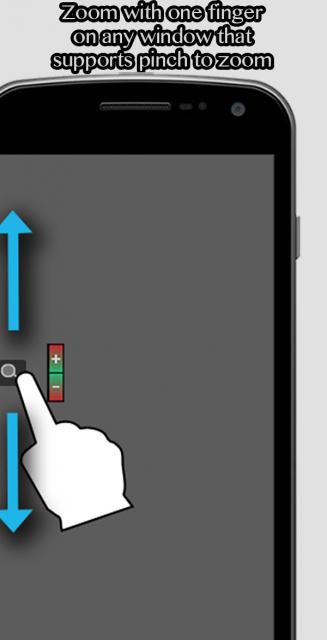
XDA Senior Member jerryfan2000 aims to change this with Assistive Zoom. As you can gather from the app's title, Assistive Zoom assists users in sending the pinch-zoom gesture signal from just single-finger operation. To make the application to be useful to a wide range of users, Assistive Zoom is highly configurable in sensitivity, trigger options, and zoom options. It currently offers three trigger icon style options, as well as fine control of zooming scale and user-selected triggers.

The application is compatible with Android devices running Froyo and greater. As this is a system-wide modification, root access is required. Want to give this a shot on your own device? Simply head over to the modification thread to get started.

___________________

[Join us August 9-11, 2013 in beautiful Miami, FL for XDA:DevCon. Read here to find out more.]Google+

Via xda-developers.com
More aboutAssistive Zoom Enables One-Finger Zoom Gesture

Sleep Better with NightLamp, the Intelligent Night Light

Posted by Unknown on Wednesday, July 24, 2013

Sleep Better with NightLamp, the Intelligent Night Light

If you've ever had difficulty falling or staying asleep at night, you've likely tried all things short of voodoo to get a better night's rest. You also probably know that too much light at night will suppress the release of melatonin from your pineal glad, potentially disturbing your sleep-wake cycle. Because of this, it's important for those with difficulty sleeping to limit their exposure to bright light at bed time.

In order to allow users to minimize exposure to extraneous light, XDA Forum Member icechen1 created NightLamp. This intelligent night light aims to help  you sleep better by functioning as a night light that can fade off after a predefined interval. If you wish to turn the light back on after it has turned off, simply tap the screen or activate one of the device's sensors such as shaking the device or saying certain voice commands. The app can also automatically turn itself on and off based on ambient light conditions. And what do you do when you need a brighter light? Simply flip your device over, and NightLamp will activate your phone's LED flash.

Getting started is as simple as heading over to the application thread and giving the app a shot. Better sleep is just a few clicks away.

___________________

[Join us August 9-11, 2013 in beautiful Miami, FL for XDA:DevCon. Read here to find out more.]Google+

Via xda-developers.com

More aboutSleep Better with NightLamp, the Intelligent Night Light

iOS7 Control Center Clone for Android

Posted by Unknown

iOS7 Control Center Clone for Android

One of the many features and "innovations" Apple fans worldwide love to tout is the all-too-familiar notification and settings area from Android Control Center of settings toggles and shortcuts. Putting aside the usual knee-jerk copycat accusations, kudos to the company for at least drawing inspiration from their main competitor. Because let's admit it, the Control Center does look interesting, in either design philosophy or whatever fruity flavor Apple has thrown in the mix.

So if you've ever wanted to give this a go on your Android device, you can get pretty close to the real deal with XDA Forum Member mallikvala's iOS7-inspired Control Center. Control Center replicates the experience one would have when using the actual feature on an iPhone. By tapping on the bottom edge of the screen, the sidebar-like Control Center slides up revealing settings toggles, brightness and volume sliders, a music widget, and seven shortcuts to apps.

Mallikvala has also packed in an extra couple of neat features that the original may or may not have. Most notably, there is a high degree of customization in regards to the aesthetics and themes, allowing you to mix and match the two colors of the panel's background gradient. In addition to the colors, the gradient style can also be chosen, such as top-to-bottom, corner-to-corner, or left-to-right. You can also toggle Mini view, which minimizes the control center to display only settings toggles.

Control Center is ad-free and is compatible with Gingerbread and later. If you'd like to check it out, visit the application thread for more information.

___________________

[Join us August 9-11, 2013 in beautiful Miami, FL for XDA:DevCon. Read here to find out more.]Google+

Via xda-developers.com

More aboutiOS7 Control Center Clone for Android

Android 4.3 Announced and Rolling Out to Nexus Devices, Images Available

Posted by Unknown

Android 4.3 Announced and Rolling Out to Nexus Devices, Images Available

We were all expecting it. In fact, we've all been waiting for it ever since this year's Google I/O. However, that conference came and went, without a trace of Android 4.3. But after last week's Android 4.3 leak, we knew it was finally coming soon. And in today's Google event, which also marked the release of the Nexus 7 refresh, it has finally been made official.

So what's new in this latest flavor of Jelly Bean? Here are some of the key changes, courtesy of the Android Developers blog post:

  • OpenGL ES 3.0 — Game developers can now take advantage of OpenGL ES 3.0 and EGL extensions as standard features of Android, with access from either framework or native APIs.
  • Bluetooth Smart — Now your apps can communicate with the many types of low-power Bluetooth Smart devices and sensors available today, to provide new features for fitness, medical, location, proximity, and more.
  • Restricted profiles — Tablet owners can create restricted profiles to limit access to apps, for family, friends, kiosks, and more. Your app can offer various types of restrictions to let tablet owners control its capabilities in each profile.
  • New media capabilities — A modular DRM framework enables media application developers to more easily integrate DRM into their own streaming protocols such as MPEG DASH. Apps can also access a built-in VP8 encoder from framework or native APIs for high-quality video capture.
  • Notification access — Your apps can now access and interact with the stream of status bar notifications as they are posted. You can display them in any way you want, including routing them to nearby Bluetooth devices, and you can update and dismiss notifications as needed.
  • Improved profiling tools — New tags in the Systrace tool and on-screen GPU profiling give you new ways to build great performance into your app.

Much has also been done to improve UI performance. Most notably, the Android 4.3 Platform Highlights page mentions a change to the hardware-accelerated 2D subsystem that modifies the stream of drawing commands to send the commands to the GPU in an optimized manner. And in instances when the CPU is required, these operations are now multi-threaded, allowing the use of multiple CPU cores. Improved window buffer allocation also speeds up buffer allocation, resulting in speedier rendering starts. And to best harness the GPU's power in 2D hardware-accelerated tasks, the system now uses OpenGL ES 3.0 for optimized texture management and to maintain higher gradient rendering fidelity. Of course, however, the main use of OpenGL ES 3.0 will be to provide game developers with the framework and native API access they need to produce high quality and efficient games.

Another major highlight in this Jelly Bean refresh is a substantial refresh to the notification system, whereby third-party apps can observe the stream of notifications and display them or transfer them to nearby connected Bluetooth devices. And just as before, notifications can be enabled or disabled per app. Building upon this, however, now users are allowed to see and toggle which apps have access to the notification stream.

The tablet multi-user feature has also been revamped. Now in 4.3, users are given the option to set up restricted profiles. This allows owners to easily create separate environments for each user, with the ability to manage restrictions in apps available in those environments. This feature is aimed to sharing your device with friends and use at kiosks.

Other notable changes include Bluetooth Smart Ready to aid in discovery and communication with nearby devices, Bluetooth AVRCP 1.3 support for richer interactions with media streaming devices, an improved DRM framework, and a VP8 video encoder.

You can learn more by heading over to the Android Developers blog post and Android 4.3 Platform Highlights page. If you're lucky enough to own a Google Nexus 4, Nexus 7, Nexus 10, or Galaxy Nexus, you can expect this update to come over-the-air shortly. And if you find yourself impatiently waiting, you can get a head start and download the images by visiting the Nexus device factory images.

___________________

[Join us August 9-11, 2013 in beautiful Miami, FL for XDA:DevCon. Read here to find out more.]Google+

Via xda-developers.com

More aboutAndroid 4.3 Announced and Rolling Out to Nexus Devices, Images Available

Great XDA Mods for Your Samsung Galaxy S 4 – XDA Developer TV

Posted by Unknown

Great XDA Mods for Your Samsung Galaxy S 4 – XDA Developer TV

The Samsung Galaxy S 4 is latest and greatest in the Samsung's Galaxy S flagship line. It comes with many neat features. However, here at XDA, we don't just want a normal device. We want to customize our device to get even more power, functionality, and great features.

In this video, XDA Developer TV Producer TK presents four mods that he's installed on his Samsung Galaxy S 4 using tools from the XDA Forums. These mods include Native Call Recording, Transparent Weather Widget, LMT (which he's reviewed in the past), and Launcher 4×4. Check this video out.

Be sure to check out other great XDA Developer TV Videos

___________________

[Join us August 9-11, 2013 in beautiful Miami, FL for XDA:DevCon. Read here to find out more.]Google+

Via xda-developers.com

More aboutGreat XDA Mods for Your Samsung Galaxy S 4 – XDA Developer TV

Obtain the Feedback You Need with General Feedback Tool

Posted by Unknown

Obtain the Feedback You Need with General Feedback Tool

Nothing's harder than debugging a problem without all of the right information at your disposal. After all, fixing whatever issue you have to deal with is hard enough. There's no need to complicate things by not truly understanding what's going on. That's why developers rightfully ask for log information when issues do arise, and why we've covered tools to do this several times in the past.

If you happen to be looking for yet another way to make sure that your users are able to pull all of the information you desire, XDA Forum Member TheUntouchable created a Windows-based utility that pulls almost anything you could need in debugging your app. Designed for end users who have little experience with ADB, General Feedback Tool makes it easy for these users to give you meaningful debug information. So, what does the utility pull? Quite a bit. As stated by the developer, the app pulls:

  • Rom Version Shows the name and version of your current rom
  • Kernel Version Shows the name and version of your current kernel
  • Ram Usage Shows the current ram usage
  • Swap Partition information If a swap partition is used, it will show you the current useage of it
  • Swappiness Shows the ratio that the kernel tells how much the swap file should be used
  • Running Prozesses Shows the current running prozesses
  • Current Kernel Log Shows the current kernel log
  • Last Kernel Log Shows the kernel log that was written till the last reboot
  • CPU Type (not all devices) Shows the cpu type of your device. Higher means better and more uv is possible.
  • Logcat Shows the current logcat
  • Init.d Folder Content Shows the content of the init.d folder. This scripts are always executed when your phone is booting.
  • LMK Config Shows the configuration for the low memory killer.
  • Baseband and Ril Version Shows the current versions of the baseband and ril of your phone
  • Panel Type (not all devices) Shows the panel type of your phone (HTC Sensation for example)

Getting started is no more difficult than sending your app's frustrated users over to the original thread.

___________________

[Join us August 9-11, 2013 in beautiful Miami, FL for XDA:DevCon. Read here to find out more.]Google+

Via xda-developers.com

More aboutObtain the Feedback You Need with General Feedback Tool

GrilledUI Library for Streamlined UI Creation

Posted by Unknown

GrilledUI Library for Streamlined UI Creation

If you're looking to get started creating a user interface for your app, there are various ways of getting started. You could always start from scratch, learning the entire process as you go along. In fact, that's probably the ideal way of doing it, provided you have the time, as you'd have a deeper understanding of how things work and how to fix problems if when they arise.

However, ain't nobody got time to do things the long way. To help speed things along for new developers who would rather concentrate on core functionality code rather than UI layouts, XDA Senior Member AuxLV created GrilledUI, an open source streamlined library aimed at easily creating common UI layouts. As described by AuxLV:

Available UI types are: tabbed UI (TabActivity), master/metail flow (SectionActivity) and their hybrid (HybridActivity). These activity classes wrap everything you need to create your UI with just a few lines of code or even load tabs/sections and instaniate fragments from XML file. HybridActivity allows you to have tabs on phones and MDF on tablets. This way you can easily make your app tablet and phone friendly without torturing phone users with multiple activities.

Included with the library are multiple examples, a BSD license, and support for pre-ICS devices using ActionBarSherlock. Head over to the resource thread to get started and visit the Github to take a peek at the source.

___________________

[Join us August 9-11, 2013 in beautiful Miami, FL for XDA:DevCon. Read here to find out more.]Google+

Via xda-developers.com

More aboutGrilledUI Library for Streamlined UI Creation

It’s a Camera! It’s a Phone! Forums Added for the Galaxy S 4 Zoom

Posted by Unknown on Tuesday, July 23, 2013

It's a Camera! It's a Phone! Forums Added for the Galaxy S 4 Zoom

With Samsung's affinity towards crossover devices suck as the Galaxy Note series, it's no wonder that we'd soon see something relatively similar to the popular Galaxy Camera, but with a phone built in. Despite the device's name, it differs substantially from the previously released Galaxy S 4 flagship.

Unlike the Galaxy Camera, which is quite similar in specifications to the Galaxy S III, the Galaxy S 4 Zoom differs significantly from the Galaxy S 4. It features a qHD 4.3″ Super AMOLED panel backed by a 1.7 GHz dual-core Pega-Dual +XMM6262 SoC and 1.5 GB of RAM. It also features 8 GB of internal storage and LTE connectivity in certain markets.

The Galaxy S 4 Zoom's camera subsystem packs a large 16 MP backside-illuminated CMOS sensor measuring in at 1/2.33″, backed by a 10x optical zoom lens. Needless to say, if you want high quality images from your camera phone, the Galaxy S 4 Zoom is likely the phone to get.

Is a 15.25 mm phone too thick in 2013? Does the excellent camera make up for the added girth? Let us know if this device makes the right compromises and if it has earned its way into your pocket. And while you're at it, don't forget to head over to the newly created forums to get started.

___________________

[Join us August 9-11, 2013 in beautiful Miami, FL for XDA:DevCon. Read here to find out more.]Google+

Via xda-developers.com

More aboutIt’s a Camera! It’s a Phone! Forums Added for the Galaxy S 4 Zoom

Air Call-Accept is a Smart Way to Answer Your Calls

Posted by Unknown

Air Call-Accept is a Smart Way to Answer Your Calls

Samsung Galaxy S 4 owners may be familiar with the the Air Call Accept feature, which allows users to answer calls by simply swiping over the infrared sensor located near the earpiece. It's most definitely a very useful (and fun) feature, allowing you to answer calls by merely bringing the phone next to your ear, or without getting your potentially grotty hands all over the screen. Good thing is, though, you don't need a Galaxy S 4 to do this. Thanks to the magic of proximity sensors (standard to every phone released in the last couple of years at least), you too can do this.

Inspired by the original Samsung feature, XDA Senior Member Williams.Joe developed Air Call-Accept, a free app which—you guessed it—allows you to answer calls without touching the device. As alluded to earlier, this is done by simply waving or coming within the range before the proximity sensor, meaning answering calls is as easy as holding the device next to your ear, as one usually would when speaking on the phone. When trying out Air Call-Accept, please be mindful that certain bugs may be present, as some users have reported that calls are being automatically accepted when the device is in an small enclosed area, such as the pocket or the bag.

So if you're device is running Android versions 1.6 or newer and are interested in giving this a go, head over to the application thread for more information.

___________________

[Join us August 9-11, 2013 in beautiful Miami, FL for XDA:DevCon. Read here to find out more.]Google+

Via xda-developers.com

More aboutAir Call-Accept is a Smart Way to Answer Your Calls

Connect to WiFi Instantly with InstaWiFi – XDA Developer TV

Posted by Unknown

Connect to WiFi Instantly with InstaWiFi – XDA Developer TV

Here's a scenario for you: Your friends, family, or annoying neighbors are over at your house watching the latest cricket match. They see a commercial, or they realize they are American and don't know the rules of cricket, so they want to connect to your WiFi with their phone or tablet to look up some information. However, you don't want to help them type in your WiFi password of "XDAistheBESTsiteintheW0rLd!!1eleventy."

In today's video, XDA Developer TV Producer Kevin shows off InstaWifi from XDA Forum Member meltedxice. Kevin shows you how to set up InstaWifi to use NFC or QR codes to share your WiFi information with your friends.  All they have to do is scan and then they are connected. Check out this video.

Be sure to check out other great XDA Developer TV Videos and Kevin's other videos.

Check out Kevin's YouTube Channel

___________________

[Join us August 9-11, 2013 in beautiful Miami, FL for XDA:DevCon. Read here to find out more.]Google+

Via xda-developers.com

More aboutConnect to WiFi Instantly with InstaWiFi – XDA Developer TV

High Resolution Device Graphics for UI Mockups

Posted by Unknown

High Resolution Device Graphics for UI Mockups

We've all seen them before. You know, those fancy UI mockups that show how an app would look on a particular device. They not only help put the finishing touches on your app's Play store listing, but they also help give your app a good first impression of being highly polished—before users even get a chance to try it out. And you know what they say about first impressions.

So how would one go about creating one of these mockups? Well, one way to do this would be to manually take an app screenshot and overlay it atop a Photoshopped image of your target device of choice. However, that could range in quality from excellent to laughable, depending on your skills with your favorite image editor.

This is where XDA Forum Member bydox comes in. Hoping to make the process more streamlined and increase overall end result quality, he released a set of minimal design mockups for five popular devices, the Samsung Galaxy S 4, Google Nexus 4, HTC One, Nokia Lumia 920, and a certain unnamed fruitphone. All phones other than the Lumia and Nexus 4 are available in 2 colors: black and white. The Nexus 4 is only available in black, and the Lumia 920 is available in six different colors. The goods come in the form of 300 dpi PSD and PNG files, allowing you to export high resolution images once you've found what part of your app you want to highlight.

Head over to the original thread to start putting the finishing touches on marketing your app.

___________________

[Join us August 9-11, 2013 in beautiful Miami, FL for XDA:DevCon. Read here to find out more.]Google+

Via xda-developers.com

More aboutHigh Resolution Device Graphics for UI Mockups

Forum Added for the Samsung Galaxy S 4 Mini

Posted by Unknown on Monday, July 22, 2013

Forum Added for the Samsung Galaxy S 4 Mini

They say that good things often come in small packages. Well, whoever said that certainly never spoke with a member of the fairer sex. But luckily, the mobile tech world generally prefers diminutive device dimensions, so the Galaxy S 4 Mini has a definite niche to fill, so to speak.

The Galaxy S 4 Mini packs a 1.7 GHz dual-core Snapdragon 400 SoC backed by 1536 MB of RAM and 8 GB of internal storage.  The device weighs in at 107 g and is 8.94 mm thick. As the Mini moniker would allude, its screen is on the smaller end of today's devices. Although, at 4.3″, the qHD Super AMOLED panel is as large as what many considered gargantuan back in 2010.

Have you been looking for something slightly smaller than today's modern behemoths? Do you think a 4.3″ device actually deserves the title mini? Head over to the newly created Galaxy S 4 Mini forums to get in on the discussion!

___________________

[Join us August 9-11, 2013 in beautiful Miami, FL for XDA:DevCon. Read here to find out more.]Google+

Via xda-developers.com

More aboutForum Added for the Samsung Galaxy S 4 Mini

Getting Started with C# Programming? Here’s an E-Book or Twenty!

Posted by Unknown

Getting Started with C# Programming? Here's an E-Book or Twenty!

It's no secret that most people prefer taking shortcuts whenever possible. After all, this is what allows us to get in, get out, and get on with our lives after engaging in whatever field we venture to start a project.

With this in mind, many budding developers often turn to programming tutorial videos and quick start guides to learn development. Sometimes, however, it's most beneficial to just sit down and read a book on the language you're trying to learn, especially if you're stuck somewhere and you need to break free.

Coming from a VB6 development background, XDA Forum Member ScatteredHell found it hard to jump into Java, so he instead chose to learn C#. He found quite a few free e-books along the way that helped him in his journey towards app developer status and decided to share them with the community. To do so, he created a thread listing quite a few free e-books and other resources that he found useful while learning C#.

So far, ScatteredHell has shared links to 16 e-books, but it doesn't stop there! If there are any you've found useful in your own journey, please share them with the community. Head over to the original thread to check out the e-books and contribute what you've found helpful!

___________________

[Join us August 9-11, 2013 in beautiful Miami, FL for XDA:DevCon. Read here to find out more.]Google+

Via xda-developers.com

More aboutGetting Started with C# Programming? Here’s an E-Book or Twenty!

Android Hovering Controls App, HTC One Physical Camera Mod – XDA Developer TV

Posted by Unknown

Android Hovering Controls App, HTC One Physical Camera Mod – XDA Developer TV

You can now mod your HTC One device to have a physical camera button. That and more are covered by Jordan, as he reviews all the important stories from this weekend. Included in this week's news is an article about controlling your device without touching it with hovering controls and news about an exciting new launcher called Everything.me.

Jordan talks about the other videos released this week on XDA Developer TV. XDA Developer TV Producer Jayce released a video talking about the future of Android app development. Later, he released a video giving good news about developer salaries. Pull up a chair and check out this video.

Links to stories mentioned:

  • Control Your Device without Touch with Hovering Controls
  • Everything.me Launcher is 'Everything You'
  • Physical Camera Button Mod for the HTC One
  • The Future of Android Development – XDA Developer TV
  • Developer Salary News… Good News! – XDA Developer TV

Check out Jordan's YouTube Channel and Jordan's Gaming YouTube Channel.

___________________

[Join us August 9-11, 2013 in beautiful Miami, FL for XDA:DevCon. Read here to find out more.]Google+

Via xda-developers.com

More aboutAndroid Hovering Controls App, HTC One Physical Camera Mod – XDA Developer TV

Having a Hard Time Setting up Android Studio?

Posted by Unknown

Having a Hard Time Setting up Android Studio?

By now, most developers have heard of Android Studio, Google's new replacement for Android Developer Tools based on IntelliJ IDEA that was launched back at Google I/O this past year. While many who have used Android Studio now swear by its ease of use, especially when targeting multiple screen sizes, device types, and resolutions, a sizeable number of users have faced difficulty in using the app.

The difficulties that users have experienced are not unexpected, however. After all, Android Studio is not a finished product. Rather, much in the way of Google's many other semi-perpetually "beta" products, it's still in its early access preview. Because of the difficulties he faced when trying to get Studio running for the first time,  XDA Forum Member lolrenx decided to create a thread detailing his experiences with the hopes of helping future developers attempting to install Studio. Since then, others have joined in on the fun and stated their issues, as well as what they have done to overcome them (if applicable).

So whether you want to see if the issues you're currently battling have been solved by someone else previously or if you just want to share stories of the developer daemons you've encountered, head over to the original thread.

___________________

[Join us August 9-11, 2013 in beautiful Miami, FL for XDA:DevCon. Read here to find out more.]Google+

Via xda-developers.com

More aboutHaving a Hard Time Setting up Android Studio?

Are In-App Purchases Effective for App Monetization?

Posted by Unknown

Are In-App Purchases Effective for App Monetization?

So you're finished with your application, you've tested it, and made it pretty. One thing's missing, though. You realize that you need to put some food on the table, so you look into app monetization options. And who's to blame you? After all, you put some seriously hard work into your application and you deserve to be able to put some food on the table for your efforts.

As a developer, you have access to several options when it comes to app monetization. Your main choices essentially come down to selling your application as a paid app in any one of a number of app markets, making it free but with ads, and going the "freemium" route with IAPs (in-app purchases).

To help new developers determine what they should try, XDA Recognized Contributor KidCarter93 recounts his own experiences with IAPs. Other developers have tossed in their experiences with IAPs and other methods of monetization, listing concerns that range from the pragmatic such as not having to maintain multiple application versions with the IAP/freemium model and piracy.

To learn more, head over to the discussion thread and read others' experiences. And if you have experience trying different methods of monetization, toss in your own two cents stating whether you've had any luck one way or another.

___________________

[Join us August 9-11, 2013 in beautiful Miami, FL for XDA:DevCon. Read here to find out more.]Google+

Via xda-developers.com

More aboutAre In-App Purchases Effective for App Monetization?