We're all pretty familiar with sidebar apps by now thanks to plenty of coverage of the numerous XDA-born apps offering such functionality. Each offering a slightly different set of features such as customization, being open-source, or the addition of floating settings, Bubble Launcher sets itself apart with a bubble-like interface.
Developed by XDA Senior Member bitstra, Bubble Launcher is a launcher that's more like a sidebar app. Instead of being a tradtitional launcher alternative, it docks itself to the side of your screen on top of your current launcher. Swiping down brings up all your apps in a list, and swiping outwards or towards the middle of the screen will pop up an interesting bubble-like knob, which you can spin to get your app of choice. Swiping upwards will bring up the settings, allowing you to set the launcher's activation spot, toggle animations, and change the size of app icons.
Bitstra has approached the sidebar experience with a unique twist. It may not be for everybody because of its 'bubbly' interface, but the circle app knob may spark some interest. It's available to any user with a device running Android 2.3 or newer. For more information, be sure to check out the application thread.
___________________
[Join us August 9-11, 2013 in beautiful Miami, FL for XDA:DevCon. Read here to find out more.]Google+
How many times have you uploaded a picture on that overly filtered and hipster-friendly photo sharing service Instagram, only to be disappointed to discover that your image has been cropped to a square? While you may be accustomed to this by now, that doesn't mean that you can't do anything about it.
This is where XDA Forum Member sergeyotro's new app #Square comes in. Rather than allowing Instagram to crop your picture without your control, #Square lets you control how this is done so that you don't lose any of your image if you don't want to.
Essentially, #Square allows you to easily add a border to your pictures of any aspect ratio, allowing the final output image size to be a square, but without any of your image cropped off. In addition to simply padding your images, the app gives you quite a bit of control over the process by allowing you to select both the color of the border, as well as output quality and format.
Want to give this a shot? Put on your skinny jeans and emo glasses, and head over to the application thread to get started.
___________________
[Join us August 9-11, 2013 in beautiful Miami, FL for XDA:DevCon. Read here to find out more.]Google+
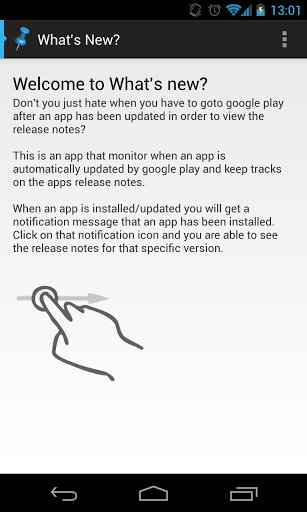
Have you ever installed application updates through Google Play without bothering to see what has changed? Who's to blame you. After all, sometimes you're busy and it's just a lot easier to hit "Update All" than it is to actually read the What's New section for every app. What's more, many people like to leave auto-update enabled on many or all of their apps.
Wouldn't it be nice if there were a tool that aggregates this information into one easy to access screen so that you can view this at your leisure? There is now such an app, thanks to XDA Forum Member kannibal85's latest app What's New.
What's New does exactly as its name says and displays the What's New section for all of your installed apps, as well as their version numbers. Making matters easier, the app can also be accessed through drop down notifications that appear after an app is freshly updated.
Head over to the original thread to get started. While you're at it, be sure to be meta and check out the app's own What's New section.
___________________
[Join us August 9-11, 2013 in beautiful Miami, FL for XDA:DevCon. Read here to find out more.]Google+
Often times at a dinner party, a software engineer gets ignored once people learn what he or she does. Many people see software engineers as dirty, caffeine-swilling, unprofessional, daylight-avoiding nerds. Many managers just don't understand software developers.
In today's episode, XDA Developer TV Jayce talks about how to avoid this stigma as a developer. Jayce interviews Mishkin Berteig, President of Berteig Consulting Inc. Mishkin talks about how to be a professional in software development. Find out what he has to say and check out this video.
Be sure to check out other great XDA Developer TV Videos.
Check out Jayce's HowToBecomeTV YouTube Channel
Check out the new Sony Xperia Tablet Z at the Sony Store and check out Sony's YouTube Channel.
___________________
[Join us August 9-11, 2013 in beautiful Miami, FL for XDA:DevCon. Read here to find out more.]Google+
For those who aren't aware, keeping up to date with the latest XDA Portal posts while browsing the forums is as easy as glancing to the sidebar on the right of the screen. However, users of Google Chrome and Opera on the PC can now see the latest Portal happenings from any part of the web with the unofficial XDA Portal Browser Extension.
Developed by XDA Recognized Contributor - Swift -, the unofficial XDA Portal Browser Extension works with Google Chrome and Opera. The extension adds a subtle XDA icon to your screen, which when pressed, pops up the ten most recent XDA Portal posts. Clicking on a post will open up the article in full in a new tab. There's also a text box at the top, enabling you to quickly search for previous articles and posts.
The extension can be found in Opera's web store. Google Chrome users have to manually install the extension, as it is still not yet available on Google's store. Fear not though, as installation is as simple as a couple of clicks and a drag-and-drop.
If this has you curious, check out the original thread for more details.
___________________
[Join us August 9-11, 2013 in beautiful Miami, FL for XDA:DevCon. Read here to find out more.]Google+
Have you ever wished that your device could sleep and wake with intelligence? You're not alone. After all, that's why many recent devices ship with magnetic sensors that allow compatible smart covers to "magically" wake the device right when you want to use it.
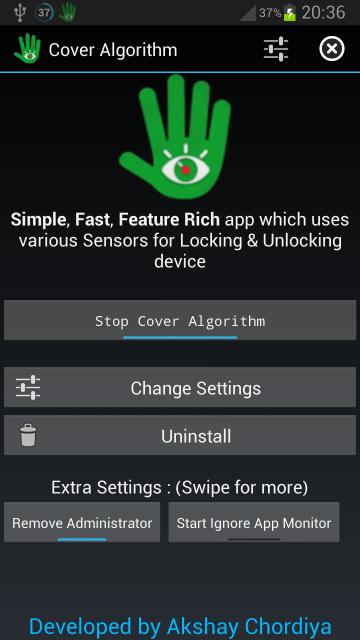
Unfortunately, not every device has such functionality built in. These devices do, however, have a cornucopia of other sensors that can be used to the same end. Making use of all of the sensors at your device's disposal, XDA Forum Member Akshay (Aky) presents Cover Algorithm. How does it work? Well, according to the developer:
The most innovating app for Locking & Unlocking your Device. It uses various sensors of your device like Proximity, Light, Accelerometer, Magnetic Sensors depending upon which Sensor you choose. Using, these sensors the app determines whether to lock or unlock the device using some special algorithms
In addition to being able to configure various sensors to wake the device and put it to sleep, the app allows for extensive customization. For example, you can make it so that this functionality is only present at certain hours of the day. This could be useful both to save battery, and also to ensure that an accidental input doesn't turn on your device's blinding screen in the middle of the night.
The app has much more functionality and customization, so be sure to check out the original thread to learn more and customize your device's sleep/wake cycles to your OCD's content.
___________________
[Join us August 9-11, 2013 in beautiful Miami, FL for XDA:DevCon. Read here to find out more.]Google+
You really never know when a horde of strange animals will attack. For these moments, it's best to prepare yourself in advance. And if you're looking to escape from, let's say, a crazy mob of critters, you'd best be served by practicing with Crazy Mob by XDA Junior Member ipkapu.
OK, fine. You'll likely never have to defend your home from such a bunch of beasts, but it still makes for quite an interesting game. The goal of the game is to do whatever you can to stop the crazy mob from attacking. While there are more than a few games of this genre, Crazy Mob is unlike most other defense games. For starters, at your disposal you have several "weapons" such as watermelons, bubbles, gift boxes, snowmen, and anvils. Next, you can also change the gravity to spice up game play. Finally, you can even choose to play as one of the monsters if you so desire.
Whether you're looking for a simple time pass the time or you're looking for something to sit down and play for extended periods, Crazy Mob may be worth an install. To get started, head over to the game thread.
___________________
[Join us August 9-11, 2013 in beautiful Miami, FL for XDA:DevCon. Read here to find out more.]Google+
XDA Developer TV Producer Jayce has said it in the past: Degrees don't always lead to success in computer science and development. Having a degree can definitely help you along in your career, but it is not a requirement. There are many high school and college drop outs that have gone on to be quite successful.
In today's episode, XDA Developer TV Jayce talks about the path to success. Jayce interviews Ben Fox, CTO of Tapstream.com. Ben talks about his path from college dropout to Chief Technical Officer. Find out what he has to say and check out this video.
Be sure to check out other great XDA Developer TV Videos.
Check out Jayce's HowToBecomeTV YouTube Channel
Check out the new Sony Xperia Tablet Z at the Sony Store and check out Sony's YouTube Channel.
___________________
[Join us August 9-11, 2013 in beautiful Miami, FL for XDA:DevCon. Read here to find out more.]Google+
So you just finished writing that app that's consumed the majority of your time for the better part of the last year. You have the UI just the way you like it, and now you're finally ready to do some testing before you release it into the wild.
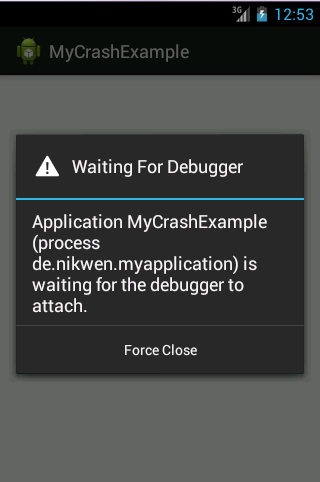
Right before you release your app, however, your beta testers run into some app crashes. You have them take logs so that you can get a better idea of what's going on, but unfortunately, you're still a bit lost. Wouldn't it be great if there were a guide thread that showed you how to read a logcat and use other debugging tools?
Well, thankfully there is just such a guide, and it comes from XDA Senior Member nikwen. The guide is far reaching, as it covers Logcat, using toast messages to debug, the Eclipse debugger, AVDs, and more. Spanning nine posts, each one of the tools is explained in great detail and with plenty of screenshots.
Those looking to get started can do so by visiting the guide thread.
___________________
[Join us August 9-11, 2013 in beautiful Miami, FL for XDA:DevCon. Read here to find out more.]Google+
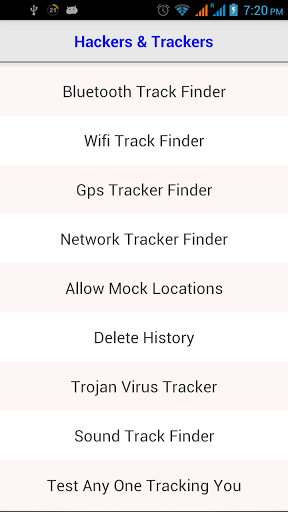
Privacy has always been a concern, and has somewhat heightened by recent revelations. And although I doubt any government would resort to using apps to 'maintain national security,' there are still dodgy 'developers' out there you need to look out for. So to help out with that, XDA Senior Member jacksparao introduced Who is Tracking.
Who is Tracking generates a list of apps that have some form of network access on your device. This means Who is Tracking will display any apps that have access to your device via Bluetooth, WiFi, GPS, and your mobile network, allowing you to spot and act on anything that just doesn't seem right. In addition, Who is Tracking has a 'Test Anyone Tracking You' feature, which brings up any connected services on your device. Other nifty little features include the option to wipe your GPS history and shortcuts to enable mock GPS locations, as well as a to your security settings.
With Who is Tracking, you may be surprised with how many apps have access to your device in ways you'd never even consider. The app is still under active development by jacksparao, so we hope to see more improvements and additions in the future. It's compatible with devices running Android version 2.2 or newer, and is free from the Play store. For more information, check out the original thread.
___________________
[Join us August 9-11, 2013 in beautiful Miami, FL for XDA:DevCon. Read here to find out more.]Google+
The interwebz are alight. Debate and argument is intense, following the launch of the HTC One and Samsung Galaxy S4, Google Play editions. The Google Play edition moniker, for those (such as I) who choose to reside under a rock, refers to the fact these devices come minus the manufacturer skins and modifications users are accustomed to, and instead ship with the "stock" Google experience, most commonly seen from AOSP or Nexus devices. A fair idea, it appears, although the launch has been met with controversy and debate over if these new handsets are a let-down. Why? Let's take a look:
These Google Edition phones are only available for "cash upfront," unlike the regular variants of the devices, which are sold in such a manner, but also on contracts via carriers. I believe it's unlikely carriers would be interested in these devices on their network, as part of the Google Edition means there's no carrier customization or modification made to the devices.
Expert users won't pay more for a device running a different firmware. They'll just install it on their regular phone. This is definitely the case for XDA users and developers, and it seems likely to me that many people would rather there was no product launch of these devices, rather simply the OEMs had released a "parallel stream" of Google Experience software they could opt to install. Perhaps that's the end-goal of this project? Who knows?
The final point I'll cover is a long point. This does't intend to cover every possible angle of argument over the Google Editions, rather give a flavor of what's going on. I believe that to sum up the anger and defense being seen from different people, we need to look at a bit of history. The first "Google" phone was the T-Mobile/HTC G1, which brought Android to the market for the first time as part of the Open Handset Alliance. This device ran pure, stock, out-the-box, Android. And boy was such early "pure Android" ugly.
The next "Google" device was the Nexus One. At this time, the Nexus devices seemed to be more developer-oriented devices, used to give developers a reference device to work on the platform, and the latest version of Android. And herein lies the problem: Google has put their name to the "Nexus" range of devices.
I believe the problem is confusion. There are too many similar schemes on the go, with similarly confusing names. I have bolded these names to draw attention to the issue and confusion. First, there's AOSP, the Android Open Source Project. If you build AOSP for a device, you'll get a vanilla, plain experience on your device. It's also entirely open source. Many of the device's features won't work without "proprietary binaries," which are added into AOSP as binaries (e.g. graphics drivers etc). ROMs such as CyanogenMod, AOKP and ParanoidAndroid are generally derived from AOSP, and the sources for these are available to download and modify freely. If a device is supported by AOSP, it's possible for the user to compile the ROM entirely, and thus ensure their device receives updates to the latest versions of Android (barring compatibility issues with the proprietary blobs, which may need updates for major revisions)
Next up is the Nexus range of devices. As mentioned previously, the Nexus moniker is for the range of (usually) Google-sold devices, which have easily unlocked bootloaders, and ship with vanilla Android, and prompt updates for 2 or 3 revisions of Android. There is an often overlooked distinction between Nexus devices and AOSP. The former has Google proprietary applications installed, and the fact a Nexus device is released does not necessarily mean it is available in AOSP. This was shown by Google when JBQ announced the Nexus 4 and Nexus 7 (LTE) wouldn't be part of AOSP (at the time).
Now let's introduce Google Play Editions. These phones are sold via the Google Play Store (like the Nexus devices currently are), but will have software updates delivered by the OEMs, rather than Google. They also feature modifications to the pure Android experience (e.g. the HTC One has a toggle for Beats Audio, and Sense frameworks in the ROM). To back this statement, the repacked Google Play Edition HTC One ROM weighs in at a whopping 432.29 MB. In contrast, an AOSP build with Google Apps weighs in at around 250 MB, even on an XXHDPI device. Clearly, these devices are not running the same software.
Still with us? I'd honestly be surprised if anyone is still able to make sense of this. I believe the issue here is to do with branding. There are too many terms being used to describe devices that have the "Vanilla Android" experience. Personally, I won't be buying any of these devices, because I want proper AOSP support for my phones and tablets. Ironically enough, I don't even run a "stock" ROM on my Nexus 10. Instead, I choose to use a compiled AOSP ROM with some changes. Ironically enough, the only two devices I use the way they came out of the box are Sony devices. Yes, Sony, the company that actively contributes towards efforts to make their devices compatible with AOSP.
Perhaps, just perhaps, I've found something here. The OEM with the most "usable" default software is also the OEM who makes it easiest for me to change to AOSP if I don't like it, giving them a motivation to get their software right. Perhaps these Google Play Experience devices will help, and show OEMs that customers want more choice and the ability to run unmodified software. My biggest concern is that of the updates. Users are still reliant on their OEM for the kernel that Google includes in the updates, and there's no suggestion any of these devices will find their way into AOSP. As such, I find it impossible to recommend a Play Edition device, at least until things are clearer. OEMs, unless you are Sony, give up on making software, and sell your devices based on the hardware. Put the device into AOSP, and stop worrying about software, let people who understand it deal with it.
Google could sort out this nonsense, and start being more bullish with their suppliers: "Want your chip in our latest phone, which will sell millions of units worldwide? Sure, once you open-source the drivers and agree to put them into AOSP. Not so keen? We'll just give the contract to your rival then, no loss to us. What's that? You're reconsidering. How nice, but since you seem hesitant, we want the chip firmware in AOSP as well".
The mobile market is frankly absurdly backward and defensive of their source code—almost as much as the graphics chip market. Dear Qualcomm, Samsung, and every other mobile chip maker: GROW UP. Make your code open source. Your rivals aren't going to copy it or benefit from it because you are all working on the "next generation" right now. And if they do, imitation is the sincerest form of flattery, right?
___________________
[Join us August 9-11, 2013 in beautiful Miami, FL for XDA:DevCon. Read here to find out more.]Google+
The Google Edition HTC One and Samsung Galaxy S 4 had their kernel sources released! That and more are covered by Jordan, as he reviews all the important stories from this week. Included in this week's news are two articles about XDA Elite Recognized Developer jcase and Ubuntu Developer Evangelist Michael Hall talking at XDA:DevCon 2013 and the guide giving an introduction to Android client-server communication.
Jordan talks about the other videos released this week on XDA Developer TV. XDA Developer TV Producer Kevin released a video talking about floating notifications and HALO, Kevin then released a video all about automatically backing up your device with OBackup, and TK interviews the developers of NinjaSMS and reviews the app. Pull up a chair and check out this video.
Links to stories mentioned:
Kernel Source Released for the Google Play Editions of the HTC One and (Possibly) the Samsung Galaxy S 4
Intro Guide to Android Client-Server Communication
Elite Recognized Developer Jcase to Talk Android Security at XDA:DevCon 2013
Developer Evangelist Michael Hall to Teach Ubuntu Touch Development at XDA:DevCon 2013
Floating Notifications and Multitasking with Open Sourced HALO – XDA Developer TV
Automatically Backup Your Android with OBackup – XDA Developer TV
Interview with Wael Nafee and Mostafa Gazar, Developers of NinjaSMS – XDA Rountables
Android App Review: Floating Messages with NinjaSMS – XDA Developer TV
Check out Jordan's YouTube Channel and Jordan's Gaming YouTube Channel
Check out the new Sony Xperia Tablet Z at the Sony Store and check out Sony's YouTube Channel.
___________________
[Join us August 9-11, 2013 in beautiful Miami, FL for XDA:DevCon. Read here to find out more.]Google+
If you need something done with your Android device and you're not sure which program is needed to do it, it can probably be done with the Android Everything Tool by XDA Senior Member ricky310711.
Alright alright, so it obviously can't do everything, but it sure seems like it can. A free tool for PCs running Windows, Android Everything Tool brings together a whole range of functions that are normally fragmented between multiple apps, tools, and software. This includes performing custom recovery functions such as backing up and restoring your device, and wiping the data, cache, system and dalvik cache. Android Everything Tool can also change the LCD pixel density of your device and fix that pesky low battery error.
The tool also comes with numerous guides that help you unlock your bootloader, install a recovery theme, restore your device to its default state, and more. Users of the HTC Sensation XL are treated to a longer list of functions such as S-Off, force update, and flashing a custom radio, among others.
Android Everything Tool, originally compatible with only the Sensation XL, will now work with any Android device that uses ADB and fastboot. Now with six versions under the belt, ricky310711 may be coming out with a seventh version incorporating bug fixes and suggestions from the community. So if you would like to give this a go, be sure to check out the original thread for more information and download.
___________________
[Join us August 9-11, 2013 in beautiful Miami, FL for XDA:DevCon. Read here to find out more.]Google+
Earlier today, we wrote about HTC and Samsung releasing the GPL-compliant kernel source code for their respective Google Play edition flagships. We knew that it was only a (short) matter of time, however, before the firmwares would be repackaged for use on standard devices. The question then which device would get the goods first.
The first repackaged Google Play edition firmware has landed, and it's for the HTC One. It comes to us from XDA Senior Member bigxie, and is based off of a system dump captured by Jerry Hildenbrand. This version has been pre-rooted with busybox installed, and it remains Odexed.
To get the goods on your own HTC One, you first have to own a GSM HTC One (Unlocked, T-Mobile, or AT&T variety). The install procedure is just a simple flash through a custom recovery, though tou also need to do a factory reset if you're coming from any other ROM.
Stock Android 4.2.2 for HTC One M7
-Made from system dump of Google Play Edition HTC One -Rooted with Koush's superuser app and binary -Latest busybox installed -Odexed
Requirements
-GSM HTC One (m7ul/m7tmo/m7att) -Custom Recovery (TWRP, CWR) -If assert fails on m7att, you may need to flash TWRP to flash the ROM or edit the install script (sorry)
Features
-Stock Android 4.2.2 w/ Google Apps -New Camera UI with improved thumb controls -Wifi and BT are working -Beats Audio toggle in sound settings -Tbalden 4.2.2 kernel
Itching to get this on your own device? If so, head over to the original thread to get started.
___________________
[Join us August 9-11, 2013 in beautiful Miami, FL for XDA:DevCon. Read here to find out more.]Google+
Android has become the dominant mobile operating system. Many of us love Android, but that doesn't mean we should ignore any new mobile OSes that may come along. What if we ignored Android when it was first released? In that spirit of support of new ideas, XDA has added forums for other OSes such as Ubuntu Touch, and we are having some discussions about Ubuntu Touch at XDA:DevCon 2013.
We already know the Ubuntu Community Manager Jono Bacon will be discussing Building a Convergent Future With Ubuntu. But what if you want to learn how to develop for Ubuntu Touch? Is there some kind of workshop you can attend? There is!
Open Source software developer, community manager, and technology evangelist Michael Hall will be holding an Ubuntu Touch Development Workshop at XDA:DevCon 2013. Working for Canonical, maker of the popular Ubuntu operating system, and experienced in Perl, Java, PHP and Python languages and a number of desktop applications and libraries, he was responsible for promoting development of Ubuntu itself and the applications that run on it. He led projects to improve integration with Ubuntu's flagship Unity desktop among desktop and web application and Canonical's Skunkworks initiative, which brought in select community contributors to work on unannounced projects being developed internally.
When Ubuntu announced their plans to enter the mobile phone and tablet market and released an early preview of their SDK, Michael took a leading role in bringing it to application developers and working with Ubuntu engineers to extend and improve on the developer toolkit. He has overseen the collaborative development of a number of core applications for Ubuntu's mobile offering, bringing community developers together with Canonical staff to plan, develop, and deliver high quality and visually stunning apps.
With all this experience in hand, he will be leading a workshop on getting started with Ubuntu Touch development. During this workshop, he will present the new Ubuntu SDK, what it has to offer mobile application developers, and how you can use it to create your own apps for Ubuntu devices of all sizes. You will be shown how to get a development environment setup, install the SDK, and where to find extra help and documentation. Finally, you will be shown step-by-step how to develop a working real-world Ubuntu Touch app, so bring your Ubuntu laptop (or VM) to code along!
Join us August 9 to 11 in Miami for XDA:DevCon 2013. Register to attend using this link for exclusive savings.
___________________
[Join us August 9-11, 2013 in beautiful Miami, FL for XDA:DevCon. Read here to find out more.]Google+
Quite a few people were intrigued by the floating notifications feature of Facebook Home. But this isn't the only way to get that. XDA Forum Member lordms12 offers up a messaging app that allows you to respond to incoming messages without leaving the screen you are on.
In this video, XDA Developer TV Producer TK reviews NinjaSMS. Yesterday, TK interviewed a couple of the developers of NinjaSMS. Today, TK shows off the application and gives his thoughts. The update reviewed in this video will be released Thursday night to the public. So check out this app review.
Be sure to check out other great XDA Developer TV Videos
Check out the new Sony Xperia Tablet Z at the Sony Store and check out Sony's YouTube Channel.
___________________
[Join us August 9-11, 2013 in beautiful Miami, FL for XDA:DevCon. Read here to find out more.]Google+
For those keeping track, the Google Editions of the HTC One and Samsung Galaxy S 4 can now be purchased from Google Play (HTC One Google Edition, Galaxy S 4 Google Edition). Of course, you know what that means: It's only a matter of time before we see the stock Google Experience software ported to their more traditional sibling devices.
Until the ports are available and more than likely aiding in the process of bringing the software over, we have kernel source for at least the HTC One Google Play Edition. The GPL-compliant kernel source code for the device was officially released via HTCDev.
Similarly, a new download recently appeared on Samsung's Open Source Release Center for the "GT-I9505G." It is unverified as of this time whether this mysterious model is indeed the Google Play edition of the S 4 or just another variant. However, given the coincident timing with the retail availability, we are confident that this is likely the Google Play edition of the Galaxy S 4.
To download the source code for the recently released HTC One Google Play Edition, head over to HTCDev (direct link). To investigate further on this mysterious GT-I9505G, head over to the Samsung Open Source Release Center and give it a download. If you find out anything regarding the I9505G, let us know in the comments. And as always, you can continue the discussion and share your development work in the HTC One and Samsung Galaxy S 4 forums.
___________________
[Join us August 9-11, 2013 in beautiful Miami, FL for XDA:DevCon. Read here to find out more.]Google+
Full screen operations come with a couple of downsides, one of them being the absence of that all important status bar. Being the hub of notifications, reminders, and more, losing the status bar is a big sacrifice that one must make for some extra screen space. If you agree, you may want to check out Swipe Status Bar.
Developed by XDA Forum Member Thomas., Swipe Status Bar serves as a simple and light solution to this predicament. Once activated and running, swiping down from the top of the screen when the status bar is not present will reveal the status bar and notification area, retaining the familiar 'swipe down' function when not in full screen mode. This isn't just useful for those with full screen launchers such as Apex launcher, but it can also serve as a useful function when you are playing games, watching videos, or viewing images in your album app. There's a testing feature, where you can test the sensitivity of the required swipe and adjust it to your liking. And to avoid any stray activation, there's also a multi-touch function, requiring a swipe with two fingers instead of one.
Swipe Status Bar is compatible with any device running Android version 2.2 or newer, and is free and ad-free from the Play store. So if this interests you, be sure to head over to the application thread for more information.
___________________
[Join us August 9-11, 2013 in beautiful Miami, FL for XDA:DevCon. Read here to find out more.]Google+
Context—there's always a context. It doesn't take long to get the hang of dealing with the context objects called for in most of the UI portions of your code. But do you really know what these parameters are doing? It's easy enough to use getApplicationContext(), getActivityContext(), or even just the keyword 'this'. But do you know which one to choose?
Dave Smith has already done a good job of describing layout inflation. Now he's tackled the sticky wicket that is understanding context. This starts with a description of what has a context; obviously this includes Applications, Activities, and Services. But you also need to consider how a Broadcast Receiver and Content Provider interact with context. Specifically, when might you back yourself into an error caused by a context no longer existing? A reference to a null contest will throw an exception (and probably crash your app which users aren't fond of). The quick and easy answer is to always use the Application context. Dave's original article outlines the few exceptions to this rule, and presents a couple of interested examples of less than optimal context objects being passed to him.
___________________
[Join us August 9-11, 2013 in beautiful Miami, FL for XDA:DevCon. Read here to find out more.]Google+
Here at XDA, we are a community of tinkerers, enthusiast, developers, makers, hackers, and doers. Here, simple ideas to answer what-if questions become reality. XDA is a community of collaboration. People gather to exchange ideas and solutions.
Today, XDA Developer TV Producer TK talks to Wael Nafee and Mostafa Gazar, the Developers of NinjaSMS. He asks them about NinjaSMS, how it got started, and why they choose to work on Android apps. Additionally, they talk about PRISM, some upcoming features of NinjaSMS, and UI/UX. If you want to see what they have to say about these topics, check this video out.
Check out other Roundtable Videos and subscribe to the XDA Roundtable YouTube Channel.
Also, be sure to check out other great video's on XDA Developer TV.
___________________
[Join us August 9-11, 2013 in beautiful Miami, FL for XDA:DevCon. Read here to find out more.]Google+
We have often stressed the importance of backing up your device. Whether before a ROM flash or a new kernel, being able to get your phone backed up fully and quickly is important. Also, if something horrible happens to your device, you have your data in hand. However, sometimes you forgot to update your backups manually.
In this video, XDA Developer TV Producer Kevin shows you how use OBackup to automatically backup your device. Kevin talks about how to set this up and some features of OBackup. What are you waiting for? Check out this video.
Be sure to check out other great XDA Developer TV Videos and Kevin's other videos.
Check out Kevin's YouTube Channel
Check out the new Sony Xperia Tablet Z at the Sony Store and check out Sony's YouTube Channel.
___________________
[Join us August 9-11, 2013 in beautiful Miami, FL for XDA:DevCon. Read here to find out more.]Google+
Sharing quick notes with friends can often become more of a chore than it's worth. Sure you can send an email, but often this feels like taking a sledge hammer to a problem best served with a chisel.
For those with NFC-enabled devices, small tidbits of data and contact information can be transferred readily and easily with nothing more than a tap. However, not everyone has NFC on their devices.
Thankfully for those without NFC-equipped devices, XDA Forum Member QrPort has created a self-titled app that functions similarly, minus the futuristic tap-to-transfer functionality. To use the app, the sender only has to input or paste in the text he wishes to send into the app to generate a QR Code. Then, the recipient scans the QR Code, and the information is deciphered.
While not quite the same as versatile or powerful as Android Beam, this has the potential to help those who want to casually send information to their peers, but lack NFC hardware. Those looking to get started need only head to the application thread.
___________________
[Join us August 9-11, 2013 in beautiful Miami, FL for XDA:DevCon. Read here to find out more.]Google+
NinePatch or .9 PNG files are a nuisance for many. These awkward little blighters are the number one cause of Android themers throwing their PC out of the window. Despite being incredibly frustrating, once mastered they are also incredibly useful and allow the use of a single image in various different shapes and sizes. Getting to grips with them can take a little time though and there are various tools out there to help. If you're just starting out with these particular files, there's no better place to start than a good old fashioned tutorial.
XDA Recognized Contributor iamareebjamal put together an incredibly detailed (and I mean incredibly detailed) guide to NinePatch files. The guide takes you through the process of decompiling and editing them, along with a rundown of all the tools you will need to do so. As an added bonus, it also covers some of the most commonly themed areas of the UI and where to find the relevant image files as well as how to edit a batch of PNG files at once.
Packed with screenshots and information, this guide is well worth a look for anyone getting to grips with Android theming. Even those who have been theming for a while might learn a thing or two from this one. You can find more in the tutorial thread.
___________________
[Join us August 9-11, 2013 in beautiful Miami, FL for XDA:DevCon. Read here to find out more.]Google+
Organizing APKs on your PC is quite a tedious process. More likely than not, they're probably named as nonsensical gibberish, and trying to find a specific APK is akin to the 'needle in a haystack' cliche. That's probably why apps such as ApkRenamer are great tools for the typical Android user. If, however, you're looking for something that does the same thing on your PC, you may want to check out XDA Senior Member pesiran's APK Organize.
APK Organize is a free program for Windows PCs that comes with a suite of functions that'll help organize your APKs—specifically to rename, compare, search for, install and uninstall, and backup and restore APKs. Renaming APKs goes further than just individual apps on your PC, as APK Organize allows for batch renaming, pattern renaming, and renaming of APKs on your device. It also comes with a monitor feature that automatically renames any APKs you place into a specific folder. The compare function allows you to easily and efficiently delete, copy, and move files to a specific directory. And if you want to install/uninstall, copy/move, or backup/restore select apps, you can do so with the search feature. Installing and uninstalling apps on your device simply requires a connection to the device with ADB enabled, and the same requirement goes for the backup and restore function.
The only other requirement is that .Net Framework 4 must be installed on your PC. But other than that, there's really not much else that's needed. APK Organize is free exclusively on the XDA forums, and is being constantly supported and updated by pesiran. If you would like to give APK Organize a go, be sure to visit the original thread for more information and download.
___________________
[Join us August 9-11, 2013 in beautiful Miami, FL for XDA:DevCon. Read here to find out more.]Google+
At XDA, we get downright giddy when we see a heavily locked down device unlocked and rooted. An unlocked bootloader and rooted device opens the door for many options of custom ROMs. Without root we have no recovery, no ROMs, no kernel optimizations, and very limited other development. Most of us are guilty of just flashing away what greater minds say we need to without ever understanding what they do.
Justin Case, aka XDA Elite Recognized Developer jcase, is a mobile security researcher, the CTO of Applied Cybersecurity, and the developer of many of these Android exploits. He is one of these great minds, and he will be presenting at XDA:DevCon 2013. Jcase will be discussing vulnerabilities and common security shortfalls in Android applications and firmware. He will also be walking the audience through identification of a vulnerability and development of an Android root exploit.
Being one of the great minds that understands Android security, jcase knows that the very same exploits we use to root our phones expose us and others to malicious activities such as spyware, bots, keyloggers, and other forms of malware. At XDA:DevCon, jcase will discuss past vulnerabilities in applications and firmware, as well as how they are mitigated today. He will teach the audience about some of the tools and methods used in identifying vulnerabilities. Finally, he will be speaking about application and firmware security, citing and explaining common mistakes, and how we can mitigate them. To end the presentation, jcase will publish and discuss a brand new root exploit for the LG Optimus series of phones.
Join us August 9 to 11 in Miami for XDA:DevCon 2013. Register to attend using this link for exclusive savings.
___________________
[Join us August 9-11, 2013 in beautiful Miami, FL for XDA:DevCon. Read here to find out more.]Google+
The much maligned Android development known as Facebook Home has gone the way of the dodo bird. However, the "chat heads" feature of Facebook Messenger is still favored in the Paranoid Android feature called Halo. Halo was intended to bring a new level of multitasking to Paranoid Android ROMs by allowing the user to receive notifications from apps and act on them from a floating or "windowed" version of the app in question.
In this video, XDA Developer TV Producer Kevin shows you how use floating notifications and multitasking your device. Kevin talks about Halo and some other options. What are you waiting for? Check out this video.
Be sure to check out other great XDA Developer TV Videos and Kevin's other videos.
Check out Kevin's YouTube Channel
Check out the new Sony Xperia Tablet Z at the Sony Store and check out Sony's YouTube Channel.
___________________
[Join us August 9-11, 2013 in beautiful Miami, FL for XDA:DevCon. Read here to find out more.]Google+
If you're anything like I am, you dread the occasional moments when you realize that you must restart your device in order to accomplish some certain task. Be it a ROM flash, a cache flush, or simply a restart because your device that has been on for two consecutive months is starting to feel a little slow, there are various reasons that would mandate one to perform a system shutdown.
Thankfully, Android boot animations can help make the process a little more enjoyable by at least giving you some eye candy while you're waiting to get to your next round in Super Hexagon. While most custom ROMs and some custom kernels come with their own hallmark boot animation, you may simply want some added variety to spice things up a tad.
Thankfully, XDA Forum Member raishiro has created and shared 81 superb 3D-rendered boot animations. These boot animations come from a collection of 56 .gifs from artist Paolo Čerić, and most of them are "interesting" enough to make you wonder if you have accidentally ingested some unmarked substance or inhaled a few too many fumes. Needless to say, they're quite fascinating boot animations, and they make the restart process just a tad more bearable.
To give your boot sequence some bling, head over to the original thread. Don't blame me if you find your device uptime lowered substantially while you try and catch a glimpse of your boot animation a few more times throughout the day.
___________________
[Join us August 9-11, 2013 in beautiful Miami, FL for XDA:DevCon. Read here to find out more.]Google+
Sometimes, some of the simplest concepts are the ones least likely to be re-imagined. However, they're also occasionally the ones that can benefit most from some fresh ideas. In my own experience, I know that a lowly alarm clock is hardly enough to trick my brain into believing that it has had enough rest.
Thankfully, XDA Forum Member saqibvohra93 has crafted an alarm clock app that lets you customize practically everything. Designed for heavy sleepers, it allows you to wake up as violently (or as gently) as your heart desires. In the developer's own words:
Alarm Clock Wise is fully featured, fully customizable, handy and most efficient Alarm Clock application in Google Play Store. Alarm Clock Wise has a very decent, elegant and sophisticated UI that attracts the user. Alarm Clock Wise is developed keeping in mind about heavy sleepers. Alarm Clock Wise wakes you up gently from light music or death metal if you are a heavy sleeper. Its barrier option ensures that your mind is not sleeping anymore.
None of us ever want to wake up when we're not ready. However, there are things we can do to make it a little less unbearable, and this is a good start. To get started, head over to the original thread.
___________________
[Join us August 9-11, 2013 in beautiful Miami, FL for XDA:DevCon. Read here to find out more.]Google+
It's been some time since we last heard about an update to AROMA. Sure, we publish stories of modifications and tweaks that utilize the AROMA Installer to afford end users choice in customizing exactly what they are installing. However, XDA Recognized Developer amarullz has now given his AROMA Installer a rather hefty update. For those who haven't yet heard of AROMA, we recommend checking out some of our earlier stories on the installer.
So what do developers have to gain by upgrading to the latest version of AROMA Installer? Increased device compatibility, for starters. Amarullz has stated that his main focus with this release is to build on the installer's already impressive compatibility, as well as to add stability and performance. However it appears as though devices must support ARM Neon to use the newest version.
AROMA File Manager has been updated as well. The new version brings forth the ability to take screen shots, a new input driver, and a host of other changes. And with an update time of 8 months and a change log lengthy enough to match, we'll give him the benefit of the doubt.
Whether you're a developer looking to package your goods in a shiny AROMA package or you simply want a nifty file manager accessible from recovery, you can head over to the AROMA Installer and AROMA File Manager threads to find out more.
___________________
[Join us August 9-11, 2013 in beautiful Miami, FL for XDA:DevCon. Read here to find out more.]Google+
As our mobile devices become increasingly connected, client-server communications are also becoming increasingly necessary. Thankfully, a new guide has emerged that helps users setup a RESTful web API.
The new guide comes from XDA Forum Member Alkonic, and covers topics including setting up a database and PHP scrip, testing your new database server, and finally how to access this from Android. The guide is aimed towards relatively seasoned developers who have a working dev environment and have already written apps, but lack experience with MySQL or PHP.
What do budding cloud-enabled developers need to get started? Not much: an Android device to test with and a computer running on the same network, an Apache/MySQL/PHP server such as WAMP for Windows, and Postman Rest Client for Chrome. Thankfully the Alkonic also breaks summarizes the steps for those new to client-server communication:
The client makes a request using a HTTP POST to a server
The PHP script queries the MYSQL server
The PHP script gets the SQL data
The PHP script puts the data into an array and assigns keys for the values. The script then outputs the data as a JSON array. JSON (JavaScript Object Notation) is a standard for data exchange, and formats the data in a way both humans and computers can easily read.
The app parses the JSON and displays the data.
To learn more, head over to the guide thread.
___________________
[Join us August 9-11, 2013 in beautiful Miami, FL for XDA:DevCon. Read here to find out more.]Google+
Sony Xperia illumination bar API released! That and more are covered by Jordan, as he reviews all the important stories from this week. Included in this week's news is an article about using CloudCube to tame your clouds and news about Ariel Shimoni and XDA Elite Recognized Developer Stericson speaking at XDA:DevCon 2013.
Jordan talks about the other video released this week on XDA Developer TV. XDA Developer TV Producer Jayce released a video talking about how a to make money as an app developer and be more than "Ramen Profitable." Also, the winners of the Sony Xperia Tablet Z contest were announced. Pull up a chair and check out this video.
Links to stories mentioned:
APIs Released for the Illumination Bar on Xperia Devices
CloudCube Keeps All Your 'Clouds' In One Place
XDA Tablet Z Competition Winners Announced!
Ariel Shimoni to Talk Monetization at XDA:DevCon 2013
Elite Recognized Developer Stericson to Talk Root Development at XDA:DevCon 2013
Be More than "Ramen Profitable" and Make Money as an App Developer – XDA Developer TV
Check out Jordan's YouTube Channel and Jordan's Gaming YouTube Channel
Check out the new Sony Xperia Tablet Z at the Sony Store and check out Sony's YouTube Channel.
___________________
[Join us August 9-11, 2013 in beautiful Miami, FL for XDA:DevCon. Read here to find out more.]Google+
Installing a custom recovery such as ClockworkMod and TWRP on your device isn't much of an arduous process. It'll only take about 5 to 10 minutes at most to connect your device to your PC in order to install your recovery of choice, maybe a tad bit longer if you need to find a recovery compatible with your device. Nevertheless, it'll still be great if you can do all that in about 30 seconds rather than 10 minutes, wouldn't it?
Luckily for us, XDA Forum Member DsLNeXuS developed Recovery Tools, an app that finds your custom recovery of choice for your rooted device and flashes it. Supporting an array of devices from a range of manufacturers, Recovery Tools allows you to skip the usual process of installing a custom recovery by doing it all for you in a fraction of the usual required time. It should be noted that not every device supported by Recovery Tools will have a choice between TWRP and ClockworkMod, as many of these devices only have one or the other developed. However, if you have another custom recovery that you would like to flash, there's an additional option allowing you to select another recovery to install from your internal or external memory.
DsLNeXuS also made Recovery Tools open source, with its source code found on Github for anyone who's interested in tweaking and playing with the app. The app is compatible with any device running Android version 2.1 or newer, and is ad-free and free from the Play store. So if would like to find out more, be sure to check out the original thread for more details.
___________________
[Join us August 9-11, 2013 in beautiful Miami, FL for XDA:DevCon. Read here to find out more.]Google+
One of the first steps to theming brilliance for any aspiring themer is the changing of application icons, a skill that any experienced themer will undoubtedly need in their endeavors. And the great thing is, the process of doing so is not that difficult. Because of this, any novice can have a crack at it without the risks of the more complex activities.
Written by XDA Senior Member Rajeev, this simple and straight forward guide breaks down the process of changing app icons into 'bite-size' steps that are easily comprehensible and followed. Using the default phone book app as an example to demonstrate the procedure, the tutorial guides you through navigating the chosen APK with 7zip File Manager, finding where the right image files are located, and replacing them with custom icons of your choosing. The process is also illustrated visually with accompanying screenshots of the various steps. Of course, keep in mind that updating the app through the Play store will reverse this modification.
Changing icons of applications this way is usually recommended over using third party apps such as Desktop Visualizer since the changes will be consistent throughout your device rather than being limited to the home screen. So if you would like to give this a go, be sure to visit the original thread for more information.
[Screenshot courtesy of neizel]
___________________
[Join us August 9-11, 2013 in beautiful Miami, FL for XDA:DevCon. Read here to find out more.]Google+
Using a command line interface is a daunting task for many novice developers and themers. So its unfortunate that one of the most popular tools for modding and theming, APKtool, requires such input. This is why we've featured some noteworthy guides on how to use APKtool for its many purposes, such as decompiling and recompiling APKs. However, if you are looking for a simpler, more efficient way to decompile and recompile APKs without command line, you may want to check out Android Apktool.
Developed by XDA Senior Member Flextrick, Android Apktool is a free program requiring Java that performs the simple function of decompiling and recompiling your APKs. It allows you to install your framework, decompile your APK of choice, and then recompile it with only a couple of clicks, streamlining and alleviating the process normally performed by APKtool. You'll quickly be on your way after setting up the minimalist development environment outlined in the brief tutorial provided, as the rest of the process is quite self-explanatory. There's also a log integrated into the tool that displays a history of activities convenient for the diagnosis of any errors that you may come across.
Coming in at a mere 2.81 MB, Android Apktool is certainly worth considering for decompiling and recompiling APKs. So if this has you interested, head over to the original thread for more information and download.
___________________
[Join us August 9-11, 2013 in beautiful Miami, FL for XDA:DevCon. Read here to find out more.]Google+
A lot of hard work goes into making an app: blood, sweat, tears, and curses. When an app is finally released, it is the hope of one who's spent so much time to make some decent scratch. But often, they find they are only Ramen Profitable, meaning that they really only make a profit if they are eating Ramen noodles.
In today's episode, XDA Developer TV Jayce talks about app marketing and being more than Ramen Profitable. To do this, Jayce interviews Ben Fox, CTO of Tapstream.com. Ben talks about their tools helps developers move beyond just being Ramen Profitable. Find out what he has to say and check out this video.
Be sure to check out other great XDA Developer TV Videos.
Check out Jayce's HowToBecomeTV YouTube Channel
Check out the new Sony Xperia Tablet Z at the Sony Store and check out Sony's YouTube Channel.
___________________
[Join us August 9-11, 2013 in beautiful Miami, FL for XDA:DevCon. Read here to find out more.]Google+
The main benefit to rooting one's Android device is the ability to run applications that are developed for root users. These applications allow you to take control of your device and do a wide variety of actions not normally permitted or possible without root access. Some of these applications allow you to take entire system-wide backups, change your devices screen density, or even alter the look and feel of your device. There is no doubt that rooting a device has many advantages.
At XDA:DevCon 2013, we are talking all about app development. Scheduled to present is XDA Elite Recognized Developer Stericson. Also known as Stephen Erickson, Stericson has been involved in the Android community since the prerelease of the T-Mobile G1, or since rc19 if we want to go in terms of Android releases. He started out learning how to create themes for Android and then he moved on to hex edits that enabled one device's apps to work on another device. He finally moved on to developing Android applications and the RootTools library to assist others with creating applications for root users.
As a developer, creating root-enabled applications becomes trivial with the RootTools open source library. Sterison's presentation will focus on how to use the RootTools library in order to create root applications that your users will love and appreciate.
Join us August 9 to 11 in Miami for XDA:DevCon 2013. Register to attend using this link for exclusive savings.
___________________
[Join us August 9-11, 2013 in beautiful Miami, FL for XDA:DevCon. Read here to find out more.]Google+
There is no shortage of cloud storage services out there. It seems like with every couple of months, there's a new one announced and marketed, offering some new twists and perks on top of a largely familiar set of features and functions. However, with this influx of variety and choice comes fragmentation of cloud storage apps on your device where you have an individual app for every cloud service you use. Not only will this issue have an impact on 'real estate,' but these apps are more often than not quite hefty in size and have a noticeably large memory footprint.
Fear not though, as XDA Forum Member aash-86 developed CloudCube. This app brings some of the most popular cloud storage services together into one comprehensive yet manageable app for your Android device. Supporting Dropbox, Box.net, Google Drive, SkyDrive, and Yandex Disk, CloudCube presents itself with a clinical and sliding user interface that provides access to the connected cloud storage, its directories, and files. CloudCube allows for the downloading and uploading of entire folders to and from your device, and will keep itself updated with regular synchronizations. The app also provides a history of actions, as well as any activity that is currently running.
What aash-86 has done with CloudCube is something that will most definitely be appreciated by users of many cloud storage services. It's a well designed and polished app and still in its beta phase, will see the inclusion of more features such as tablet optimization and the synchronization of individual files. Its compatible with Android versions 2.3 and newer, ad-free, and free for download from either the application thread or the Play store. So if this interests you, make sure to check out the original thread for more information.
___________________
[Join us August 9-11, 2013 in beautiful Miami, FL for XDA:DevCon. Read here to find out more.]Google+
A custom recovery is an incredibly useful tool for anyone who wants to make the most of his or her (rooted) device. Even if you aren't a fan of custom ROMs or kernels, you probably still use a custom recovery if for nothing but the ease of backing up and restoring your device. There are of course many other reasons why you might find yourself diving in and out of recovery, and that is a process which can become tedious.
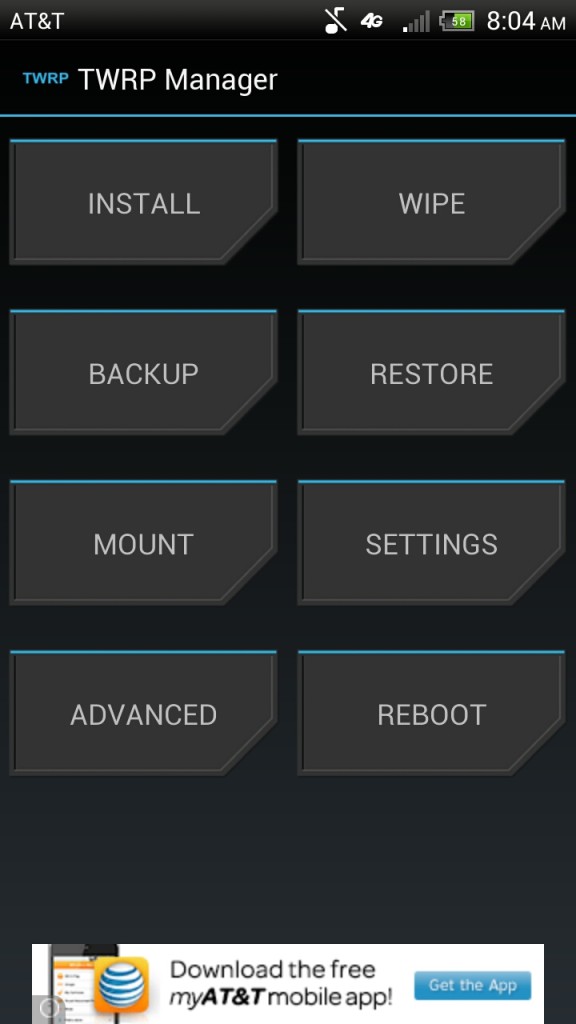
That's where TWRP Manager by XDA Recognized Developer and Forum Moderator jmz comes in. The application allows the user to initiate recovery functions without rebooting by using OpenRecoveryScript commands. TWRP is one of the most popular options available when it comes to custom recoveries, and with a wealth of features above and beyond the norm as well as support for a lot of the most popular devices available, it's easy to see why. TWRP Manager mirrors the distinctive recovery UI that you are already familiar with. It allows you to flash, wipe, and restore your device easily without the need to reboot or use a button combination.
It's important to note that the application is still in beta, so there will be bugs. However, if that's not something that bothers you and TWRP is your recovery of choice, this is well worth a look. Head over to the original thread for all the details.
___________________
[Join us August 9-11, 2013 in beautiful Miami, FL for XDA:DevCon. Read here to find out more.]Google+
Back at CES, Nvidia announced a unique Android Device. It wasn't a tablet. It wasn't a phone. It wasn't a phablet. It was SHIELD. As XDA Developer TV Producer Jordan talked about earlier, SHIELD is a gaming device poised to really make use of Nvidia's next flagship SoC, the Tegra 4.
Designed to resemble a standard gaming controller, SHIELD is intended to shake up the drab Android gaming ecosystem, and Nvidia is doing what they can to deliver a great product. In addition, the device allows you to stream PC games as long as you have the appropriate video card. Jordan has gotten his hands on a SHIELD unit, and he's here to give you an unboxing as well as his first impressions. Pull up a chair and check out this video.
Be sure to check out other great XDA Developer TV Videos and Kevin's other videos.
Ubuntu Touch Q&A Responses Available, More DevCon Speakers, Updated Oppo Find Review – XDA Developer TV
Android App Review: Four Home Automation Android Apps Compared – XDA Developer TV
What's Possible with CASUAL & How to Make Your Own CASUAL – XDA Developer TV
Voice Control Your Phone with Tasker and AutoVoice – XDA Developer TV
Useful NFC Mod for Android, Ubuntu Touch Ports Compilation, More XDA Devcon News! – XDA Developer TV
Check out Jordan's YouTube Channel and Jordan's Gaming YouTube Channel
Check out the new Sony Xperia Tablet Z at the Sony Store and check out Sony's YouTube Channel.
___________________
[Join us August 9-11, 2013 in beautiful Miami, FL for XDA:DevCon. Read here to find out more.]Google+
Threads dedicated to screenshots, wallpapers, signatures, and the like are always quite fun to browse through—either for the creativity boost for your next home screen set up or just to get a taste of what layouts other XDA forum goers have on their devices. Of course, in the format of a forum thread, you'll most likely continuously click through pages and pages of responses just to do so. However if Google Chrome is your PC browser of choice, you may want to give the XDA Gallery extension for Chrome a go.
Developed by XDA Senior Member RubenRybnik, XDA Gallery fetches all images from a thread in a new tab, allowing you to view them in one scrolling page, without the thread pages and responses. With each image, there's a link to the post that it is originally a part of, as well as a link the to the page of the thread that the post can be found in. Pressing on an image enlarges it, and with the pop-up image gallery, you can navigate left and right, much like how the forums display image attachments.
This will no doubt be useful for many forum goers, allowing a quicker and more convenient way of browsing screenshots, wallpapers, icon packs, and so forth. So if you would like to try XDA Gallery out on Chrome, visit the original thread.
___________________
[Join us August 9-11, 2013 in beautiful Miami, FL for XDA:DevCon. Read here to find out more.]Google+
Further testament to Sony's increasing support for third-party developers comes with their release of 'experimental' APIs for that funky translucent illumination bar found on many of their phones such as the Xperia S. The new APIs will allow developers to play and experiment with the bar's functionality in various situations, apps, and ROMs.
Announced at Sony's Developer World, the APIs will allow developers to control the bar in unrestricted ways never before possible, such as setting the LED color, controlling the LED pulses, and define fading patterns. The devices that are fully supported by the APIs are the:
Xperia SP
Xperia ZL
Xperia ZR
Xperia UL
Xperia A
The following phones are also supported, however support for the fading patterns will not be as extensive:
Developers of the Xperia S and P should also be mindful that the hardware only supports white color, and this limitation may be found on other devices.
These new APIs also mark the introduction of 'experimental' APIs from Sony, and will most likely be for 'playful' and novel features of the Xperia lineup. So if you own one of the supported devices and would like to check out just exactly what the illumination bar can do, be sure to visit Sony's announcement for more information and download.
___________________
[Join us August 9-11, 2013 in beautiful Miami, FL for XDA:DevCon. Read here to find out more.]Google+
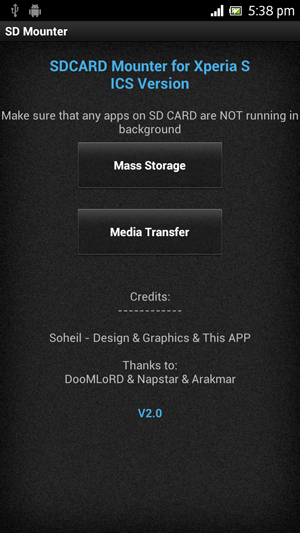
A feature that the Sony design team chose not to include in their early 2012 flagships was mass storage mode. While MTP has its advantages over USB mass storage, this exclusion left many users scratching their heads. Not only is USB mass storage faster, it also wouldn't really hurt to have the choice. But all things aside, there's now an app called SD Mounter by XDA Senior Member Soheil_rf that enables mass storage developed on the Xperia S, P and U running Ice Cream Sandwich and Jelly Bean.
Based on XDA Recognized Developer DooMLoRD's SD Card Mounter for the same devices with Gingerbread and XDA Senior Member Arakmar's scripts, SD Mounter allows users to easily activate either mass storage mode or media transfer mode. A rooted device with busybox is required for it to operate properly, so don't be surprised when SuperUser prompts for root permission. As with any mass storage device, it is also recommended to eject your device from your PC once you're done your business before you switch back to media transfer mode to prevent any unwanted storage errors.
So if this interests you, be sure to check out the original thread for more information.
___________________
[Join us August 9-11, 2013 in beautiful Miami, FL for XDA:DevCon. Read here to find out more.]Google+
If you have been living under a rock, XDA has been running an amazing contest the past two weeks involving the latest tablet to hit the market, the Sony Xperia Tablet Z. After almost 100 entries, the judges were able to narrow it down to the following 10 winners (in no particular order) along with a brief description of their winning entry:
1. lilstevie – LittleKernel development to allow separate boot and recovery kernels
2. zacthespack - native port of, and custom ROM for, LinuxonAndroid
3. Apache14 - open source IR blaster
4. bluefa1con - bringing official PACman ROM to the Tablet Z
5. mamenyaka - Ubuntu Touch port to the Tablet Z
6. rayman - functional multiboot of different android variants as well as booting third party linux distributions
7. rydo88 - 'smart environment' setup utilizing NFC tags and Sony's entertainment packages with the Tablet Z
8. sagarmane4u - education based solutions for studying and exam prep
9. sailnw - boat management application for cruisers and sailors
10. anthonycr - open source Lightning Browser development for 10″ tablets
We really thank everyone for submitting ideas, and only wish that we had more to give away. Be sure to look for these projects to start appearing in the Sony Xperia Tablet Z Original Android Development forum, and check back over the next few weeks to see articles featuring these winners and their projects. Also we'll let you know when it's time to start voting on the Grand Prize winner of the Sony NEX-6 camera.
___________________
[Join us August 9-11, 2013 in beautiful Miami, FL for XDA:DevCon. Read here to find out more.]Google+
Responses fom Ubuntu pouring into Ubuntu Touch Q&A thread! That and more are covered by Jordan, as he reviews all the important stories from this week. Included in this week's news are two articles about Pearl Chen and Mark Murphy talking at XDA:DevCon 2013 and the review of the Oppo Find 5 now that it is more widely available in North America.
Jordan talks about the other videos released this week on XDA Developer TV. XDA Developer TV Producer Kevin released a video talking about controlling your device with your Voice, XDA Elite Recognized Developer AdamOutler released a video all about CASUAL, and TK did an app review of four home automation apps. Pull up a chair and check out this video.
Links to stories mentioned:
Device Review: Oppo Find 5
Responses From Ubuntu Pouring Into Ubuntu Touch Q&A Thread
Pearl Chen to Talk NFC Development at XDA:DevCon 2013
Developer Mark Murphy to Talk Android Plugins at XDA:DevCon 2013
Forum Added for the Samsung Galaxy Mega
What's Possible with CASUAL & How to Make Your Own CASUAL – XDA Developer TV
Voice Control Your Phone with Tasker and AutoVoice – XDA Developer TV
Android App Review: Four Home Automation Android Apps Compared – XDA Developer TV
Check out Jordan's YouTube Channel and Jordan's Gaming YouTube Channel
Check out the new Sony Xperia Tablet Z at the Sony Store and check out Sony's YouTube Channel.
___________________
[Join us August 9-11, 2013 in beautiful Miami, FL for XDA:DevCon. Read here to find out more.]Google+
I will be the first to admit that I'm cheap. When browsing the Google Play Store, an application has to do a lot and do it simply and easily for me to spend any amount of money on the app. However, I understand that developing an app takes a lot of time, effort, cursing, and knowledge; and the developer deserves to be paid. So I tolerate ads and in-app purchases.
Android is the world's most popular mobile OS, with the Play Store growing at an incredible rate. Thousands of new apps are added daily, all trying to get a piece of the pie and turn into the next Angry Birds. What is really the best strategy to pursue to consistently generate revenue in this "free" ecosystem?
Ariel Shimoni, Director of Publisher Relations at StartApp, will be discussing this and monetization in general at XDA:DevCon 2013. He has been with StartApp for the past 2 years, handling their developer lifecycle. From lead to account and support, helping grow StartApp to over 25,000 apps and an Ad SDK downloaded over 800M times to date. Before StartApp, he spent 3 years as an account manager in the online marketing world, focusing on performance and downloadable products.
With this knowledge and skills in hand, Ariel will review some of the most popular models currently used by apps in the Play Store, like banners to icon ads. During the presentation he analyze each model and try to help you to figure out how to best match your app to the right business model for you.
Join us August 9 to 11 in Miami for xda:devcon 2013. Register to attend using this link for exclusive savings.
___________________
[Join us August 9-11, 2013 in beautiful Miami, FL for XDA:DevCon. Read here to find out more.]Google+
Ever since moving to a phone with virtual navigation buttons, I've been bugged by the screen space they use—a gripe held by many out there as well. However you minimize this issue, be it a mod that reduces the height of the navigation bar, using Pie control on Paranoid Android or CM10, or a third-party app such as Button Savior, there's now an alternative called the Ultimate Dynamic Navbar, developed by XDA Forum Member MrBIMC.
Ultimate Dynamic Navbar is possibly the one solution that many have been waiting for. Instead of drastically changing the way we navigate our devices with a different UI and position, it retains the navigation bar in its form and shape, with one subtle twist: It can hide itself. What's even better is the extensive customization that MrBIMC has allowed for, packing in four different themes, the option to adjust transparency, and a choice of three activation methods, among plenty of other settings. Additional buttons can be set, and different actions can be triggered on long-press. The app also includes the option to hide the real navigation bar, thus a rooted device is required.
Ultimate Dynamic Navbar is actively supported by MrBIMC, with an agenda of ridding bugs and including even more customization options such as theming support. This support can already be seen with the seven versions already under his belt. The app is ad-free and is free exclusively on the XDA Forums. So if you would like to check it out, visit the original thread for more information and download.
___________________
[Join us August 9-11, 2013 in beautiful Miami, FL for XDA:DevCon. Read here to find out more.]Google+
There's no denying that privacy is a huge concern for a large number of mobile users across all operating systems. Short of smashing your wireless router and trading down to a 3310 that's kept in a lead-lined box until you need to make a call, it can be incredibly difficult to keep track of where, when, and to whom your personal information is divulged.
Android applications require various permissions, which you are no doubt familiar with by now. Most require these for valid reasons. Some, however, may take advantage of a particular permission and use it to do something you might not be aware of or have expected. Apart from installing only applications that you absolutely need and trust, the best way to try and eliminate the possibility of permissions being abused is to use something like OpenPDroid to adjust these permissions on a per-app basis. The only downside to such a modification is that it can be difficult to put in place for the average user. XDA Senior Member M66B has taken a step towards making permissions management a whole lot easier with a little help from the Xposed Framework.
XPrivacy is an Xposed module that allows the user to view all the currently installed applications on their device and then adjust the individual permissions that app is able to use. Instead of simply preventing the application from collecting the data it is looking for, which can lead to force closes, XPrivacy will provide false data such as an empty contact list or spoofed location. A full list of the possible restrictions and any other information you could possibly want is available from M66B's Github. The module is also open source, which is nice.
If privacy is a concern for you, take a look at the original thread for more information.
___________________
[Join us August 9-11, 2013 in beautiful Miami, FL for XDA:DevCon. Read here to find out more.]Google+
All too often, major device manufacturers such as HTC, Samsung, and Motorola steal the thunder with their announcements and product releases, leaving little room for smaller OEMs to enter the market. Today we're going to put aside the HTC One and Samsung's Next Big Thing to talk about the Oppo Find 5, the Chinese company's first foray into the global market.
You may be asking why we at XDA-Developers would want to review a relatively obscure device that is unfortunately difficult to procure in many regions. Well, availability was recently broadened, and we've already been inside the device and liked what we saw. (Giggity.) But most importantly, Oppo has been incredibly proactive in fostering the developer community for the device, making it the ideal phone to develop with or simply enjoy the development works created by others. In fact, their developer-friendly stance begs for comparison against the LG-made Google Nexus 4, so that's exactly what we'll do.
The Oppo Find 5 retails for $499 (16 GB) and $569 (32 GB), making it markedly more expensive than the Nexus 4. Does it have what it takes to stand apart from the crowd and earn its way into your pocket, despite competition from LG/Google, as well as HTC and Samsung? Read on to find out.
Hardware and Unboxing
The first thing you will notice about the Find 5 is that it has one of the snazziest boxes ever used on a mobile device. The dark-colored cardboard box features aluminum accents and a magnetic clasp. This exudes attention to detail, making for exceptional first impressions.
Cracking the box open, you'll find the usual bundle of accessories such as a wall wart, USB cable, disposable headphones, and a SIM tool. As an added bonus, the Find 5 also comes with a couple of NFC tags to play with.
Design
Making our way to the device itself, let's start by saying that the Oppo Find 5 is a handsome device. If you're a fan of sharp, angular lines and masculine design, the Find 5 is poised to please. As its name alludes, the Find 5′s screen measures in a 5″ diagonally, making this a rather large device. Luckily though, the Find 5 will still fit into most pants pockets with ease.
Unfortunately, those will small hands may have trouble reaching all four corners of the display without repositioning during one-handed use. Luckily for those in search of a smaller device with the same feel, the rumor mill has it that there will be a more diminutive version coming relatively soon. These are, however, only rumors at present. And if the alleged price point is accurate, this is likely more of a midrange model rather than the current high end Find 5.
Holding the Find 5 is a bit confusing at first. Upon seeing its plastic body, you immediately expect a less than ideal build quality and light body weight. Thanks to an internal steel frame, however, the device is both surprisingly hefty in-hand and feels more sturdy than you would expect from something encased in plastic. Since the plastic isn't of the chintzy, glossy variety so often seen on some of the competition, the casing doesn't give off the impression of being easy to scratch. And those who like to play a little rough with their devices will be happy to know that there is nary a flex nor a creak when applying pressure to the device.
In comparison to the Google Nexus 4, the Find 5 is noticeably larger. While the two devices share a similar thickness (the Find 5 being a hair slimmer), the Oppo manages to feel significantly thinner thanks to its curved edges.
Screen
The defining characteristic of any modern mobile device is unquestionably its screen. Luckily, Oppo is well aware. They've graced the Find 5 with a simply remarkable panel. While 1080p is quickly becoming commonplace among 2013′s high-end flagship phones, the JDI-sourced 5″ 1080p IPS screen in the Find 5 still manages to set itself apart.
Aside from being sharp, it is also vibrant, packs a good amount of contrast, and is extremely well calibrated. Using an X-Rite i1Display 2 and HCFR Colorimeter, we found that our Find 5 has a color temperature remarkably close to the ideal D6500K calibration point. At minimum brightness, it measures in at 6504K. At 50% brightness, it comes in ever-so-slightly cool at 6563K. At maximum brightness, it is noticeably more cool at 6632K. While not directly tested, contrast and gamma also seem appropriate. Even though you're probably not going to use your phone to edit pictures destined for print, it's nice to know that what you see on screen is quite close to what you're supposed to be seeing.
Viewing angles are not the absolute best we've seen on modern devices, but they're still as good as you would expect from a quality IPS panel, and far better than what's seen on the Nexus 4. There is a small loss of brightness at extreme angles, but there is no color inversion at any angle.
This 441 ppi screen is on par with the slightly denser panel found on the HTC One, and its images are unquestionably more natural and lifelike than those seen on the Samsung Galaxy S 4′s oversaturated AMOLED panel. And unfortunately for Google's latest flagship, there is simply no comparison between the two displays in any regard. Simply put, when viewing a high resolution image head-on, you may forget you're looking at an LCD rather than an actual photograph.
Performance and Battery Life
If screen is the most important aspect of a modern mobile device's hardware, the internal guts unquestionably follow. The Find 5 features the same quad-core Qualcomm Snapdragon S4 Pro (APQ8064) system-on-chip as the Nexus 4. For the uninitiated, this iteration of the S4 Pro includes four 1.5 GHz Krait cores and an Adreno 320 GPU. The fast processor is backed by 2 GB of RAM and either 16 or 32 GB of storage.
While other SoCs now have claimed the ultimate performance throne from the S4 Pro, its speediness is still a force to be reckoned with. You'll be hard pressed to spot any actual performance differences between this device and one running a faster chipset such as the Snapdragon 600 or Samsung's latest Octca in CPU-intensive tasks. The Find 5 has more than enough CPU power to bring a speedy experience, regardless of what you throw at it.
However as is the case on the Droid DNA, which features not only the same resolution but also the same SoC, the GPU seems to be slightly underpowered for the job. This manifests itself in a few sporadic instances of choppy scrolling and zooming here and there. This can be seen somewhat in the GPU benchmarks below. It's nothing of a deal-breaker, but a little more pixel power would have been nice. Thankfully, though, this problem is somewhat mitigated by loading more optimized aftermarket firmware.
If GPU performance is the Find 5′s achilles heel, battery life is its annoying and ever-present mother-in-law. One would correctly assume that an ultra high resolution, bright, and vibrant display mated to a fast processor incurs substantial battery demands. Luckily, the Find 5 packs in a 2500 mAh battery to compensate.
Despite the hefty battery, though, making it through a full day of moderate to heavy use is unfortunately but a dream. For those counting, it scored 306 on the AnTuTu battery tester, putting it slightly below the venerable HTC HD2.
Cameras
The Find 5 comes with a rear-facing 13 MP camera, and a 1.9 MP front-facing camera. The rear shooter is a Sony Exymor RS camera modle and is capable of hardware HDR. It is also able to capture an insanely high 120 fps in video, albeit at a low 640×480 resolution. 1080p recording is done at a still impressive 30 fps. Having 13 megapixels doesn't mean anything, however, if the lens is poor. Luckily, the Find 5 is equipped quite well for a camera phone. Its lens is relatively speedy at f/2.2, and it uses blue glass filters to increase image quality.
So what's the end result with Oppo's high end camera hardware? See for yourself in the images below taken from the rear-facing camera. In good lighting, images and videos are crisp and clear. And in more difficult conditions, such as those with high amounts of dynamic range, the Oppo further distances itself from competing devices.
Almost as impressive as the Find 5′s rear camera is its front camera. While the 1.9 MP camera in the front is certainly not going to win any awards on dynamic range, resolution, or contrast; it is more than capable of capturing self-portraits and remarkably sharp video chat. Images comparing the two cameras can be seen below.
Note on HDR: Performance using HDR was a mixed bag. In certain scenes, HDR contributed nicely, protecting both highlight and shadow detail. However, there were many instances where it caused photos to take on an over-saturated and almost neon look. Haloing was also quite visible in most HDR captures.
My recommendation to all who care about image quality would be to try and expose your shots properly without HDR first. Spot metering is tied to focus point selection, and is thus just a simple tap away. But when the captured scene makes it simply impossible, then perhaps give the HDR mode a shot. Don't expect miracles, and brace yourself for possible disasters.
Hardware Buttons
The power button is found on the upper left of the device, and has a satisfyingly clicky feel. The volume rocker is found on the right, and is similarly crisp and rewarding. Both the volume rocker and power button share the same sleek angular lines as the device itself, making them fit right in.
Unfortunately, Oppo decided to go the hardware route for its Android navigation keys. These come in the form of three capacitive buttons: menu, home, and back—in that order. Sadly, using such a layout is unintuitive since the back button is not on the left. This differs from many other devices, as well as Nexus device softkeys. We can only assume that this was done because it is easier to reach the lower right corner in single handed operation with such a large device. Needless to say, we would have preferred onscreen UI keys for Android navigation because they enable a sleeker and more versatile front face, and can disappear when not needed such as while playing video.
Software
While hardware is what drives most to initially consider a device, it's the software that you experience day-in and day-out. For this reason, all the Gigaflops and Petabytes in the world won't save you from a poor or locked down user experience.
Stock Firmware
The Oppo Find 5 ships with a heavily-skinned version of Android 4.1.1 Jelly Bean. In fact, it's actually one of the most heavily skinned variants of Android that this author has ever seen. The skin resembles Xiaomi Tech's MIUI and builds upon the Android aesthetic with richer animations, interesting and unified icon themes, lighter colors, and some generally pleasing eye-candy.
There are a few issues with the skin's visuals, which are best exemplified in the screenshot below. Have a hard time reading the subject line? Me too, and that's a problem.
Aftermarket Development
At this point you may be thinking that the Find 5 is a nearly perfect device. It packs a relatively speedy processor, a class-leading screen, and great cameras. However, these aren't the Find 5′s greatest assets. Instead, the Find 5′s biggest strength is the company itself.
Oppo has embraced the aftermarket development community by doing all that it can to aid third party developers in the process. This is even something touted on their official website, citing support for Paranoid Android, CyanogenMod, vanilla Android, and PAC rom. Want a Google Edition device? This comes pretty darn close!
In fact, development is so mature on the device thanks to many of the hard working developers on XDA that the two main issues cited above (notification text color and occasionally choppy UI performance) can be bypassed. This obviously varies depending on your choice of ROM and kernel, but the option exists for those willing to put in the work.
Obtaining initial root couldn't be simpler, thanks to XDA Elite Recognized Developer AdamOutler's CASUAL software. Once rooted, there is an abundance of choice at your fingertips. This is largely due to Oppo's commitment to helping rather than harming the community. Some great places to start would be the device's official CM nightlies, Paranoid Android, PAC ROM, Unofficial TWRP, the 30 Mbit Camera Mod, and many more in the device's Original Development section.
Closing Thoughts
The Oppo Find 5 is quite an interesting device. It comes from a manufacturer relatively unheard of outside of Asia, yet it manages to set itself apart due to the amazing screen, class-leading camera, great build quality, and Oppo's developer friendly nature. It is different from the Samsung Galaxies and HTC Ones in the world because it allows and even encourages you to use the community to your advantage. The Find 5 isn't perfect. In its next version, we'd like to see a substantially beefier GPU and onscreen UI navigation keys rather than hardware capacitive buttons. Better battery life wouldn't hurt either. However, the company's developer-friendly stance more than makes up for the Find 5′s faults.
Is the Find 5 right for you? Given that it isn't available on-contract from a major carrier for a reduced fee, many will have a hard time forking over the dough, especially when the similarly unlocked Nexus 4 is available for a fraction of the cost. However, the Find 5 retains much of what makes the Nexus 4 great, adding a slimmer profile, a leagues better screen, substantially better cameras, and aesthetics that you may or may not find more pleasing. The Find 5 isn't for everyone, but will undoubtedly be perfect for some. Those looking to purchase the device can do so through the official website.
___________________
[Join us August 9-11, 2013 in beautiful Miami, FL for XDA:DevCon. Read here to find out more.]Google+