Seamlessly Synchronize Your Notes with Easy Cloud Notes Beta

Posted by Unknown on Friday, May 31, 2013

Seamlessly Synchronize Your Notes with Easy Cloud Notes Beta

Ever since Google Keep was released some time ago, it has become an everyday staple for many users. And who's to blame them. The application is simple, east-to-use, and has an aesthetic and efficient interface. However, one potential complaint that some may have with Keep is that it relies on Google's cloud to store its notes and allow you to access them across devices. While Google is widely considered to be the best and the most reliable personal cloud solution, some may prefer to use a different service.

This is where XDA Recognized Developer Goddchen comes in. He created an app called Easy Cloud Notes. And as it name implies, it allows you to take cloud notes rather easily. Currently, it supports various note types, as described by developer:

It supports the common note types:

  • Text notes
  • Checklists
  • Photo notes
  • Audio notes
  • Drawings (coming soon)

Sounds a bit like Google Keep, right? Well since we like having choice, that's where these apps diverge. So what kind of cloud services does Easy Cloud Notes support? Currently, the supported cloud services include the following:

  • Dropbox
  • Google Drive
  • Box.net
  • SugarSync
  • SkyDrive

While I assume that most who use this app will end up using Google Drive for the back end, it's still quite nice to be given choice. After all, that's part of the reason we love Android, right? On top of the diverse note types and user-selectable cloud backup solutions, the app's interface is well designed, as seen in the developer's other apps that we've featured in the past.

If that's gotten you excited, you can go ahead and give it a shot by heading over to the application thread.

___________________

[Join us August 9-11, 2013 in beautiful Miami, FL for XDA:DevCon. Read here to find out more.]Google+

Via xda-developers.com

More aboutSeamlessly Synchronize Your Notes with Easy Cloud Notes Beta

Unofficial CWM for Ouya, CASUAL Root and Recovery for AT&T Galaxy S4, MotoACTV Development Active – XDA Developer TV

Posted by Unknown

Unofficial CWM for Ouya, CASUAL Root and Recovery for AT&T Galaxy S4, MotoACTV Development Active – XDA Developer TV

An unofficial build of ClockworkMod Recovery has been released for the Android-powered Ouya game console. That and more are covered by Jordan, as he reviews all the important stories from this week. Included in this week's news is an article about using CASUAL to root and install TWRP on on your AT&T Samsung Galaxy S 4 easily and news about development on the Motorola MotoACTV.

Jordan talks about the other videos released this week on XDA Developer TV. XDA Developer TV Producer Kevin gave us video on DLNA, Elite Recognized Developer AdamOutler tore apart the AT&T Samsung Galaxy S 4, Jordan interviewed the creator of Casetop and released a highlights video. Pull up a chair and check out this video.

Links to stories mentioned:

  • Unofficial CWM Recovery Port for the Ouya
  • CASUAL Root, Recovery for the AT&T Samsung Galaxy S 4
  • Active Development for the Motorola MotoACTV
  • Did You Spot XDA FSM / RD Zacthespack's App at Google I/O?
  • Play Your Videos on Your Television with DLNA – XDA Developer TV
  • AT&T Samsung Galaxy S 4 Unboxed the XDA Way – XDA Developer TV
  • [LIVE] Casetop May Transform Your Mobile Device into a Productivity Device – XDA Roundtables
  • XDA Roundtable Highlights: Casetop Interview with Johnny Andrus – XDA Developer TV

Check out Jordan's YouTube Channel and Jordan's Gaming YouTube Channel

___________________

[Join us August 9-11, 2013 in beautiful Miami, FL for XDA:DevCon. Read here to find out more.]Google+

Via xda-developers.com

More aboutUnofficial CWM for Ouya, CASUAL Root and Recovery for AT&T Galaxy S4, MotoACTV Development Active – XDA Developer TV

USB Mass Storage App for Recent Samsung Devices

Posted by Unknown

USB Mass Storage App for Recent Samsung Devices

Not many feature omissions have drawn as much ire in recent memory as the lack of USB Mass Storage. While Media Transfer Protocol has numerous advantages such as safer removal and simultaneous access from both your computer and mobile device, it's just not quite the same as directly mounting your device as standard USB storage. This is on top of the hoops that non-Windows users have to go through to access the storage in the first place.

Thankfully, there's no shortage of tweaks and mods to get the beloved USB Mass Storage functionality back. The newest solution comes from XDA Senior Member MohammadAG, and it is for quite a few Samsung devices including the Galaxy S III, Galaxy S 4, and the Galaxy Note 2. And even if you have a Samsung device that isn't one of the above, it's quite possible that it may still work for you.

As described by the developer:

 Features:

  • Allows you to use your microSD card as a USB Mass Storage device.
  • Shortcuts on your homescreen to easily enable/disable USB Mass Storage mode.
  • Warns the user if they try to disable Mass Storage mode without unmounting/ejecting on the PC side.

Tested working on:
Samsung Galaxy Note II (GT-N7100)
Samsung Galaxy SIII (GT-I9300)
Samsung Grand Duos (GT-I9082) – Thanks to wan Mohd in Play Store reviews.
Samsung Galaxy S4 (GT-I9500) – Thanks to taiseer999 in the replies below.
Samsung Galaxy S4 (GT-I9505) – Thanks to Solomon Chow in Play Store reviews.
Samsung Galaxy S4 (SGH-I337) – Thanks to Delyan Georgiev in Play Store reviews.

Eager to get USB Mass Storage on your device? If so, head over to the original thread to get started.

[Thanks to The Waswas for the tip!]

___________________

[Join us August 9-11, 2013 in beautiful Miami, FL for XDA:DevCon. Read here to find out more.]Google+

Via xda-developers.com

More aboutUSB Mass Storage App for Recent Samsung Devices

Wake Up with AlarMe, the Weather-Based Alarm

Posted by Unknown

Wake Up with AlarMe, the Weather-Based Alarm

A weather-based alarm is quite an interesting and practical innovation. It's an idea you'll most definitely appreciate if you've ever driven the car to work, only to be stuck in traffic for 20 minutes when you could have walked or ridden on a fine sunny day. It's similarly useful when you wake up just to see snow blocking the driveway and the road, leaving you unable to get to where you need to go.

Well, since XDA Forum Member Mdk001 was growing increasingly frustrated with these situations, AlarMe was created. This is an alarm clock that, you've guessed it, bases itself on the weather of the day. In addition to the conventional method of creating your standard alarm with a time and description, AlarMe adds extra 'Weather Rules' for different weather and the subsequent time changes you would like to occur. This signature criteria allow for up to 2 different weather conditions, which you then set a different alarm time for.

With a clean Holo user interface, AlarMe presents itself with further options for customization such as 24 hours time view, imperial or metric temperature units, alarm and snooze duration, among many others. However, most importantly, AlarMe provides the choice of weather provider between Open Weather and Weather Underground, two well known and reliable sources of weather conditions. If however you did come across an issue regarding this, Mdk001 included a function which allows for the reporting of such problems. Nonetheless, we look forward to more flexibility and choice in terms of weather providers in the future.

A well-refined app with an active developer behind it and built on an interesting concept and idea, AlarMe may be an app you would like to try out. It is available for Android 2.2 and above, and is free and ad-free from the Play Store. For more information and discussion, check out the application thread.

___________________

[Join us August 9-11, 2013 in beautiful Miami, FL for XDA:DevCon. Read here to find out more.]Google+

Via xda-developers.com

More aboutWake Up with AlarMe, the Weather-Based Alarm

Doing More with the ActionBar

Posted by Unknown on Thursday, May 30, 2013

Doing More with the ActionBar

I love the look and functionality of the ActionBar. I find my thumb has more dexterity at the top of the screen than it does at the bottom when I'm holding my phone with one hand. And so I'm happy to see that the interface is evolving while retaining that valued real estate. Play Music is one app that show off that evolution. The app allows you to see the background at the top of the page, but then fades the ActionBar background color in as you scroll down the page, becoming opaque after you've scrolled past the Artist artwork. This image shows that. No, I don't have any artist artwork, but you can see that the Action bar is clear to start, then becomes orange as I scroll down. It's a pretty neat animation trick which you can use in your own apps.

Cyril Mottier wrote a guide back in November that shows how you can animate the ActionBar. In his demonstration he makes the background fade through several ranges of color (see the video below). Once you know how it's done, you can make it do a lot more. Play Music is simply mating the alpha with the scroll location, which I would assume is very easy on the processor. Cyril saw this demonstrated at IOIO and wrote a follow-up article that augments his earlier explanation. But I also like the idea from a comment in the November article mentioning it would be technically possible to turn the ActionBar into a progress indicator. I suppose this could be as easy as resizing a bounding box to match a percentage, but I'll let you work out all the details.

[via Reddit]

___________________

[Join us August 9-11, 2013 in beautiful Miami, FL for XDA:DevCon. Read here to find out more.]Google+

Via xda-developers.com

More aboutDoing More with the ActionBar

Using Internal/Hidden Classes of the Android API

Posted by Unknown

Using Internal/Hidden Classes of the Android API

Pssst… over here. Yeah, did you know about the Hidden Android Classes? Shhh… it's a secret. They let you do stuff you otherwise couldn't. You can read internal data, like the text message database stored on a phone. You can also gain lower level access to the hardware in order to extend your app's access to things like the touchscreen input values, or WiFi radio usage. To get your hands on that kind of contraband, you'll need to do some poking around in the Android SDK, and make a few… changes… to the way your Eclipse ADT plugin works.

This information comes to our attention because XDA Recognized Developer E:V:A bumped his own post out of year-old obscurity, but boy are we glad he did. If you like to do things you're not supposed to, it'll be worth your time to read the guide. Head on over to his original thread for full details.

E:V:A's work boils down the avalanche of information on the subject which was posted by Inazaruk a couple of years ago. The Java classes that are known synonymously as Hidden or Internal Classes are protected from direct use and hidden from being shown in the Java docs (using the @hide directive). Using them is just a matter of hacking the android.jar file and tweaking your IDE setup to stop blocking your path to the forbidden fruit.

One thing I think Inazaruk and E:V:A both missed was a simple explanation of possible applications for the hidden classes. Read more about that in this article.

___________________

[Join us August 9-11, 2013 in beautiful Miami, FL for XDA:DevCon. Read here to find out more.]Google+

Via xda-developers.com

More aboutUsing Internal/Hidden Classes of the Android API

XDA Roundtable Highlights: Casetop Interview with Johnny Andrus – XDA Developer TV

Posted by Unknown

XDA Roundtable Highlights: Casetop Interview with Johnny Andrus – XDA Developer TV

Here at XDA, we are a community of developers and power users. XDA's history and purpose is based on a long standing sharing of knowledge, ideas, creations, and opinions. XDA is a place where you can learn to do just about anything for your mobile device, sometimes to the detriment of your warranty.

Recently, a new creation has come to our attention. This creation, called Casetop, promises to turn any smartphone into a laptop. XDA Developer TV Producer Jordan interviews Johnny Andrus, the creator of casetop. Jordan did a live broadcast of the interview and spent 30 minutes talking about the device and getting it into production. In this video, Jordan gives you the shortened highlights from this interview. So check out this video and be sure to stay tuned when we announce our next hangout so you can watch it live!

Links to stories mentioned:

Check out Jordan's YouTube Channel and Jordan's Gaming YouTube Channel

Also, be sure to check out other great video's on XDA Developer TV.

___________________

[Join us August 9-11, 2013 in beautiful Miami, FL for XDA:DevCon. Read here to find out more.]Google+

Via xda-developers.com

More aboutXDA Roundtable Highlights: Casetop Interview with Johnny Andrus – XDA Developer TV

Did You Spot XDA FSM / RD Zacthespack’s App at Google I/O?

Posted by Unknown

Did You Spot XDA FSM / RD Zacthespack's App at Google I/O?

For most of us, Google I/O is probably beginning to feel like a distant memory—perhaps less so for those lucky enough to be browsing on your shiny new Chromebook Pixels. We're all aware by now of the big stories from this years conference, but among all that was something that was of great interest to us here on the Portal, which you might not have noticed.

One of the sessions put on by Google was titled Voiding Your Warranty: Hacking Glass, the purpose of which was to show those in the Glass Explorer program how to root the device and run their own applications. During the session, the capabilities of Glass were demoed by showing not only how to gain root access but how to run a full desktop operating system, in this case Ubuntu. One of the tools used to achieve this was an application called The Complete Linux Installer that we featured here on the Portal just under a year ago. Considering that the application was written by our very own Recognized Developer and Forum Moderator zacthespack, we decided to track him down and get his opinion on the use of his application to help hack Glass and a few other things as well.

Well Zac, why don't you start by telling us a little bit about yourself?

"Hello, I'm Zachary Powell (zacthespack on XDA) and I am a second year BcS Computer Games student at the University of Essex (UK). I have been on XDA since 2009, becoming a Recognised Developer in 2012 and a Forum Moderator earlier this year. My passion for both Android and FOSS has encouraged me to work on multiple projects, including Slap OS on Android, my newest joint-venture: XML Games, and of course; LinuxonAndroid.  My other interest include computer games and computer game design. Virtual Worlds are a particular interest of mine because I enjoy seeing what a community can create within them."

It must have been a bit of a shock to see your app being used by Googlers at IO. What was your initial reaction?

"Yes, it was quite a shock. It had never crossed my mind that the employees of Google could be using my app, never mind it being featured at their biggest event. I see it as a serious milestone in the project's life to be included amongst Google's work." 

Do you think that running a full desktop OS on a device such as Glass will become commonplace, or will users prefer to stick with a lightweight and minimal interface?

"I think that both have their places. Clearly for day-to-day use a desktop operating system isn't practical, but it does have it's uses – particularly when you are talking about using a command line and command line tools. Clearly, with the limited size of the glass' screen, the use of a desktop GUI is prevented; it's certainly not going to be able to run a web browser. However, when resolutions improve, this could become more possible. As it is, the screen is large enough for a command line and I like the idea of being able to develop and compile code from a HUD on the move. 

I do feel that in general it won't become commonplace for the average user to run a full desktop OS on the glass because for most people, a desktop operating system is a word processor and an web browser. There is no general need for them to have access to developmental tools. The minimal, easy to use system is preferred by the average user.
However for advance users and developers who want to tinker with their glass and unlock the full power of the device, running a desktop OS on the glass would make a big difference."

What are your thoughts on Glass in general?

"I believe that the Glass is a fantastic product, and is something that I am itching to get my hands on. Obviously the idea of a HUD is nothing new, but I think that Google have taken the idea in such a way that the result is second-to-none. There is no other device like this and although there is still a lot of room for improvement, by the time Google release to the general public I think it will be a well polished and usable device. The fact it runs Android is great because you are able to run a far better range of apps, including my own. This also makes the process of ensuring apps are Glass compatible much easier. I am looking forward to getting my own Glass and discovering it's full potential."

What originally motivated you to begin the Linux On Android Project and is the project still going?

"The project originated from a desire to get Linux running on my HTC Desire S. The idea and method used in the project is nothing new, but we seek to make it a universally accessible platform (as long as you are rooted). After developing the project and creating a tutorial in XDA, there was a clear demand for the project as people started asking me to help them get it running on their devices. It was at this point that we started creating the universal method, and from there the project really took off.
Yes, we are very much still going. We are working on new improvements constantly, including new Linux Distros and making the app more universally accessible in terms of the languages it has been translated in to and the number of devices it can now run on."

Considering our recent focus on helping those new to app development, could you tell us a little bit about your methodology, process, and perhaps any tips you might have for aspiring developers?

"Trial and error is definitely the key here. There is a great range of Open Source apps available which you can study the source code for and learn from. This is something I strongly recommend anyone to do. Although the phrase is "don't fix something that isn't broken", I can't help myself but to continue improving the app and adding new features. 

My biggest tip would be to never stop learning. Always look to better your knowledge. The Android platform is always changing, and you have to change with it."

Tell us a little more about the new projects you mentioned earlier.

"SlapOS on Android is a branch of LinuxonAndroid using our Ubuntu install as a base to then install the SlapOS software, allowing your android device to integrate with your SlapOS cloud, with this every Android device can become a cloud node!

XML games is a new project A friend of mine and myself have just set up and launched on kickstarter. XML Games aims to allow the players themselves to easily and quickly create new game levels using a predefined set of XML tags. Coupled with an XML web platform, players can view and share each other's levels online, unlocking the possibility of endless new and unique gameplay!
Using XML to design levels allows for us as the developers to make the levels and games completely cross platform. This opens players to an ever growing range of different levels all of which can be designed by anyone on any platform.
Once you have made your levels, they can be shared on the XML Games website community. Allowing anyone to browse and download to play. The hope here is that users can head onto their PC, code their own levels with the help of our handy guide, and then head onto their phone, and download their own level!
We plan to start out on Android creating a few open source games, but with enough funding hope to expand onto other platforms and more games!"

Given the Linux theme here I have to ask, what is your personal distro of choice?

"Primarily I use Ubuntu for work as I like its stability, however I do enjoy playing with Arch Linux because of its customisability."

Thanks Zac.

If you'd like to follow up on anything mentioned by Zac, check out the links below.

___________________

[Join us August 9-11, 2013 in beautiful Miami, FL for XDA:DevCon. Read here to find out more.]Google+

Via xda-developers.com

More aboutDid You Spot XDA FSM / RD Zacthespack’s App at Google I/O?

Floating Notifications Lets You Manage Your Alerts with Ease

Posted by Unknown

Floating Notifications Lets You Manage Your Alerts with Ease

Accessing your notifications is already pretty simple and requires little more than a swipe down from the top of the screen, unless of course you prefer to run applications in full screen or make use of some kind of extended desktop option. In these situations, it can often mean moving away from the app you are currently using which can be a nuisance. There are a few ways around this.

I'm sure that by now you're familiar with Halo, the latest feature to be added to Paranoid Android. This feature allows notifications to be accessed easily from anywhere, but isn't really available to those without a PA-supported device. However, XDA Senior Member crazyfool_1 has developed an application that performs a similar function.

Keep in mind that this is NOT halo. There are no app pop ups that allow multitasking. This is purely for notifications. This is, however, a very intuitive and fluid way of managing your alerts without moving away from whatever you were already doing. In a similar style to Halo or Facebook's "Chat Heads," your notifications will stack up in a floating bubble that can be moved around the screen and interacted with or dismissed easily. The bubble itself can be configured to your liking, and certain apps' notifications can be prevented from appearing if you wish.

The app is still in the early stages of development, but seems to be functioning well and proving very popular. Make sure you check this one out if the good old fashioned notification tray just doesn't cut it for you anymore. Check out the application thread for more information.

___________________

[Join us August 9-11, 2013 in beautiful Miami, FL for XDA:DevCon. Read here to find out more.]Google+

Via xda-developers.com
More aboutFloating Notifications Lets You Manage Your Alerts with Ease

Active Development for the Motorola MotoACTV

Posted by Unknown on Wednesday, May 29, 2013

Active Development for the Motorola MotoACTV

"Wait, what is the Motorola MotoACTV? Doesn't sound very familiar."

Unbeknownst to many, the MotoACTV is an interesting device released by Motorola all the way back in 2011 that acts as a part-time watch, and a part-time fitness tracker. With Bluetooth, WiFi and GPS support, it also interestingly came with Android Gingerbread, thus making it a standout device among its smartwatch peers, and even more so with the active development going on behind it.

XDA Recognized Developer ClearD came up with a root method for the MotoACTV, crowning it the title of the first rooted smartwatch. With ClearD's Root Tool recently updated to version 2.0.1, users of this device can not only root the MotoACTV, but also perform a plethora of other actions. These include:

  • Backup data
  • Flash boot image with the option to root
  • Restore data
  • Open ADB command prompt
  • Reboot into recovery
  • Return to rooted or unrooted stock

In addition to the RootTool, ClearD also developed the MotoACTV Image Flasher, a tool that allow MotoACTV users to flash images and roms (and yes, there are custom ROMs for this watch), and wipe the device's data and cache.

With a rooted device comes an overclock method, discovered by XDA Senior Member dproldan. Using the overclock module by Tiago Sousa and the provided zip file, users must have ADB installed to issue the given commands required to create 4 frequency steps:

  1. 300 MHz
  2. 600 MHz
  3. 800 MHz
  4. 1 Ghz

With this, users can now set the over- and under-clock the MotoACTV's CPU frequency using tools such as Elite Recognized Developer coolbho3000's SetCPU.

So if you are a user of the Motorola MotoACTV, most definitely go ahead and check out the development thread for more information and discussion.

___________________

[Join us August 9-11, 2013 in beautiful Miami, FL for XDA:DevCon. Read here to find out more.]Google+

Via xda-developers.com

More aboutActive Development for the Motorola MotoACTV

Create Your Very Own Boot Animations

Posted by Unknown

Create Your Very Own Boot Animations

If you've already taken a look at the boot animation utility featuring 400 different animations for your Android device, but haven't seen anything that catches your eye, you may want to create your very own boot animation. If this is the case, you may want to check out XDA Senior Member ayushrox's guide on how to do so.

A guide written for Windows Users, it lays down the foundations by explaining just exactly what a boot animation is, what it consists of, and what each component's purpose is. A process that is actually quite simple, ayushrox breaks it down into 10 'bite-size' chunks, or steps, for the newcomer who may not know all the pedantic details that is required. Accompanying screenshots and examples of code are also conveniently provided for the steps that may require some visual aid. Ayushrox highly recommends the use of image editing software such as Adobe Photoshop, and having either 7Zip or Winrar installed when creating boot animations, as they are necessary for the required steps.

Again, it is quite a simple process that, with a bit of practice, will become second nature just like any of the other tasks involved in theming your Android device. So if you would like to create the perfect boot animation for yourself, or have a custom animation for your ROM or kernel, be sure to check out the guide at its original post.

___________________

[Join us August 9-11, 2013 in beautiful Miami, FL for XDA:DevCon. Read here to find out more.]Google+

Via xda-developers.com

More aboutCreate Your Very Own Boot Animations

AT&T Samsung Galaxy S 4 Unboxed the XDA Way – XDA Developer TV

Posted by Unknown

AT&T Samsung Galaxy S 4 Unboxed the XDA Way – XDA Developer TV

Recently, XDA Elite Recognized Developer AdamOutler tore apart and hacked up a Samsung Galaxy Note 10.1. The large device was quite a show, but sometimes it is more exciting to see the inside of a smaller device. How do they fit so much power in such a small space. So using his powers of hackery, AdamOutler is taking apart the AT&T Galaxy S 4.

After tearing down and Unboxing the XDA Way, he continues by giving a tour of the device's components. AdamOuter demonstrates the device setup, installing recovery, and rooting the device. So if you wanted the freedom to do what you want with a device you bought, check out this video. Also, check out the full teardown hangout and rooting video.

heck out Adam's other unboxing Videos:

Also, be sure to check out other great video's on XDA Developer TV.

___________________

[Join us August 9-11, 2013 in beautiful Miami, FL for XDA:DevCon. Read here to find out more.]Google+

Via xda-developers.com

More aboutAT&T Samsung Galaxy S 4 Unboxed the XDA Way – XDA Developer TV

Looking to Improve the Sound Quality on Your Smartphone?

Posted by Unknown

Looking to Improve the Sound Quality on Your Smartphone?

With all of the (often pointless) sound "tweaks" out there, it's easy to forget that the true sonic upgrades will almost invariably come from output hardware rather than software. And while some software tweaks do actually make a marked improvement on sound quality without sabotaging clarity and neutrality (Elite Recognized Developer Supercurio's Voodoo Sound and the HRTF functionality in DSPManager come to mind), much of the software tweaks are are just glorified bass-heavy equalizers (*cough*Beats*cough*) that would make any true audiophile cringe.

So, what does this mean? Simple. It means that if you're looking to improve the sound quality of the music coming from your smartphone, you're going to have to pony up a few bones for a decent output stage. While many are content with simply using the included earbuds, others go so far as to purchase an external USB-enabled DAC, a portable headphone amplifier, and truly impressive transducers. However, this kind of rig is not for everyone. Not only are there price considerations to take into account, but all of this gear will most likely not fit into the already stuffed pockets of your skinny jeans. And let's face it, not everyone will appreciate an electrostat rig like the $12,900 Sennheiser Orpheus HE90 pictured above or a set of Stax. And if you're spending serious dough on the output stage, you had better have solid electronics and a well recorded music supply to back it up.

Thankfully, this is where XDA Forum Member jRi0T68 comes in. He shares with us a few tips to help hone in on exactly what it is that you want in the world of mobile audio with his brief guide. Now, I know what you may be thinking: "Why in the world does a headphone buying guide belong on XDA?" Well, for many of us here, one of the key functions in our mobile device, and as such, it is of significant importance to many in the community. Despite being only a primer, the guide covers a decent number of topics that should be considered before making a purchase:

1: Budget
2: Genres/Musical preference
3: Type of headphone
4: Functionality
5: The audio rig as whole
6: Source material
7: Build Quality

I'd also toss in one final criteria: sonic preference. Not everyone wants neutrality (i.e. to hear the recordings the way the recording engineers meant for them to be heard). After all, that's why many enjoy the warm sounds and even-order harmonic distortions of tube amplifiers, which by all objective means of measurement are inferior to their more analytical and razor-flat transistor counterparts that deliver unpleasing odd-order harmonic distortion when pushed too far. That's not to say that all tube-based amps are warm and have an excessive amount of even-order harmonic distortion, but that is a general trend caused by the underlying technology exhibited by many models.

As with amplifier technology, certain sets of cans (and loudspeakers, for that matter) are not aimed at being neutral, but still deliver pleasing sound, if that's what you're looking for. This is where the traditionally neutral and transparent Canadian (NRC research and work by Floyd E. Toole) and warm British (traditional "laid back" B&W character in many models) ideologies diverge, but that's far beyond the scope of this article.

Now if you are lazy and want a few quick blanket recommendations, I suggest taking a look into the following cans. I've owned, listened to, and/or played around with them as well as dozens of others, and they are some of the best in their respective categories and price ranges for those looking for neutral and detailed sound:

However, if you'd like to delve deeper into the world of audio and find out what works best for you, head over to the original thread. Your ears will thank you.

No matter what you end up choosing, though, make sure you heed jRioT68′s advice:

Many popular headphones (ahem Beats, Bose, Skull Candy) are more appearance than quality, and may offer booming bass that overshadows the rest of the music. THERE ARE BETTER OPTIONS AT THE SAME OR LOWER PRICES. Don't settle for a nice label. Get quality you can hear.

___________________

[Join us August 9-11, 2013 in beautiful Miami, FL for XDA:DevCon. Read here to find out more.]Google+

Via xda-developers.com

More aboutLooking to Improve the Sound Quality on Your Smartphone?

Promote Your Listing on Swappa with These Signature Badges

Posted by Unknown on Tuesday, May 28, 2013

Promote Your Listing on Swappa with These Signature Badges

When we announced our partnership with Swappa, we also made an exception to one of our forum rules by allowing XDA members to list to their Swappa listing in signatures to garner more attention. XDA Recognized Contributor and Themer PulseDroid created a handful of signature badges for the most popular devices, should you have a listing up on Swappa for the Samsung Galaxy S II/III, Note I/II, Galaxy Nexus, Nexus 4, HTC One X, or Droid DNA.

You can view the badges in the forum thread.

___________________

[Join us August 9-11, 2013 in beautiful Miami, FL for XDA:DevCon. Read here to find out more.]Google+

Via xda-developers.com

More aboutPromote Your Listing on Swappa with These Signature Badges

[LIVE] Casetop May Transform Your Mobile Device into a Productivity Device – XDA Roundtables

Posted by Unknown

[LIVE] Casetop May Transform Your Mobile Device into a Productivity Device – XDA Roundtables

It has long been the dream of many technology enthusiasts and road warriors to have to carry only one piece of electronic equipment and still be able to stay in touch. The smaller the electronic equipment, the better. As it stands now, many people carry a phone and a laptop.

There have been many attempts to remedy this situation, such as the Motorola Atrix and its laptop dock. However, this only worked with Atrix handsets. Many tablets have tried as well. The ASUS Transformer line allows users to attach a keyboard, but that doesn't function as a mobile phone so you are still carrying two devices. And not everyone's a fan of the Padfone. Well, XDA Senior Member andjohn has begun a KickStarter project called Casetop. The Casetop device promises to turn any phone into a laptop.

We wanted to know how it works, so XDA Developer TV Producer Jordan set up a live interview with the developer of this project. Jordan will ask all about the device, and some questions about what it takes to build something like this.

So check below for a link to the live broadcast when it begins at 8pm Eastern(GMT-4) or check out and subscribe to the XDA Roundtable YouTube Channel.

___________________

[Join us August 9-11, 2013 in beautiful Miami, FL for XDA:DevCon. Read here to find out more.]Google+

Via xda-developers.com

More about[LIVE] Casetop May Transform Your Mobile Device into a Productivity Device – XDA Roundtables

Sony Mobile Sponsoring XDA:DevCon 2013

Posted by Unknown

Sony Mobile Sponsoring XDA:DevCon 2013

If there's one thing that Sony Mobile has done over the past year to change its image, that's been to support the independent Android developer community. From open-sourcing DASH to releasing an ALPHA build of Jelly Bean with the kernel source to contributing to AOSP projects, Sony has signaled that they are a company that embraces open source and (by extension) the community as a whole. If you haven't already, you should really check out their Developer World site where you'll find tutorials, source code, and all sorts of interesting announcements.

Due to their contributions, it comes as no shock that Sony Mobile is sponsoring XDA:DevCon 2013 at the "Elite Recognized Sponsor" level. What this means is they are committed to helping bring the highest level of content and participation possible. They'll be sponsoring their own "supersession," as well as hosting a booth for you to meet and greet some Sony engineers.

We can't say enough how happy we are to have Sony Mobile join us on this adventure, and we look forward to bigger and better things to come. And to provide further incentive, register to attend using this link for exclusive savings.

___________________

[Join us August 9-11, 2013 in beautiful Miami, FL for XDA:DevCon. Read here to find out more.]Google+

Via xda-developers.com

More aboutSony Mobile Sponsoring XDA:DevCon 2013

Robotium Guide Updated for Testing Apps without Source

Posted by Unknown

Robotium Guide Updated for Testing Apps without Source

You may recall that just two days ago, we covered a guide showing you how to use Robotium for automated application testing. Now, it looks like XDA Senior Member EatHeat's handly little thread has received a rather significant revision.

When the previous article went live, we noted that EatHeat was planning an addition to his post to cover Robotium's ability to test apps using only the APK, rather than source code. They say that good things come to those who wait, but apparently they didn't specify how long you'd be waiting. The update has now been added to the guide.

As with before, the mojo behind this is the open source Robotium project. If you would like to learn more about Robotium, visit their Google Code page. If you'd like to take a peek at their source and/or fork some of that action, head over to their GitHub page. And finally, if you wish to learn how to use Robotium's APK testing functionality, head over to the guide thread's second post.

___________________

[Join us August 9-11, 2013 in beautiful Miami, FL for XDA:DevCon. Read here to find out more.]Google+

Via xda-developers.com

More aboutRobotium Guide Updated for Testing Apps without Source

Play Your Videos on Your Television with DLNA – XDA Developer TV

Posted by Unknown

Play Your Videos on Your Television with DLNA – XDA Developer TV

When the Samsung Galaxy S III came out, the commercial showed a person playing their video on a huge television for all to see. Well this isn't a Samsung-exclusive trick. Sony helped estimable the Digital Living Network Alliance or DLNA.  This group is responsible for defining interoperability guidelines to enable sharing of digital media between multimedia devices.

In this part of the series, XDA Developer TV Producer Kevin gives a demonstration of DLNA.  Kevin shows you three examples of how to use DLNA to view videos on your phone, from his Xbox to his television to an Internet streaming box. What are you waiting for? Check out this video.

Be sure to check out other great XDA Developer TV Videos and Kevin's other videos.

Check out Kevin's YouTube Channel

___________________

[Join us August 9-11, 2013 in beautiful Miami, FL for XDA:DevCon. Read here to find out more.]Google+

Via xda-developers.com

More aboutPlay Your Videos on Your Television with DLNA – XDA Developer TV

Weather App by Example Teaches JSON, HTTP, and API Use

Posted by Unknown

Weather App by Example Teaches JSON, HTTP, and API Use

Developers who are just getting started can leap through the learning curve by reading code written by more experienced programmers. It becomes even more useful if you can read an explanation of what each code chunk does, like with this weather app tutorial. Francesco Angola, who also wrote that guide on using Httpclient, has done a great job of explaining how to use a website API, parse a JSON string, and present the results to the user.

Francesco starts by exploring the data available from the Open Weather Map API. Don't be confused by that web page title. The goal here is to gather text data on the current weather conditions, not to display on an onscreen map. Entering the URL in a browser returns a JSON string, whose format he uses to craft a parser method with the help of the JSONObject and JSONArray classes. I consider this to be the core of the guide. The parser lays out a roadmap for how the data object will be stored. This technique is easily adapted anytime you're working with the JSON format. From here, he uses HttpClient to grab the string that feeds the parser. The guide concludes by creating a bare bones activity that displays weather conditions on screen.

Head over to his blog for the full tutorial.

[Via Reddit]

___________________

[Join us August 9-11, 2013 in beautiful Miami, FL for XDA:DevCon. Read here to find out more.]Google+

Via xda-developers.com

More aboutWeather App by Example Teaches JSON, HTTP, and API Use

Your Very Own Motion Detector

Posted by Unknown on Monday, May 27, 2013

Your Very Own Motion Detector

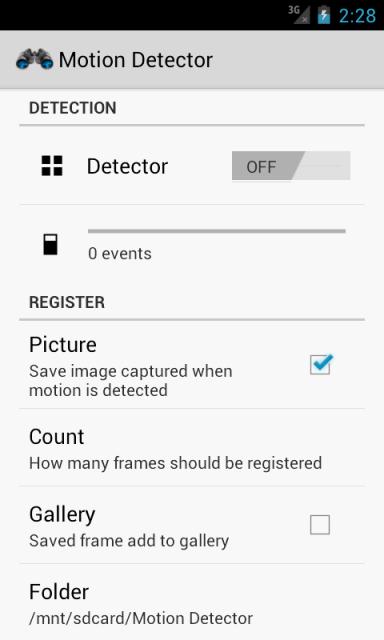
Is someone stealing the cookies from the cookie jar? Where have the chocolates gone? Who has eaten all the jelly beans, while 'kindly' leaving the black ones for others to 'enjoy?' Maybe it's time for you to put on that detective's hat and monocle and find out exactly what is going on. First course of action? Download Motion Detector by XDA Forum Member Zawadaki.

Surprisingly, Motion Detector actually turns your Android device into quite a capable motion detector—nothing extraordinary, but nonetheless, surprisingly capable.  By using either the front or rear camera of your device to register any sort of movement, Motion Detector also packs a couple of other useful functions that may be of use. With an easily navigable Holo user interface, Motion Detector can also take a picture of any detected movement by the camera, determined by a user-adjusted sensitivity level. This image is then saved to gallery or uploaded to cloud storage for later viewing. You can also toggle an alarm to sound every time movement is detected, and save an event log recording just when exactly are the chocolates been stolen. The app will still run if the screen is off, and there is even a widget to conveniently toggle the motion detector. However, please be warned, as the app will only be as good as your camera, and expectedly so, as the app relies entirely on the camera to perform its main function.

If not for its 'intended' purpose, it's sure fun for novelty. It's compatible with any Android device running 2.3 or newer, and is free and ad-free from the Play Store. If you would like to know more, be sure to check out the application thread.

___________________

[Join us August 9-11, 2013 in beautiful Miami, FL for XDA:DevCon. Read here to find out more.]Google+

Via xda-developers.com

More aboutYour Very Own Motion Detector

CASUAL Root, Recovery for the AT&T Samsung Galaxy S 4

Posted by Unknown

CASUAL Root, Recovery for the AT&T Samsung Galaxy S 4

Thinking about rooting and installing the fantastic TWRP recovery on your brand new AT&T Galaxy S 4? Are you looking for a more CASUAL™ way of going about things? Give it a go with Cross-platform ADB Scripting, Universal Android Loader!

As with all things CASUAL, this comes by way of XDA Elite Recognized Developer AdamOutler. However, ultimate credit for these wiles that Adam has packaged into this iteration of CASUAL goes to XDA Recognized Developer djrbliss. As Adam puts it:

Credits @djrbliss - Motochopper and Loki

So what can you expect with Adam's tool? As with the other CASUAL-packaged root methods, this will root your device and install the fantastic TWRP recovery with a single click. Furthermore, as the C in CASUAL implies, this Java-based program will run on any OS, provided that you have Java installed. In addition to having Java on the host machine, you also need to have USB debugging enabled on the target device.

Adam has also provided a video for those who want to see it in action before applying it on their own devices:

Looking to get started? If so, you can do so by visiting the original thread. And if you prefer CWM as your recovery of choice, Adam also has you covered.

___________________

[Join us August 9-11, 2013 in beautiful Miami, FL for XDA:DevCon. Read here to find out more.]Google+

Via xda-developers.com

More aboutCASUAL Root, Recovery for the AT&T Samsung Galaxy S 4

Flash Galaxy S 4 Custom ROM and Recovery, Testing Android Apps with Robotium – XDA Developer TV

Posted by Unknown

Flash Galaxy S 4 Custom ROM and Recovery, Testing Android Apps with Robotium – XDA Developer TV

XDA Elite Recognized Developer Chainfire has worked around Samsung's attempt to block rooting your phone. Therefore, new devices have been added to CF-Auto-Root. That and more are covered by Jordan, as he reviews all the important stories from this weekend. Included in this week's news is a tutorial on testing your app with Robotium. And in related news, there is an article on how flash custom ROMs and Recovery to the Samsung Galaxy S 4.

Jordan talks about the other videos released this week on XDA Developer TV. XDA Developer TV Producer Jayce released a video on phone interview tips and tricks and he follows it up with a video on tips and tricks for a main interview. Pull up a chair and check out this video.

Links to stories mentioned:

Check out Jordan's YouTube Channel and Jordan's Gaming YouTube Channel

___________________

[Join us August 9-11, 2013 in beautiful Miami, FL for XDA:DevCon. Read here to find out more.]Google+

Via xda-developers.com

More aboutFlash Galaxy S 4 Custom ROM and Recovery, Testing Android Apps with Robotium – XDA Developer TV

Unofficial CWM Recovery Port for the Ouya

Posted by Unknown

Unofficial CWM Recovery Port for the Ouya

Some time ago, we gave the Android-powered Ouya game console a place in our forums. Since then, we've not heard too much about this curious little non-phone/tablet device other than a guide to help users connect via ADB, sideload apps, and obtain root access and some as of yet fruitless efforts towards UART and Play Store access.

Luckily, this development lull has been interrupted thanks to XDA Forum Member mybook4, with some help from Forum Member sonofskywalker3 and Recognized Developer rayman. Mybook4 managed to port an unofficial CWM build to the device.

To install the CWM port on your own device, you need to first achieve root. To do this, visit Forum Member tcollum's root thread linked in the introduction. After you've achieved root access, fastboot boot into a recovery image stored on your computer. Once in the temporary recovery, flash a recovery-flashable update.zip for permanent recovery access.

Those interested in getting started should head over to the recovery thread. To learn more about the process, and how sonofskywalker3, mybook4, and rayman achieved this, visit the development project thread.

___________________

[Join us August 9-11, 2013 in beautiful Miami, FL for XDA:DevCon. Read here to find out more.]Google+

Via xda-developers.com

More aboutUnofficial CWM Recovery Port for the Ouya

Relive File Management of Yesteryear with Phone Commander for Windows Phone 7

Posted by Unknown

Relive File Management of Yesteryear with Phone Commander for Windows Phone 7

Some time ago, we covered a tool aimed at micromanaging your installed apps on Windows Phone 7 devices. While full app control is nice, it won't quite satisfy the obsessive tweakers. We also previously saw a plethora of registry tweaks courtesy of XDA Recognized Developer xboxmod. However, registry tweaks are often a tiny bit too risky for novice users who aren't ready to take a deeper plunge into device tweaking.

What's a good middle ground for those who want to do more than uninstall apps but don't want to risk breaking their registry? How about a good, old fashioned file manager! And on the topic of old fashioned, what about one that has a nostalgic air similar to one of the most popular FTP and file browsers from yesteryear. XDA Forum Member Martin7Pro has the solution with Phone Commander. And unlike Midnight Commander and Norton Commander, Phone Commander has quite a bit of planned added functionality, including:

Two-panel filemanager,
SMS and Mail configurator (groups, searching, backup),
Registry editor (editing, export, import),
Taskmanager (working apps dehydrating, resuming, closing, memory increasing),
Tiles configurator (creating, grouping),
MultiMedia manager (searching, playing etc.),
Applications configurator (uninstalling, grouping),
Keyboard Shortcuts configurator (HTC 7 Pro, Gold, Prime),
and another next by plugins system.

Even more impressive is what Martin7Pro has in mind for the next version:

Next version will have (still in development):

Opensource plugin system (like desktop TotalCommander). First plugin will support registry keys (as 'directories' ) and values (as 'files'). Second plugin in development is FTP, where one panel will contain normal WP7 filesystem, second panel FTP site filesystem, all commander directions will works in this configuration. Third plugin will support HWND Windows, processes and threads. Another plugins you can code yourself with pre-defined plugin interface (tiles/installed/running apps, Hardware drivers, URL protocols, system services, mailboxes, SMSBox, Calls, Schedulers etc).

So what are you able to do with it now? Good question. In the words of the dev:

To manage all files very quickly include multioperations (like TotalCmd).
To copy mp3 files to any phone directory by desktop TotalCmd, create playlist on phone and hear music.
To do the same vith movies, photos etc.
To copy e-books from my desktop and read them in phone (formats: doc, RTF – the best reading, pdf etc).
To edit all files in phone (the same formats, include binaries).
To import .reg files to Registry

Those wishing to get started should head over to the application thread to snag a copy of the XAP.

___________________

[Join us August 9-11, 2013 in beautiful Miami, FL for XDA:DevCon. Read here to find out more.]Google+

Via xda-developers.com

More aboutRelive File Management of Yesteryear with Phone Commander for Windows Phone 7

Compromised Sky Apps and the Security Aftermath

Posted by Unknown on Sunday, May 26, 2013

Compromised Sky Apps and the Security Aftermath

After our earlier article warning users to uninstall the Sky apps from their devices, it's time to take a look at the technical significance of this attack. Firstly, the attackers have managed to do two key things here, each of which should each be impossibly difficult for the Play Store update system to be secure:

  • Gained access to the Play Store Developer Console of Sky, presumably through gaining access to the associated Google Account
  • Obtained access to, or managed to otherwise generate or reproduce, the private RSA keys used to sign the Sky Android app packages

The former is obviously important to security, since without access to the Developer Console, it is not possible to push out an update to an existing app. While obviously a malicious user could publish his own app, he would not be able to push an update to an existing app already installed via the Play Store, unless he can do so using the account of the developer who originally published the application.

The latter is equally (if not more) important a security measure: Even if an attacker gains access to your Developer Console, they cannot push an update to an existing app if it is not signed using the same keys as before. This check is also enforced on each individual Android device, meaning even if there was a bug in the Play Store implementation of this security, your own device would reject the update! All bets are off though, if the private signing key is compromised or accessed.

In the case of the current Sky attack, it seems likely that both the Developer Account and the private signing keys were compromised. At this point, the safest option would arguably be for Google to use its remote uninstall trigger on these packages, if there is any indication the actual packages themselves were compromised. Sky will no doubt resist this, as they would not want to see their apps disappear from users' devices. Unfortunately for them though, it is long past that. These users need to uninstall the app now, as Sky can no longer continue to use these keys.

And herein lies the ultimate problem in the Android security chain (and indeed in most certificate based security systems). There is no system for effective, wide-reaching key revocation. If your Android signing keys are compromised, the trust chain ends. There is no way for you to revoke your compromised key, so clients will no longer trust an app update signed with it. There is also (less importantly from security, but more importantly from the developer's perspective) no way to securely supersede these keys with new ones (while ensuring an attacker cannot replace the keys with his own).

What does this mean for developers?

Take all reasonable steps to protect your Google Play Store Developer account:

  • Use two-factor authentication on the account.
  • Enable a password or PIN lock on your phones which contain the authenticator app. If you enter a backup phone number, consider the security risks of an attacker compromising your telephone provider via social engineering, or compromising your login to issue a new SIM on your account (to allow them to obtain a one-time login token).
  • Use a very, very, very, very, very secure password for your Developer account, and do not use this password anywhere else. Do not use this Google account for anything else. Log into it only from your own computer, only over WPA-2 (or better) encrypted WiFi, which you control. If you can type this password in under a minute, it's not secure enough. It should also be random. Random is not your partner's name followed by the year they were born in. Unless their name is "r$kGmn9d4Fl9&*sEm.Xs2Fl0_3fGjdk" and they were born in year "hJfMn?32VwmndkD2lsk34Rojks83″

Take immense care of your private code signing key as well:

  • It is called private for a reason. Users who install your applications are trusting you to keep this key safe. Do that, and do so with your life. You should plan on being dead for many years before anyone can gain access to this. Many years would likely be a number greater than the life of the universe. Or at least the expiry date on the certificate.
  • Do not decide to "just backup the key to Dropbox for safekeeping" (or indeed any other cloud or remote storage system).
  • Don't give anyone else access to the key. If you work in a team, can you perhaps operate a system whereby only one person signs the final updates? If it's really necessary, then share the key, and ensure the other person takes equal levels of precautions.
  • Attackers will always attack the weakest point in your system, and will password-reset your Dropbox account if it gets them access to the shared folder where you stored your private key (and password to decrypt the key in the corresponding readme file, which you knew to never do, but did anyway), or snoop on your emails if you ever attach the key.
  • Protect your key with a very strong and random password (remember the lecture before about what random means?) – do not use this password anywhere else. Do not store this password somewhere an attacker can gain access to. Do not store it with or near your key.
  • Store your private key on an encrypted USB flash drive, and disconnect the drive from your computer when not in use. Then put this drive in a safe when not in use. Store a second copy of the key in a safe deposit box in your bank. This will obviously be heavily encrypted, using a long, secure, random key.

Finally though, what lessons should we all learn (and perhaps Google start to ponder)?

  • There is currently no way to revoke a compromised application signing key. While arguably this is because anyone can sign an app using their own key, and install it on Android (thus meaning that revoking a key is of limited use), this isn't the case as Google pushes forward with trying to force automated updates upon unsuspecting users. Automated updates are a huge security risk until there is a rapid and effective key revocation system available to developers.
  • There is no way for developers to recover from a compromised signing key. Perhaps Google ought to review the signing system, such that developers create a CA key, which is then used to cross-sign other keys (such as their private signing key), such that if an application key is compromised, they can generate a new one, and sign it with their CA key. (this relies upon the developer understanding this, and realising he must guard the CA key with both his and his family's lives, and guard the application signing key "simply" with his own life)
  • The Sky apps in question had fairly generous permissions access on the devices they were installed upon. Perhaps developers should stop making their apps attractive targets, and stop bestowing themselves with such wide-reaching permissions on our devices. There is no reason for the majority of apps to make use of any permissions whatsoever (perhaps asides from being able to access the SD card, a permission I argue should be sandboxed to an app-specific area anyway)

Hopefully, Google will make use of their remote uninstall ability to remove the app from user devices, and also let them know somehow (email to their Gmail accounts) what happened, and that Sky did not look after their key properly. This is a major embarrassment to Sky, and they should hang their heads firmly in shame for not taking sufficient precautions to ensure that everyone with access to their signing key was suitably competent to prevent it falling into the wrong hands.

At the end of the day, it is the end user whose security is affected by the failings of the developer. And for this reason, security lapses such as these are unforgivable.

___________________

[Join us August 9-11, 2013 in beautiful Miami, FL for XDA:DevCon. Read here to find out more.]Google+

Via xda-developers.com

More aboutCompromised Sky Apps and the Security Aftermath

Job Interview Prep: Main Interview Part 2 – XDA Developer TV

Posted by Unknown

Job Interview Prep: Main Interview Part 2 – XDA Developer TV

Continuing his series about Job interviews, XDA Developer TV Producer Jayce talks about the biggest part of the job process, the main in-person interview. This follows up on his other videos talking about phone interviews and resume tips he has gotten from different people.

In today's episode, Jayce gives some tips about how to have success in an interview. Jayce then expands on his tips to help you get your next job with advice from his experience interviewing many people about jobs and careers.  Check out this video.

Check out Jayce's other videos and his Careers in Android Series.

Be sure to check out other great XDA Developer TV Videos.

Check out Jayce's HowToBecomeTV YouTube Channel

___________________

[Join us August 9-11, 2013 in beautiful Miami, FL for XDA:DevCon. Read here to find out more.]Google+

Via xda-developers.com

More aboutJob Interview Prep: Main Interview Part 2 – XDA Developer TV

Sky UK Apps Compromised on Play Store, Uninstall Them!

Posted by Unknown

sky_apps_playstore_hacked

Today is Sunday, 26th May, and across the world, many people have woken up following a leisurely lie-in to the small notification of an updated app being available. Nothing unusual there, or so you'd think.

The only difference is that today, some of these app updates may well have been malicious updates, pushed to some of the Sky UK official Android apps. As reported by PC Pro and Android Police; the  Sky Go, Sky+, SKY WiFi, and Sky News apps all appeared to be targeted in the attacks that involved updates being pushed to the Google Play Store for these applications.

Fortunately, the compromise was more than a little obvious, with the app listing being defaced, including the header banner, description, and screenshots of the Play Store listing, which have since been removed (Thanks to AndroidPolice for the image).

Obviously, the best advice here is to uninstall any Sky apps that you have installed. This ought to alleviate most risk (unless these apps contained an unknown, zero-day exploit that permitted them to break beyond the application container). This is highly unlikely though, and uninstalling the app should be sufficient a precaution to take.

The question here is: Would anyone have noticed this attack had the Play Store listing not been visibly changed? Had the listing not been defaced, would anyone be aware of this surreptitious update which had been installed? I believe nobody would be aware, and everyone would be sitting, none-the-wiser, with a ticking time-bomb on their phones and tablets. These are not small-time apps, with the Sky Go app having between 1 and 5 million users, so the potential for building a silent bot-net of devices is not insignificant.

Later today, we'll take a dive in and look at the implications of this attack, and what it means for app developers, and users alike. In the meantime, stay safe, and uninstall any Sky apps on your phone. Doing this, you should be reasonably protected against any further risks of this compromise.

Finally, one last piece of advice for Sky or anyone else affected by a similar security incident in the future: When you do announce the breach via Twitter, please do so and link to something verifiable on your own website that details it (in light of recent Twitter accounts being hacked), rather than making a grammatically incorrect and rushed tweet that raises the question of if your Twitter account is compromised:

skysecurityfail

 [Source: AndroidPolice; PC Pro]

___________________

[Join us August 9-11, 2013 in beautiful Miami, FL for XDA:DevCon. Read here to find out more.]Google+

Via xda-developers.com

More aboutSky UK Apps Compromised on Play Store, Uninstall Them!

Your Very Own Smart Flashlight with Ambient LED

Posted by Unknown

Your Very Own Smart Flashlight with Ambient LED

I actually don't really have any personal real-life scenario in mind, other than this being a handy little night light, where you might need a flashlight that will turn on and off automatically by itself. But then again, I feel the same way for many of the other 'software gimmicks' that some phones have nowadays, such as eyeball tracking software and the like. Nevertheless, the Ambient LED Flashlight is a pretty cool app that will turn on 'only when you need it.'

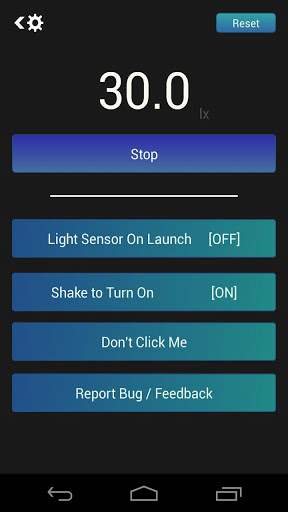
Developed by XDA Forum Member apple4life, Ambient LED Flashlight uses your device's light sensor to know exactly when you need or don't need light. With the flexibility to calibrate with a lux meter exactly in what light conditions you need the flashlight to be on and off, the app will then activate and deactivate the LED flash of your device accordingly. Hence, the scenario of transforming your phone into a night light.

Apple4life has also integrated a feature, whereby you can activate the LED flash with a simple shake of the device. Of course, both the light sensor and the shake features work on top of Ambient LED Flashlight's basic function of being a typical flashlight. If you would like to turn off the light sensor and shake features, you can do so through the settings menu. Apple4life also acknowledges that some devices may react slower if using the light sensor, an issue that is said to be attributed to the inability to get an accurate reading of the sensor.

Ambient LED Flashlight is compatible with Android versions 2.2 and newer, and kudos to apple4life for making the app free and ad-free. If you would like to check it out, head over to the original thread for more information.

___________________

[Join us August 9-11, 2013 in beautiful Miami, FL for XDA:DevCon. Read here to find out more.]Google+

Via xda-developers.com

More aboutYour Very Own Smart Flashlight with Ambient LED

Xposed Framework Module for the AT&T Galaxy S 4

Posted by Unknown on Saturday, May 25, 2013

Xposed Framework Module for the AT&T Galaxy S 4

Got yourself a brand new Galaxy S 4? Are you looking for some fun mods to make it truly your own? If you're about to apply some custom "ROMs" that really happens to be more of a theme than a ROM, you should consider trying something new using the Xposed Framework instead.

Not too long ago, we talked about the relatively new Xposed Framework by XDA Recognized Developer rovo89 and how it enables end users to apply modifications that would otherwise require flashing update.zip files. In addition to making the experience safer for guinea pigs testers, Xposed also makes the process significantly easier and less intimidating to new users, as long as the framework is present in the installed ROM.

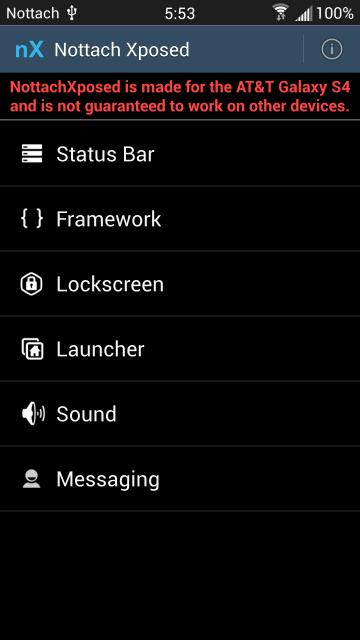
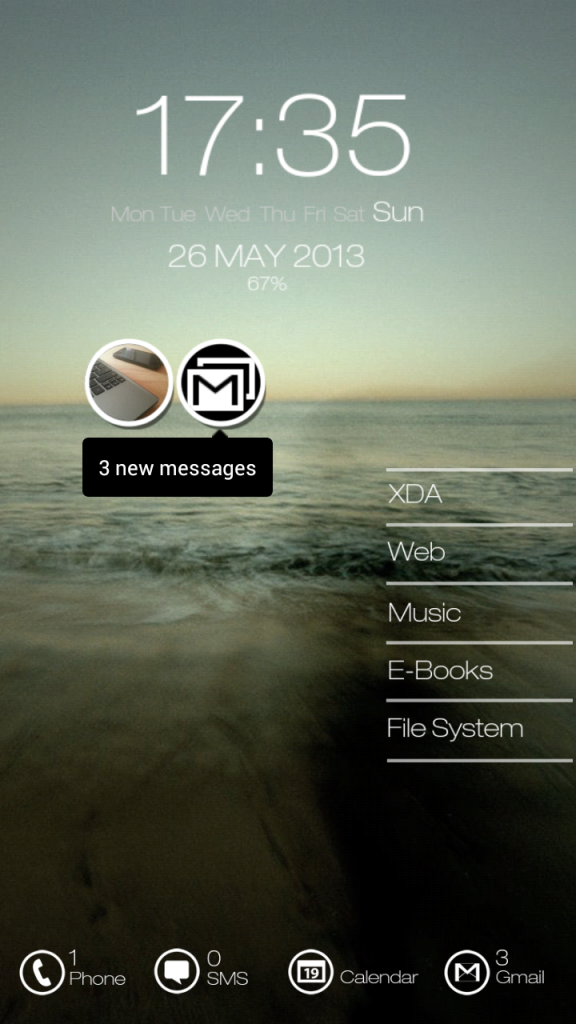
Making use of rovo89′s tool, XDA Recognized Developer Nottach has released an Xposed module to give your device some added personality and features. Known as NottachXposed, this module overhauls your AT&T Galaxy S 4′s status bar, launcher, lock screen, framework, messaging app, and more. Here are some of the highlights:

What's New:
Color all the things!
Circle battery icon option
Any color circle battery
Any color quick toggles
Show date with status bar clock
Hide headset apps notification
Hide headset connected icon
Any color signal icons
Any color status bar icons
Smart alarm icon options
Hide quick setting labels
Hide quick setting indicator bars
Fixes and optimizations
Other stuff I forgot

If you're interested in getting started, head over to the original thread.

___________________

[Join us August 9-11, 2013 in beautiful Miami, FL for XDA:DevCon. Read here to find out more.]Google+

Via xda-developers.com

More aboutXposed Framework Module for the AT&T Galaxy S 4

Job Interview Prep: Phone Screen Part 1 – XDA Developer TV

Posted by Unknown

Job Interview Prep: Phone Screen Part 1 – XDA Developer TV

XDA Developer TV Producer Jayce has been very busy creating videos to help you in your job search. He spoke to people who said resumes don't work. He talked to a recruiter to reveal how resumes are chosen. So, now that you've got your potential employer's attention, what next?

In today's episode, Jayce interviews Brian Shin, a recruiter at ProCount Staffing, about phone interviews. Brian gives some tips about how to success in a phone interview. Jayce then expands on his tips to help you get your next job.  Check out this video.

Check out Jayce's other videos and his Careers in Android Series.

Be sure to check out other great XDA Developer TV Videos.

Check out Jayce's HowToBecomeTV YouTube Channel

___________________

[Join us August 9-11, 2013 in beautiful Miami, FL for XDA:DevCon. Read here to find out more.]Google+

Via xda-developers.com

More aboutJob Interview Prep: Phone Screen Part 1 – XDA Developer TV

Auto Test Your Android Apps with Robotium

Posted by Unknown

Auto Test Your Android Apps with Robotium

You've just finished coding your very first app, but before you release it to the wild, you need to do one very critical step: testing. Most Java developers out there have heard of Selenium.

No, I'm not talking about the metalloid 34Se. I'm talking about the Java-based automated application tester. Luckily for Android developers, there's a similar tool called Robotium. According to the Robotium project page:

Robotium is an Android test automation framework that has full support for native and hybrid applications. Robotium makes it easy to write powerful and robust automatic black-box test cases. With the support of Robotium, test case developers can write function, system and acceptance test scenarios, spanning multiple Android activities.

Thankfully, XDA Senior Member EatHeat has written a guide to help new developers perform automated testing on their applications using this tool. Currently the guide covers installation and use of Robotium to test your applications, given that you have the source code at your disposal. However, don't worry too much if you don't. EatHeat is also planning on extending his guide to cover Robotium's ability to test apps even when source is unavailable. That's right, all you need is the APK!

Please keep in mind that you should still actually test your application manually before launching it to the wild. In fact, we even have resources in our new App Development forums to help with that! But for those who want to do a little additional testing, Robotium may be just what you're looking for.

To get started, first head over to the Robotium project page on Google Code. Once you've downloaded the required files, head over to the original thread for EatHeat's guide.

___________________

[Join us August 9-11, 2013 in beautiful Miami, FL for XDA:DevCon. Read here to find out more.]Google+

Via xda-developers.com

More aboutAuto Test Your Android Apps with Robotium

Open Source CPU Info App for Windows

Posted by Unknown

Open Source CPU Info App for Windows

So you're playing with your shiny new Windows 8 tablet PC, when one of your like-minded geeky friends asks you to recite its hardware specs. Unfortunately, when you're about to spout off details of its Clover Trail architecture and its supported features, you draw a blank. In fact, you even forget about its clock speed and whether or not it supports virtualization.

Luckily, this is where XDA Forum Member familyguy59 comes in. He has shared source code for an app that detects CPU information. The app actually goes beyond simple information such as max clock speed, processor name, and number of physical and logical cores. It can even detect bus speed, cache sizes, and much more. And best of all, the application is open source.

Today I created a small program which detects most information of your CPU. The program is called 'DetectCPU' and it does what it says.

The program is licensed under the GPL3.0. This program is written in Visual Basic(.Net) 2012 for Windows Desktop.

Want to look at the code or compile a copy for yourself? Interested in incorporating some of its functionality into your own app? Whatever the case, head on over to the original thread to take a peek!

___________________

[Join us August 9-11, 2013 in beautiful Miami, FL for XDA:DevCon. Read here to find out more.]Google+

Via xda-developers.com

More aboutOpen Source CPU Info App for Windows

Guide to Using Adobe Air on Android

Posted by Unknown on Friday, May 24, 2013

Guide to Using Adobe Air on Android

When writing an app with performance in mind, you most likely want to write it native code using  the Android NDK, rather than some sort of interpreted language. However, sometimes you may be more familiar with a particular interpreted language or you may simply not need the performance benefits of native code. In these cases, many people begin with Java, but some feel a bit more facile with Adobe Flash.

This is where XDA Senior Member neumedia comes in. He has crafted a quick guide aimed at helping flash developers who are just getting started with using Adobe Air on Android. Spanning across three posts, the currently covered topics are comprised of various issues you'll likely face when using Air on Android:

  • How do you intercept device sleep and wake events on adobe air
  • How to handle back button key press
  • How to enable your Adobe Air app to be transferrable to the external SDcard

Neumedia suggests that users first visit Adobe's online guide for using Air on Android as a primer. Once you have done this, visit the guide thread for solutions to the issues above. It's worth mentioning again, however, that if ultimate performance is key, you're better off just writing native code. However, using Air may be valuable for those writing apps that don't need quite as much performance and if you are more familiar with another language.

___________________

[Join us August 9-11, 2013 in beautiful Miami, FL for XDA:DevCon. Read here to find out more.]Google+

Via xda-developers.com

More aboutGuide to Using Adobe Air on Android

Chainfire Patches Samsung’s Attempts to Block Root, New Devices Added to CF-Auto-Root and ADBD Insecure

Posted by Unknown

Chainfire Patches Samsung's Attempts to Block Root, New Devices Added to CF-Auto-Root and ADBD Insecure

Samsung, Samsung, Samsung, you never cease to amaze. You love to say that you are friendly to the developer and user communities, and some have even bought that. There's an old saying that says, "Actions speak louder than words." There's another one that says, "Fool me once, shame on you; fool me twice, shame on me." Both apply here, as you stooped to another low when you started rolling out updates to the Samsung Galaxy S4 that disabled the ability to elevate user permissions (effectively what "su" does) via a kernel configuration.

With the update of SuperSU to v1.30, XDA Elite Recognized Developer Chainfire has patched the attempt by Samsung to hamper the developer community they so (hate) love.  While good for a time when Samsung first deployed this, hack attempts like supercurio's StupidSU are no longer needed, as they utilized a temporary solution.

In addition to the SuperSU update, Chainfire has also updated his CF-Auto-Root to include the Sprint Galaxy S4 and Canadian Galaxy S4, and updated the Samsung Galaxy S4 I9500 and I9505 releases. And to top it all off, ADBD Insecure was updated to allow it to play nicely with SELinux on the S4. Whew! That's quite an impressive body of work in such a short time.

I think it's time we learned a lesson from some wise, old contemporary philosophers who asked us to get on our knees and pray that "we don't get fooled again" by Samsung's words.

___________________

[Join us August 9-11, 2013 in beautiful Miami, FL for XDA:DevCon. Read here to find out more.]Google+

Via xda-developers.com

More aboutChainfire Patches Samsung’s Attempts to Block Root, New Devices Added to CF-Auto-Root and ADBD Insecure

Jolla Sailfish OS Device Unveiled, New XDA University Tutorials! – XDA Developer TV

Posted by Unknown

Jolla Sailfish OS Device Unveiled, New XDA University Tutorials! – XDA Developer TV

New Mobile Operating System Jolla Sailfish's flagship device has made its first appearance. That and more are covered by Jordan, as he reviews all the important stories from this week. Included in this week's news are two articles about XDA-University courses teaching you how to port ClockworkMod recovery and crafting recovery-flashable packages.

Jordan talks about the other videos released this week on XDA Developer TV. XDA Developer TV Producer TK gave us a run down on Google I/O 2013, Kevin gave us a tour of AutomateIT, and TK released an app review of Profile Flow. Pull up a chair and check out this video.

Links to stories mentioned:

  • Jolla Sailfish OS Flagship Device Makes First Appearance
  • App Analytics, or the Death of the Independent App Developer
  • Forums Added for the LG Optimus G Pro and Sony Xperia Tablet Z
  • XDA University: Porting ClockworkMod Recovery to New Devices
  • XDA University: Crafting Recovery-Flashable Packages
  • One Stop Guide Shop for the Newbie and Dev
  • What Happened at Google I/O 2013 – XDA Developer TV
  • Tasker Alternative: AutomateIt, Automates Your Device Tasks – XDA Developer TV
  • Android App Review: Change Your Phone's Profile with Profile – XDA Developer TV

Check out Jordan's YouTube Channel and Jordan's Gaming YouTube Channel

___________________

[Join us August 9-11, 2013 in beautiful Miami, FL for XDA:DevCon. Read here to find out more.]Google+

Via xda-developers.com

More aboutJolla Sailfish OS Device Unveiled, New XDA University Tutorials! – XDA Developer TV

Boot Animation Paradise for your Android Device

Posted by Unknown

Boot Animation Paradise for your Android Device

The default boot animations on any device, no matter which manufacturer, are generally pretty bland and boring, which is probably why many of us dedicate an unreasonable amount of our time in our quest for the 'perfect' boot animation to greet us every time we turn on our device. Well, there is good news, as XDA Forum Member Vincent8111 has compiled nearly 400 boot animations into one program for our pleasure and convenience.

The BootAnimation Changer runs on Windows PCs and delivers an extensive collection of boot animations spanning a multitude of different themes. Animations can be sorted either by name or file size, and range from the opening sequence of The Simpsons, to anime, to colorful abstract patterns, and of course, our beloved Android mascot. If you would like to see the entire boot animation, you can conveniently do so with the preview button and window.

One notable feature of the BootAnimation Changer is that although each animation comes by default in its own native resolution, they can be resized to the dimensions of your device. Now, one would think that this would limit the amount of choice for users with unconventional resolution devices. However thankfully, Vincnte8111 included a homothetic option. This keeps the proportions of the animation while resizing, rather than stretching the animation to fill a larger area which will result in warping and loss of quality. However, devices with higher resolution will still be restricted in terms of choice, as there is no way of actually enlarging images while keeping the same quality and details. When resizing boot animations, you can also set the the quality of the JPEG image files of the animation on a '0 to 10′ scale if you would like to adjust the animation file size.

The other nifty useful function of the BootAnimation Changer is the ability to export the boot animation as a zip file, which you subsequently flash onto your device through a custom recovery. And for users who own devices with no external storage capabilities, the flexibility to flash the animation onto the device through Android Debug Bridge (ADB).

A bit of a warning though, especially for those with limited broadband usage, the program comes in at a pretty hefty 1.6 gigabytes thanks to the 400 or so boot animations that comes with it. The BootAnimation Changer comes in French, and English, and is free from the original XDA post. If you would like to know more, visit the program thread for more information and download.

___________________

[Join us August 9-11, 2013 in beautiful Miami, FL for XDA:DevCon. Read here to find out more.]Google+

Via xda-developers.com

More aboutBoot Animation Paradise for your Android Device

Flash Custom ROM and Recovery to Samsung Galaxy S 4

Posted by Unknown on Thursday, May 23, 2013

Flash Custom ROM and Recovery to Samsung Galaxy S 4

After reading about Dan Rosenberg's bootloader exploit for the Samsung Galaxy S 4, I figured it would not be long before someone would craft a package for loading custom ROMs. Of course, I shouldn't be surprised that Dan is the one who figured it out.

You may know him better as XDA Recognized Developer Djrbliss. In his original thread, you'll learn about the Loki package he put together to load custom recovery and ROM images into AT&T and Verizon variants of the GS4. The device must already be rooted, but he links to guides that can walk you through that as well.

There are a couple of caveats to the exploit. The first is that it will be very easy for the carriers to patch against it, so avoid OTA updates unless you know they don't contain a patch. The second is that the Loki package is intended for developers, which means it's not just a one-click operation. Having looked through the code repositories, it does look like a very straightforward set of command line operations, so don't be scared off either.

The exploit side steps the signature check when the phone launches a ROM. Dan found it when looking at the phones aboot partition. Searching for some of the strings found in his disassembly, he discovered it's nearly identical to the Little Kernel open source bootloader. This made it significantly easier to figure out how the boot process works. It turns out that the signature check function is written to memory during the boot process. His exploit overwrites this code to return a confirmation that the ROM is signed even though it is not.

___________________

[Join us August 9-11, 2013 in beautiful Miami, FL for XDA:DevCon. Read here to find out more.]Google+

Via xda-developers.com

More aboutFlash Custom ROM and Recovery to Samsung Galaxy S 4

Windows-Based Multi-Tool for the Sony Xperia U

Posted by Unknown

Windows-Based Multi-Tool for the Sony Xperia U

If you are a flashaholic and an owner of the Sony Xperia U, you may be interested in the multi-purpose tool developed for the Xperia U by XDA Forum Member AlexDroid00 that allows you to perform a whole host of actions that may alleviate the required process that are necessary otherwise.

Developed for Windows PCs, the multi-tool for the Xperia U combines many actions, which would otherwise have to be performed individually and with different tools,  into one program for your convenience. These functions include:

  • Flash kernel with Fastboot
  • Flash kernel with ADB
  • Rebooting, installing and updating applications, wiping data and cache, running a logcat, and reverse tethering of capslock66 with the ADB/FASTBOOT Tool
  • Boot animation Tester
  • Bootloader unlocking wizard
  • Root and Un-root
  • Button for visit the XDA's thread to check for upgrades
  • Driver ADB/XU/FASTBOOT Installer
  • Credits visualizer
  • Language selector

Using the tool is easy and straight forward, only requiring you to follow the prompts in the program when running. With 8 updates under the belt, AlexDroidoo is actively working on the tool, He also has an extensive list of future improvements and features on the agenda, and he is taking part in discussions and answering queries from the community. The tool is available in 2 languages, Italian and English, and is a free download of about 45 megabytes.

So if you are a user of the Sony Xperia U, be sure to check out the original thread for more details and discussion.

___________________

[Join us August 9-11, 2013 in beautiful Miami, FL for XDA:DevCon. Read here to find out more.]Google+

Via xda-developers.com

More aboutWindows-Based Multi-Tool for the Sony Xperia U

XDA University: Crafting Recovery-Flashable Packages

Posted by Unknown

XDA University: Crafting Recovery-Flashable Packages

Those of us who use Linux on a day to day basis don't think twice about sinking our fingers into the system files that govern how our devices perform. For instance, I use an LG L9 and was quite comfortable playing around with the way my SD card was being mounted in order to improve performance. For those who aren't at home with the way the OS works, adding a startup script with a few lines of code might as well be witchcraft. That's why flashable zip files are so handy for simple tasks and indispensable for complex projects. If you do it right, all the end-user needs do is copy a file to his SD card and reboot into recovery to flash the package.

There are some automatic tools out there that can help create these files. In fact, we've already covered at least one of them. But there's really no substitute for knowing exactly what goes into one. XDA Senior Member Denkantor can explain it all, and decided to make an XDA University guide on package for flashing from recovery. Head on over to his original thread to see what he's up to.

It doesn't take much to make an update.zip file. Denkantor likes to use 7zip. And if you're on Windows, he recommends Notepad++. You'll also need the file(s) you want to flash. The Edify scripting language is what a custom recovery is looking for. You'll be guided through the basics, but learning more is easy since you can look at any flashable file as an example.

___________________

[Join us August 9-11, 2013 in beautiful Miami, FL for XDA:DevCon. Read here to find out more.]Google+

Via xda-developers.com

More aboutXDA University: Crafting Recovery-Flashable Packages

Android App Review: Change Your Phone’s Profile with Profile – XDA Developer TV

Posted by Unknown

Android App Review: Change Your Phone's Profile with Profile – XDA Developer TV

We often want our mobile device to act differently depending on where we are. When we are at the gym, we may want the ringer to be loud so we can hear it over the sound of the treadmills. When we are at the office, we want it to be quiet or silent to not bother your cubicle-dwelling co-workers. But sometimes, we forgot to change our profiles.

XDA Forum Member amithgc has an application to help change profiles and can make your smartphone even smarter.  In this video, XDA Developer TV Producer TK reviews Profile Flow. TK shows off the application and gives his thoughts.

Be sure to check out other great XDA Developer TV Videos

___________________

[Join us August 9-11, 2013 in beautiful Miami, FL for XDA:DevCon. Read here to find out more.]Google+

Via xda-developers.com

More aboutAndroid App Review: Change Your Phone’s Profile with Profile – XDA Developer TV

Side-Swiping Multitasking with Kakudo

Posted by Unknown

Side-Swiping Multitasking with Kakudo

Recovering iPad users may still remember the multitasking function where you can swipe left or right to switch between running apps. I sincerely apologize if you are still trying to put this traumatic period of your life behind you, but your nightmares may be reawakened in the form of Kakudo, an app that brings this feature to the Android operating system.

A surprisingly useful function, XDA Forum Member Acela1230 decided that the iPad was undeserving of such practicality, and took the initiative to bring it over to Android. By simply swiping left or write from the edges of the screen, you can easily switch to other currently active apps on your device. A minimizable bar at the bottom of the screen housing shortcuts to your favorite apps can also be revealed with a swipe from the bottom up. Customization is also available, allowing for different sensitivity levels of the swipe-able areas, the icon and swipe bar size, as well as toggling on and off the notification icon, the app drawer, and start on boot. To turn off or on Kakudo, a master button on the top right hand corner will allow you to do just that. Issues acknowledged by the developer include lag when launching apps at the home screen, and the inability to toggle GPS on and off.

Acela1230 has developed an app for Android that delivers a function that (as a far as I am aware) is unheard of in the Android market, until now. Users of devices running Android 2.3 or newer can download Kakudo for free from the Play store, and are invited to become beta testers at the Google+ group page. If you would like to find out more, be sure to check out the application thread for additional information.

___________________

[Join us August 9-11, 2013 in beautiful Miami, FL for XDA:DevCon. Read here to find out more.]Google+

Via xda-developers.com

More aboutSide-Swiping Multitasking with Kakudo