Google Tasks and Calendar All-in-One with Day by Day

Posted by Unknown on Tuesday, April 30, 2013

Google Tasks and Calendar All-in-One with Day by Day

For those who rely heavily on Google Tasks and Calendar for Android, you may want to check out Day by Day, a feature packed app developed by XDA Forum Member appiens.

In essence, Day by Day combines a to-do list and calendar into one single app for your Android device. It does this with a pleasant Holo user interface with 2 horizontally sliding screens, one of which is a tasks list and the other is a calendar. The task screen lists all tasks drawn from your Google Tasks, and all calendar events planned with Google Calendar as well as any other calendar that may be synced to your device.

The calendar screen is quite standard, displaying the present month, and tasks and events of the selected date. Both tasks and events can be created and edited with ease, and are automatically synced with Google. If you would like to wish a friend a happy birthday, selecting the event will bring up the option to view the friend in your contacts list. Swiping right on tasks and events allow for quick deletion of the selected. There is widget support, and 20 aesthetic themes for you to choose from.

Day by Day is an app that will definitely help you with day by day tasks and events. It's easily navigable with a logical interface, and nicely keeps all your task and event synchronization in one place. Appiens has made this available to all users of Android 2.2 and newer, and can be downloaded for free from the Play store. So if this interests you, check out the original thread for more details.

Google+

Via xda-developers.com

More aboutGoogle Tasks and Calendar All-in-One with Day by Day

Official and Confirmed: AT&T Galaxy S 4 is Bootloader Locked

Posted by Unknown

Official and Confirmed: AT&T Galaxy S 4 is Bootloader Locked

The Samsung Galaxy S 4 was just released a few days ago, going on sale across the US through most carriers (root already achieved). Reviews are somewhat mixed, with some claiming this to be the latest best thing in smartphone history, while others are not so impressed. US carrier versions seem to suffer from carrier-itis, which is a medical term for "severely crippled and loaded to the eyeballs with bloatware". If history has taught us anything since the Galaxy family has been around, it is the fact that Verizon Wireless tends to lock the daylights out of every phone in in their line up. It is in fact, one of the only carriers world wide that actually sell bootloader locked Galaxy devices (as well as many other devices). Well, Verizon, it looks like your worst nightmare is coming as AT&T is going to start following your same model as well. According to a review posted by Engadget as well as several people talking in IRC channels, and topped off with a comment by Mr. Cyanogen himself, it seems to be that the "death star" is bringing in Samsung's latest and greatest with a big slap in the face of all developers: The phone has a locked bootloader.

I know that at this point, Samsung is probably hiding behind the carriers, using them as shields, contractual obligations, yadda, yadda, yadda. We tend to think that this is a somewhat valid excuse, but the truth of the matter is that when a certain company reaches a point of critical mass in terms of how big it actually is, the tables turn. In other words, AT&T's success (or Verizon's for that matter) is not just dictated by the quality of its network. One thing that people also look at in this day and age, is the wide array and variety of top of the line devices being offered. The combination of both certainly makes up for about 90% of the total success of a carrier, with the remaining 10% attributed to good customer service. So, that leaves you at, quite possibly (and being a bit conservative) on a 60-30 split in terms of importance. After all, you could have a 5G network, but if you have no phones to support it, what good is it? I guess what I am trying to say here is that Samsung definitely had a lot of weight in negotiations in order to avoid caving in like this, which makes me wonder even more if the Korean manufacturer is in fact leaning towards the dark side.

The SGS4 International and T-Mobile versions are sold unlocked and are perfectly capable of taking the market by force. Why do you let two carriers dictate how you make your products? I hope that Samsung realizes that they likely have considerable weight as people nowadays are happy about devices performing well, and not so much about getting over 9000 Mbps in speed (particularly when you will be capped or hit a limit). So, Samsung, you ARE driving the market and the continued success for these carriers and not the other way around. At this point in time, I can draw two conclusions:

  1. You have some of the worst contract reviewers and negotiators on the planet when it comes to dealing with US carriers.
  2. You are indeed turning a page in history and have started going down a path where developers and hobbyists are not really welcome anymore.

The path you are taking right now is likely #2, as you obviously can spend a pretty penny on half decent lawyers (based on recent wins against Cupertino's finest). In fact, it seems to me that you are turning into what you claimed to despise the most. You have absolutely, positively, nothing at all to gain from locking the bootloader (and neither does AT&T for that matter), and in fact, you are simply losing a good stream of bug reviewers and people who can discover pretty serious flaws in your code. Let alone the sole fact that, regardless of your statements about us (us being the developer and hobbyist world) representing a small fraction of your overall sales, you will definitely lose lots and lots of potential sales, which will translate into millions of dollars of lost revenue. Again, having someone with as massive of a following as Steve Kondik telling hundreds of thousands of users from this group not to buy this device… well, lets just say that I sincerely hope your contract with AT&T has a provision for getting paid back for unsold devices.

Well, Samsung, if for argument's sake you are indeed being locked by AT&T into this nonsensical contractual provision, you are effectively the proverbial elephant with a chain around its ankle. For those of you not familiar with this analogy, when an elephant is young, it can be chained easily to prevent it from escaping. As the elephant grows up, the chain can no longer restrain it, but the elephant does not break it because it knows in its head that it will not be able to, even though it can. You needed to be around when you were a smaller player in the market and as such, you took upon weird termed contracts and accepted certain conditions from carriers. Fast forward 12 years or so since the boom of mobile devices and your introduction to the world of mobile communications. You are now a behemoth and are still bound by the same stupid chain, refusing to break it because you think you will hurt your business. You are a provider, you have many, many venues to get your products out to your customers (other carriers, developer edition phones, selling directly, etc). God only knows how many millions of dollars you spend yearly on marketing efforts, so getting your name out there is not exactly an issue either. Why in the world are you letting a single (well, two if you count Verizon) dictate how YOU do business? You have successfully made a name for yourselves already. I am positive that IF you were to threaten carriers to pull your devices from their networks, they would effectively soil themselves. Oh, and there is no law protecting them from being able to block your devices from working with their network either. It would likely fall under the umbrella of anti-competitive practices (aka boycott). Considering past/recent events involving carriers (DMCA and the T-Mobile/AT&T failed merger, for instance), I am sure that any court would be thrilled to hear such a case and rip the carriers to shreds.

So, I am sincerely hoping that you are indeed being forced by carriers AND that you are taking resolutions to tackle this pointless ordeal. All I am going to say is that after a 1 year affair with an Epic 4G Touch, being afraid to brick my device for flashing it as it was hard brick positive due to faulty chips (even with a documented reason AND fix provided by our developers which you paid no attention to whatsoever); and after seeing this ongoing trend by Samsung to bend over for carriers while making developer's lives miserable and caring little about their users, I will gladly never recommend Samsung devices to anyone ever again. Just because I can, here is Steve Kondik's closing statement on his Google+ post:

I would not recommend buying this device on AT&T if you want to run CyanogenMod or another custom ROM, or if you are a developer and need to work with or debug the lower layers.

It is now time to act and try to save face, Samsung.

You can find more information in here, here, and a bit more discussion going on in here.

Google+

Via xda-developers.com

More aboutOfficial and Confirmed: AT&T Galaxy S 4 is Bootloader Locked

Android App Review: High Quality Phone Call Recording Done Right – XDA Developer TV

Posted by Unknown

Android App Review: High Quality Phone Call Recording Done Right – XDA Developer TV

Sometimes when you are talking with business associates or trying to get directions to the hottest party, it would be nice to be able to record the call to have an audio record of action items or turn-by-turn directions. This is of course assuming that laws in your jurisdiction permit you to record others.

XDA Senior Member zakiancel has an application to help you record your voice calls and make voice notes in a lot of formats.  In this video, XDA Developer TV Producer TK reviews Incall Recorder. TK shows off the application and gives his thoughts, so check out this app review.

Be sure to check out other great XDA Developer TV Videos

Google+

Via xda-developers.com

More aboutAndroid App Review: High Quality Phone Call Recording Done Right – XDA Developer TV

How Will Paranoid Android Interpret Multi-Window / Overlay Functionality?

Posted by Unknown

How Will Paranoid Android Interpret Multi-Window / Overlay Functionality?

Paranoid Android, the popular AOSP based ROM for multiple devices, and multi-window functionality are two things that we have mentioned here on the XDA Portal several times before. It now seems as though the two are about to become quite closely acquainted following news that the Paranoid Android team are in the process of developing their own implementation of this much sought after feature.

Of course this kind of functionality is nothing new, Cornerstone allowed users to do three things at once before Paranoid Android had even seen the light of day and Samsung were still being harassed about updates for the original Galaxy S. It has, however, received a fair amount of recent publicity due to its inclusion as a standard feature on devices like the Samsung Galaxy Note 2. We've also seen a surge in the popularity of apps such as Floating Stickies and Overlays, which allow users to achieve a kind of "windowed" multitasking experience. Given the amount of user demand for such a feature I guess it was inevitable that some of the most popular custom ROMs out there would begin trying to implement this right out of the box. Well, Cyanogenmod did previously try to integrate Cornerstone into CM9 but that didn't go so well.

The difference with the news from Paranoid Android is that they will be attempting to create this modification from scratch and presumably avoid the same kind of problems faced by the CM team. In a Google+ post from the PA team, they state that their implementation will outshine the competition. For the moment, though, this is still in a very early stage and a lot more testing and development is still required. The video that accompanies the post shows apps running as standalone windows, almost like with floating widgets, which are triggered from the notification tray and retain the hybrid settings applied by the user. However, this is not how the feature will act in its final form. This is purely for testing, but does already look incredibly promising and only begs us to wonder just what shape will this take in its final and finished form.

Check out the G+ post above or the video below for more information and let us know your opinions in the comments.

Google+

Via xda-developers.com

More aboutHow Will Paranoid Android Interpret Multi-Window / Overlay Functionality?

Forums Added for the T-Mobile HTC One, AT&T and Sprint Galaxy S 4

Posted by Unknown on Monday, April 29, 2013

Forums Added for the T-Mobile HTC One, AT&T and Sprint Galaxy S 4

Not too long ago, we covered the release of the HTC One and gave you a quick glimpse of its performance. Shortly after, we gave the One a home on our forums for both the international and some US carrier variants. Now, however, we have also created a forum for the T-Mobile HTC One variant.

Similarly, we covered the release of the Samsung Galaxy S 4 and gave the international version a forum here last month. However, now we are happy to also give the AT&T and Sprint variants their place as well.

Those looking to get in on the discussion can do so by visiting the links below to the newly created forums:

  • T-Mobile HTC One
  • AT&T Samsung Galaxy S 4
  • Sprint Samsung Galaxy S 4
Google+

Via xda-developers.com

More aboutForums Added for the T-Mobile HTC One, AT&T and Sprint Galaxy S 4

Three All-in-One Solutions for Android Driver Issues

Posted by Unknown

Three All-in-One Solutions for Android Driver Issues

It used to be the case that whenever you wanted to use ADB or FastBoot with a device, you were required to install a specific driver for each device. For anyone regularly flashing several devices or developers who test on numerous different phones and tablets, this could prove to be something of an inconvenience, especially when setting up for the first time and having to hunt around in a dingy corner of an OEM website looking for the correct driver. Thankfully, things are somewhat simpler nowadays thanks to several different solutions to this old issue.

You may remember us previously talking about the Universal Naked Driver by XDA Senior Member 1wayjonny. This is a Windows based tool (compatible with XP, Vista, 7 and 8) that allows you to make use of ADB, Fastboot, and (for ASUS devices) APX on over 250 different devices with minimal effort. Check out the link above and the forum thread for more information on this one.

Continuing on from the success of the Universal Naked Driver, Koush has taken the device/vendor ids collected within the UND thread and used them to create an alternative solution, which claims to work on all Android phones and all versions of Windows, presumably XP and above. You can find Koush's Universal ADB Driver and the source for it from the G+ post linked to above.

Last but certainly not least is a project entitled Casual Android Driver Installer, or CADI for short. This is the brainchild of XDA Senior Member jrloper, and like the two already mentioned options, it attempts to alleviate the frustration of device-specific drivers. The difference with CADI though is that it is fully integrated into the CASUAL by XDA Elite Recognized Developer AdamOutler and takes a somewhat different approach to the problem. It uses elements of an open source USB device driver installer called libwdi by Pete Batard and essentially determines which devices are connected via USB before generating drivers on the fly and automatically taking care of the installation process. That's a pretty good example of three open source projects coming together in a glorious trinity of non-proprietary loveliness if ever I saw one.

So if you are still plagued by the problem of individual drivers for each of your devices, it's definitely in your best interests to look into one, or indeed all of these options. Let us know your preferred method of driver avoidance in the comments below.

Google+

Via xda-developers.com

More aboutThree All-in-One Solutions for Android Driver Issues

NASA Sends More Androids to Space, Qualcomm Galaxy S4 Rooted – XDA Developer TV

Posted by Unknown

NASA Sends More Androids to Space, Qualcomm Galaxy S4 Rooted – XDA Developer TV

Samsung Galaxy S4 Rooted across multiple carriers. That story and more are covered by Jordan, as he reviews all the important stories from this week. Included in this week's news is a tutorial to backup your TA Partition on the Sony Xperia Z and NASA launching several Nexus One phones into space.

Jordan talks about the other videos released this week on XDA Developer TV. XDA Developer TV Producer Jayce talks about Xposed framework and Mono for Android. Pull up a chair and check out this video.

Links to stories mentioned:

  • Root for Samsung Galaxy S 4 Works Across Multiple Carriers
  • Tutorial to Backup Your TA Partition on the Sony Xperia Z
  • To Infinity and Beyond! NASA Launches 3 Nexus Ones into Orbit
  • Ten Winners of the HTC One Molded XDA Cases Announced
  • App Development: Xposed Framework for Android – XDA Developer TV
  • App Development: Become a Mono for Android Ninja – XDA Developer TV

Check out Jordan's YouTube Channel and Jordan's Gaming YouTube Channel

Google+

Via xda-developers.com

More aboutNASA Sends More Androids to Space, Qualcomm Galaxy S4 Rooted – XDA Developer TV

Linux 3.0.8 Kernel for 2011 Xperia Devices

Posted by Unknown

Linux 3.0.8 Kernel for 2011 Xperia Devices

Some devices just refuse to die, no matter how long they've been around. That said, a team of devoted developers has come together to bring the Linux kernel 3.0.8 to every 2011 Xperia device.  The last official kernel release from Sony (Ericsson) for 2011 Xperia Devices was version 2.3.62.

XDA Recognized Developer nobodyAtall based this kernel on the 'M7630AABBQMLZA404033I' CAF tag, which is 'the latest tagged release for this arch and is linux 3.0.8.' The supported devices and the developer behind each one are as follows:

  • Xperia Mini by Recognized Developer nobodyAtall
  • Xperia Live with Walkman by pcfighter
  • Xperia Pro by XDA Senior Member M66B
  • Xperia Neo V by XDA Senior Members mechmetal and mikeioannina
  • Xperia Neo by XDA Senior Members mechmetal and mikeioannina
  • Xperia X10 Mini Pro by XDA Senior Member expeacer
  • Xperia Ray by XDA Senior Member iriijo
  • Xperia Active by XDA Senior Member mikeioannina
  • Xperia Arc by XDA Recognized Developer DooMLoRD

The kernel for each of the listed devices is available for download and testing from the kernel thread. The kernels for the Mini, Live with Walkman, Pro and Neo and Neo V are said to be bootable and usable, with near 100% functionality, while the rest are still at various stages of development (at the time of writing). More detailed status for each of these kernels can be found in the discussion thread.

Google+

Via xda-developers.com

More aboutLinux 3.0.8 Kernel for 2011 Xperia Devices

The Great Fusion: a Thought-Evoking Adventure

Posted by Unknown

The Great Fusion: a Thought-Evoking Adventure

It's rare to see an old school point-and-click adventure on the relatively modern tablet and smartphone, which is surprising, as the touch screen is probably the perfect medium for such a genre. Hoping to change that, we introduce The Great Fusion: developed by XDA Recognized Developer hazex. It's a classic point-and-click adventure game driven by a not-so-futuristic plot that's eerily within the realm of possibility of  our world's future.

You take on the role of Max in the year 2022, a once aspiring hardware and biotechnology engineer who had his future and aspirations stripped from him due to the prevailing social, economic, and political corruption in wake of the drastically degenerating global economy. It's a world that you don't want to be part of, but are forced to dwell in as you try to scrape a living. The Great Fusion isn't a game of action or simple-minded fun. It's a journey that explores the underlying social, economic, and political criticisms of our modern world through an enjoyable medium. As you point and click your way through a journey represented through beautifully hand-drawn graphics and atmospheric backtrack music, The Great Fusion cleverly alludes to the many affronting aspects of the society we live in and further draws you into the a well crafted plot.

The Great Fusion isn't for everybody. The Great Fusion is compatible with Android versions 2.2 and above, and can be downloaded for free from the Play store. So if you're a fan of the point-and-click genre, or a patient person who can appreciate the thought, design and cleverness that The Great Fusion has to offer, check out the original thread for more details.

Google+

Via xda-developers.com

More aboutThe Great Fusion: a Thought-Evoking Adventure

Need Help Designing Your Android App?

Posted by Unknown on Sunday, April 28, 2013

Need Help Designing Your Android App?

Sure you do. I mean, why not? Help is always welcome and encouraged, so go ahead and help yourself to an extensive compilation of resources that may help you design your Android app, courtesy of XDA Senior Member and PimpMyRom developer Androguide.fr.

Posted in the recently introduced App Development Forums, the compilation includes a variety of different resources that may be useful in helping you design your application. Categories include:

  • Online tools
  • Offline tools
  • Custom views and libraries
  • Websites and blogs
  • Videos

These resources allow you to perform various actions, as well as to simplify the processes involved in designing an app. Androguide.fr also conveniently explains each resource and what exactly each tool does, what each site and blog specialize in, and what videos and shows instruct in. Android Asset Studio, for example, allows you to generate and download pixel-perfect drawables (such as launcher and notification icons) for any screen resolutions. Androguide.fr links sites that contain archives of noteworthy open-source libraries, sites and blogs that specialize in Android design, engineering, resources and the likes by professional Android and app engineers, and videos and shows produced by professionals of the Android industry.

These resources have made the development of Androiguide.fr's very own PimpMyRom easier, and are sure to benefit any Android app developer and designer out there. These resources can be found in the original thread, so if you're ever in need of help in app design, go check it out.

Google+

Via xda-developers.com

More aboutNeed Help Designing Your Android App?

App Development: Become a Mono for Android Ninja – XDA Developer TV

Posted by Unknown

App Development: Become a Mono for Android Ninja – XDA Developer TV

In an effort to help support XDA's recently added forums focusing solely on App Development, we have been providing information to support developers in their quest.  Yesterday, XDA Developer TV Producer Jayce interviewed XDA Recognized Developer rovo89 about his Xposed Framework..

In today's episode XDA Developer TV, Jayce interviews Miguel De Icaza, Co-Founder and CTO at Xamarin, about Mono for Android. Miguel talks about open source development and the value of open sourcing software and his compiler. Check out this video.

Check out Jayce's Careers in Android Series.

Be sure to check out other great XDA Developer TV Videos.

Check out Jayce's HowToBecomeTV YouTube Channel

Google+

Via xda-developers.com

More aboutApp Development: Become a Mono for Android Ninja – XDA Developer TV

How to Sign and Zipalign Your APK Files

Posted by Unknown

How to Sign and Zipalign Your APK Files

When you get done coding and testing your shiny new app, you'll still have a couple of steps left to make it ready for prime time. There are plenty of ways to learn about signing APK files, but I found XDA Senior Member Nikwen's guide to give just enough of an overview without getting bogged down in the details.

You can drill down to the gritty details of the process by reading the manual. There are two big developer references put out by Google, one on signing your application and the other on using the zip align tool. Signing an app is a requirement for release. Zip aligning is not, but it does help to optimize the APK file, so it's highly recommended. Just make sure that you do the aligning after the file is compiled and signed.

Those not wanting to spend an hour reading can watch Nikwen walk through the process in ten easy and illustrated steps in the original forum thread. He uses Eclipse for the task. The guide gets down to business with steps six and seven, which create the new key. This is also where you put your makers mark on the product by assigning your name, company, address, and how long the signed package will be able to be installed (in years) to the finalized file.

Google+

Via xda-developers.com

More aboutHow to Sign and Zipalign Your APK Files

Create Your Own Photo Chronology with PhotoChron

Posted by Unknown

Create Your Own Photo Chronology with PhotoChron

Have you seen those videos on YouTube? By that, I mean the surreal videos that show the transformation of one's looks over years. You might have even attempted to recreate them, but either forgot 5 days in, or just simply lost the motivation to do so. Now there's an app that can help you create your own photo chronology called PhotoChron.

Developed by XDA Forum Member Twodads, PhotoChron is a simple app that aims to help you create your own photo chronology. The user interface is straight forward and intuitive, allowing the creation and concurrent tracking of multiple projects. Photos are taken through PhotoChron's  own camera app, which has its own helpful little perks. The camera app allows the option to toggle an overlay of a guiding facial visual, or have the previous photo overlaid on top of the photo you're currently taking. A project screen displays all the photos in the chronology, and has 4 actions on the bottom:

  1. Launch PhotoChron's camera app
  2. Generate a video of the photo chronology
  3. Share the project and photos through various sharing options
  4. Import images from the device's gallery

And just in case you're one of those who likes to forget things, Twodads included the options to turn on daily, weekly, or monthly notifications to remind you of the daily, weekly, or monthly 'selfie' you've committed to taking for the next couple of years.

PhotoChron is compatible with Android versions 2.3 and newer, and can be downloaded for free from the Play store. If this has you curious, visit the application thread for more details.

Google+

Via xda-developers.com

More aboutCreate Your Own Photo Chronology with PhotoChron

Root for Samsung Galaxy S 4 Works Across Multiple Carriers

Posted by Unknown on Saturday, April 27, 2013

Root for Samsung Galaxy S 4 Works Across Multiple Carriers

If you're thinking about signing up for a carrier-subsidized Samsung Galaxy S4 here's a bit of good news: XDA Recognized Developer Djrbliss posted a rooting guide that is dead simple and works with all variations that use a Qualcomm processor (AT&T, T-Mobile, Verizon, etc.). The technique was originally developed for Motorola devices, and thus is called Motochopper. It will work for Windows, Linux, or OSX. Windows users will need to have the latest Samsung USB drivers. With that prerequisite satisfied, you need only run the .bat (Windows) or .sh (the other OSes) file get your root on.

This was just released yesterday, and there are a few things to consider before giving it a spin. Rooting the S4 can be considered a bit risky because there isn't a clear path for fixing the device if rooting fails. But I image it won't be too long before someone is able to dump a stock image and get a custom recovery working on the device. And I'm sure you've heard the news that at least some carriers will be delivering phones with locked bootloaders (booo!) but that's never stopped us before. Maybe the same exploit that worked with the Atrix HD will work with these since the processors are cousins?

If you still want to throw caution to the wind, head over to the original thread for a download link and instructions.

[Photo Credit]

Google+

Via xda-developers.com

More aboutRoot for Samsung Galaxy S 4 Works Across Multiple Carriers

Find People to Help Translate Labels in Your App

Posted by Unknown

Find People to Help Translate Labels in Your App

I used machine translation to make the image for this post, but anything more complicated that 'hello world' would probably have come out with an awkward syntax and lost meaning for many languages. That's why when it comes time to localize your app for many different languages, there's no substitute for having a real person do the translations. Luckily, there are many forum members willing to help out, and XDA Senior Member Benkxda will introduce you to them.

You may remember Benkxda as the person maintaining the list of app testers. This time around, he's working in much the same way to join translators with developers. If you're fluent in multiple languages, I hope you'll consider throwing your hat into the ring. It's one way to ensure new apps will support your language. All you need to do is private message Benkxda to let him know you're interested, and then subscribe to the original thread.

Developers can start their own public thread about the translation project, sharing the link to it in the translator's thread. Please read the rules in the first post. You'll find that you should only submit if your app is nearly complete. This prevents confusion caused by having to request subsequent translations if features are added or changed.

Google+

Via xda-developers.com

More aboutFind People to Help Translate Labels in Your App

App Development: Xposed Framework for Android – XDA Developer TV

Posted by Unknown

App Development: Xposed Framework for Android – XDA Developer TV

Recently, XDA has added a set of forums focusing solely on App Development. Last week, XDA Developer TV Producer Jayce asked you want topics you wanted to hear regarding App Development.  Well, Jayce listened and has cooked up an interesting video for you.

In this episode, XDA Developer TV Jayce interviews XDA Recognized Developer rovo89 about his Xposed Framework. Rob's open source development tool gives you great power over your device. Check out this video.

Check out Jayce's Careers in Android Series.

Be sure to check out other great XDA Developer TV Videos.

Check out Jayce's HowToBecomeTV YouTube Channel

Google+

Via xda-developers.com

More aboutApp Development: Xposed Framework for Android – XDA Developer TV

PlayView Developed by the Community, for the Community

Posted by Unknown

PlayView Developed by the Community, for the Community

If you have been to the new App Development forums, you may have come across a project called 'Playview for CardsUI'. Started by XDA Recognized Developer GadgetCheck, it's an open source project that aims to replicate the aesthetic philosophy and design of the new Google Play store, and in particular, the card-like lists.

"How do you think we can achieve a list view like the new Play store…Can anyone help me out?" GadgetCheck, 10th April, 2013

Within days, GadgetCheck, XDA Senior Member Androguide.fr, and other XDA community members managed to achieve strides of progress in this proposal. Presented with a simple question and an initial prototype  the XDA community, with a bit of coding and open-source libraries, further refined the product into what is known today as PlayView for CardsUI. Every aspect of PlayView's development is documented in the forum thread, with points of major progress uploaded to Github for the community to check out and contribute to. The libraries are open-sourced, allowing anyone to incorporate the UI into their works.

What's so great about this project is that it epitomizes what XDA-Developers is about: social contribution from the community towards development, helping one another out, and sharing and enjoying the end result. It's something we all can see in CyanogenMod, FreeXperia, AOKP, and the many other teams and developers who dedicate their time and effort to get Android development to where it is  in the present day.

PlayView for CardsUI is still a work in progress, so if you would like to check it or or chip in, make sure to head over to the development thread for more details.

Google+

Via xda-developers.com

More aboutPlayView Developed by the Community, for the Community

Tutorial to Backup Your TA Partition on the Sony Xperia Z

Posted by Unknown

Tutorial to Backup Your TA Partition on the Sony Xperia Z

If you have ever heard the expression there is no free lunch, you likely know what that means. Like with most things in life, sometimes you need to give a little to get a little. This is normally the case when it comes to bootloader unlocking of most devices, regardless of manufacturer (keyword here is "most"…. I had to say this before Samsung fans jump out of their chairs with pitchforks :p). The likes of Asus and HTC normally offer official methods for unlocking their bootloaders. In order to do this, you must turn over your soul… err, I mean your warranty, just for that bit of extra functionality (and in the case of HTC, that is just a bit of extra functionality as there are still several things that are blocked even after a bootloader unlock). There are of course other manufacturers that offer these unlocking services as well, which give you a far richer experience and more freedom for the same price. One such case is Sony and their Xperia line up. Many moons ago, Sony came up with an official tool to unlock your bootloader, much like the aforementioned manufacturers have done, and yes, they also take your warranty along with the unlock right. However, you gain full control of the device by doing it, or at least nearly full control as you lose a little something in the process… Unlocking the bootloader on any Xperia device that supports it will also wipe out the included DRM (Digital Rights Management) keys embedded in the device, which are essential for a few software bits to work on the Xperia .

The newest addition to the Sony lineup  the Xperia Z, suffers from the same predicament. Unlocking the bootloader will effectively wipe your DRM keys, leaving you with a non-functional Bravia Engine 2, TrackID, or OTA update capabilities, as well as a few other things. If you have not yet unlocked your BL, but are considering doing it, you must read the guide made by XDA Forum Member rickwyatt. The member provides an easy to follow guide with tools to help you back up your TA partition, which contains (as you may have guessed/known) the DRM keys. Being able to back up the TA partition effectively gives you a "time machine" allowing you to go to the point before you unlocked your device. Restoring the partition will do two things: it will restore your DRM keys as stated earlier, and it will relock your bootloader. Mind you, this can only be done BEFORE unlocking the BL because your TA partition WILL change, and backing up someone else's will instantly kill your device, hard brick style.

While this is not exactly the solution a few of you were waiting for to get BE2 working again on your unlocked Z, it is a step in the right direction. Just keep in mind that it is always advisable that if you are going to restore your TA partition from your backup, you should be on a completely stock rom/kernel. There are reports from some people in the thread who have had soft bricks by restoring over custom ROMs and/or kernels while others have had very few if no issues at all.

Take it for a spin only if you have not unlocked your device yet. The thread is a good discussion and is filled with lots of useful information that might prevent you from making a mistake in the process. Please make sure that you read and understand what is going on before diving in.

This wont work if you Unlocked your bootloader already because
you have already changed you TA partition. also don't flash
someone elses TA it will hard brick your phone

You can find more information in the original thread.

Want something published in the Portal? Contact any News Writer.

Google+

Via xda-developers.com

More aboutTutorial to Backup Your TA Partition on the Sony Xperia Z

Squeeze Every Bit of Juice from Your Battery with Battery Doctor V3

Posted by Unknown on Friday, April 26, 2013

Squeeze Every Bit of Juice from Your Battery with Battery Doctor V3

It's well established by now that decent battery life is hard to come by in this day and age, which is why it's so important to balance satisfactory device usability with sound battery conservation. It wouldn't make sense to sacrifice device usability for longer battery life, nor having an absolute power horse of a device that can't last for more than an hour.

Battery Doctor may be the solution to finding the correct balance. Developed by XDA Senior Member ksmobile, who also created Clean Master, Battery Doctor delivers many useful functions and features with a logical and navigable interface. Clean Master grades your battery life and usage and optimizes the battery life accordingly through various settings modifications. Different modes can be toggled that aim to extend battery life to varying degrees, and customized modes can also be created with personalized settings.  In addition to multiple profiles, schedules can also be set, toggling different modes at different times of the day, thus fully automating the process. Charging and battery consumption statistics are also presented, with the charging records even informing of days when charges are normal or excessive.

The most notable feature however, is its Screenlock Power Saving function. This function underclocks the CPU frequency to the very lowest when the screen is off, thus preventing unnecessary battery loss during periods when the phone is not in use. Naturally, only root-enabled users can activate Screenlock Power Saving. Other miscellaneous yet handy options include activating flying mode when the phone signal is less than 10%, and disabling WiFi and auto-syncing when Screenlock Power Saving is activated.

Battery Doctor is an excellent remedy for devices suffering from less than desirable battery life, packing various useful and practical features into a relatively light app. It is compatible with Android version 2.2 and above, and can be downloaded for free. If you would like to know more, check out the original thread for additional details.

Google+

Via xda-developers.com

More aboutSqueeze Every Bit of Juice from Your Battery with Battery Doctor V3

To Infinity and Beyond! NASA Launches 3 Nexus Ones into Orbit

Posted by Unknown

To Infinity and Beyond! NASA Launches 3 Nexus Ones into Orbit

Back in August of 2012, XDA OEM Relations Manager jerdog brought us news about a little Android project that was a bit "out there." The Phone Sat project is NASA's latest attempt at keeping up several parts of the space program while substantially cutting down on costs by using more day-to-day hardware and electronics. Remember that unimpressed astronaut meme with a caption of "so your phone has more computing power than the Apollo 11?" It seems that NASA engineers must have taken it to heart. So, over the last 8 months or so, 3 Nexus One devices have been prepared for being blasted into space with the sole objective of being tested as satellites. The entire project costs roamed in the vicinity of $3,500 to $7,000 USD, which is several orders of magnitude less than the cost of a normal satellite equipped with a similar array of sensors and onboard hardware.

As of this past Sunday (4/21/2013), the 3 devices have been orbiting around Earth, reporting their location as well as sending down imagery taken with the on board cameras. Before you all start wondering about battery life (really a common subject in most XDA threads), the devices are not only equipped with their regular Lithium Ion battery packs, but the blocks on which they are mounted are fit with large capacity battery packs as well. One of the prototypes is also equipped with solar panels. After all, what better energy source is there than the Sun itself? Most radio communications on the N1s have been disabled, so no SMS, MMS, or phone calls can be made either from/to the device. No word on the ROM used or if it is rooted, but we can only assume it is vanilla Android with a few extras added.

The choice of hardware is quite interesting, and just goes to prove that the potential uses of open source hardware and software literally have no boundaries. The obvious fact that NASA engineers have the capability to talk to and interact with all levels of hardware and sensors in the device puts them in absolute control of their hardware and therefore, their mission. The need for open development not only helps hobbyists and ORD positive people fulfill their addiction. This working model essentially can be used to expand the limits of what we know today and even allow us to conceive projects that were beyond our grasp or even imagination. Just imagine the benefits! Looking at this particular example, the savings generated from a single satellite being replaced by these devices are astronomical (no pun intended). That same money can then be put back into R&D to start pushing forward other possible breakthrough projects. So, for those who still think that open source is a waste of time and that GPL is useless, just remember: GPL and open source in general just saved NASA a few million dollars, and all for the betterment of mankind.

Now, lets just hope that they don't burn to a crisp upon atmospheric re-entry. Thanks for reading.

WASHINGTON — Three smartphones destined to become low-cost satellites rode to space Sunday aboard the maiden flight of Orbital Science Corp.'s Antares rocket from NASA's Wallops Island Flight Facility in Virginia.

You can find more information in the original article from NASA website.

Want something published in the Portal? Contact any News Writer.

Google+

Via xda-developers.com

More aboutTo Infinity and Beyond! NASA Launches 3 Nexus Ones into Orbit

Xperia Z Goes AOSP, Galaxy S4 Firmware Available, ADB on ChromeOS – XDA Developer TV

Posted by Unknown

Xperia Z Goes AOSP, Galaxy S4 Firmware Available, ADB on ChromeOS – XDA Developer TV

XDA:DevCon, a conference for developers by developers was announced this week. That story and more are covered by Jordan, as he reviews all the important stories from this week. Included in this week's news is a discussion of AOSP being released for the Sony Xperia Z and an article on enabling ADB on ChromeOS.

Jordan talks about the other videos released this week on XDA Developer TV. XDA Developer TV Producer Steve talked about his switch from Samsung to HTC, Kevin gave us a demonstration of the Tasker alternative Llama, and TK released an Android app review of SuperBeam. Pull up a chair and check out this video.

Links to stories mentioned:

  • Xperia Z Joins Sibling in the AOSP Mix
  • Suddenly a Wild Samsung Galaxy S 4 Firmware Appears
  • Guide to Enable ADB and Fastboot on ChromeOS
  • Forum Added for the Samsung Galaxy Note 8.0
  • Introducing XDA:DevCon – A Conference For Developers By Developers
  • Android App Review: Files Fly with SuperBeam – XDA Developer TV
  • Goodbye Samsung! Hello HTC! Steve's Change in OEMs – XDA Developer TV
  • Tasker Alternative: Llama Location Profiles to Control Your Device – XDA Developer TV

Check out Jordan's YouTube Channel and Jordan's Gaming YouTube Channel

Google+

Via xda-developers.com

More aboutXperia Z Goes AOSP, Galaxy S4 Firmware Available, ADB on ChromeOS – XDA Developer TV

Want to Promote Your App?

Posted by Unknown

Want to Promote Your App?

Marketing is crucial to your app's success. It's the process that generates the downloads, generates the exposure and popularity, and generates profits. However, how do you go about marketing your app? Unbeknownst to many, marketing consists of 4 main elements:

  1. Product: Your app
  2. Price: Your app's price
  3. Place: How you're going to get your app into the our hands
  4. Promotion: How you're going to make us want to use your app

You've gotten your app up and running. It's been tested, you know what price you app's going to be, and you've opened a Play store publishing account. Now how do you go about promoting your app?

XDA Forum Member DoubleP90 has written a nifty little guide on how to promote your app. The guide is laid out well and is a great starting point for those just beginning to think of promotion. DoubleP90 covers and simplifies some important aspects of promotion, touching upon the promotion mix of advertising, personal selling, sales promotion, publicity, and public relations. He does this in an understandable and straightforward way that doesn't require a business degree to decipher. The guide outlines some simple methods of promotion, ranging from the tried and true method of word of mouth, to discounts and web ads.

A most useful guide and starting point for promoting your app, DoubleP90′s guide can be found in its original thread in the App Development forums.

Google+

Via xda-developers.com

More aboutWant to Promote Your App?

Stay Up-to-Date with The News: UK Edition

Posted by Unknown

Stay Up-to-Date with The News: UK Edition

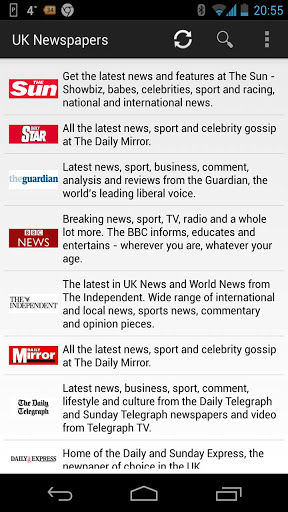
As of late, we have been covering apps that have surfaced on XDA that perform functions that we are used to seeing on most mobiles. However, the gist of these new/old apps is that they all add a bit of a twist to the already working models, thus breaking the status quo of all the other apps in its category. In the particular case of RSS feeds or other types of news feeds, most apps will deliver vast contents to your screen, from any source capable of relaying information to your particular app. However, the limitation for most if not all apps of this kind is that they will display only a couple of sentences, maybe even a small synopsis of the entire piece, and will link you to the source's website to read the article. XDA Recognized Developer h4oxer has come up with a rather elegant solution to avoid having to go to yet another site to finish reading interesting stories.

The News: UK Edition is, as stated before, a news feed. It is capable of retrieving information from pretty much any news source in the UK (England, Wales, Scotland, and Northern Ireland), so you can stay up-to-date on anything from local news, traffic, to even some of that juicy gossip that revolves famous people. The difference between this app and others is that the app can retrieve the entire article and put it in your screen thanks to what the dev has called EasyRead technology. Because of EasyRead, there is no the need to link to an external website anymore, thus forcing you to read the article in a web browser. The articles are formatted newspaper-style, so they are quite easy to read. You do have the option to go to the website as well in case you are more comfortable reading the pieces that way.

The app's interface can be fully customized by letting you change the order of all pieces, sources, and news type. On top of that, the app offers integration of some of the most commonly known media tools. This way you can share your favorite stories with the rest of the world via Facebook, G+, e-mail, and much more. The dev is looking for good feedback, whether it is bugs or suggestions. So, please leave your thoughts in the thread.

The News: UK Newspaper Edition (Free) is the ultimate App for getting the latest UK (England, Northern Ireland, Scotland & Wales) news from all the UK's top newspapers, from broadsheets to tabloids. With our EasyRead technology you can decide to view the full articles in perfect newspaper format right from the App!

You can find more information in the original thread.

Want something published in the Portal? Contact any News Writer.

[Thanks to XDA Recognized Developer h4oxer for the tip!]

Google+

Via xda-developers.com

More aboutStay Up-to-Date with The News: UK Edition

Theme ALL the (Rooted) Phones with XThemeEngine

Posted by Unknown on Thursday, April 25, 2013

You may or may not recall sometime last year, when a member by the name of XDA Recognized Developer rovo89 introduced a brand new concept to this world, named Xposed Framework. This essentially enables the user to hack any ROM and change virtually anything without coding, cracking the ROM open with a kitchen, or even flashing a zip through recovery. Possibilities with such a tool are virtually endless, and it is nearly risk free. Some people have released a few things here and there, but as with most novel concepts, things take time to take a foothold in people's minds. The good news is that more and more people are beginning to see the wonders of this framework and have begun using it to add functionality that would otherwise require a brand new ROM (as what you want may not be available for your favorite ROM). XDA Forum Member ruqqq is among those people, and he has released something quite interesting based on Xposed.

XThemeEngine is similar to TMobile theme engine found in CyanogenMod and derivatives. Essentially, choose a theme, download it, and apply it via the engine. There's no flashing, and there's no mess. The only difference is that the CM engine is only available for AOSP ROMs (there are some engines analogous to this like VR Theme Engine, but this one is completely built on Xposed as the platform). The dev states that this will work if two conditions are met: The device needs to be rooted, AND Xposed framework needs to be installed. It has been tested on a wide range of devices already without issues. The dev also states that it is possible (and in fact quite simple) to make new themes from scratch (template provided as well), so you can literally let your imagination fly. If your imagination pool is somewhat dried up and you feel like using an existing theme,  porting can also be easily accomplished by following a few steps.

Please take it for a spin and share your creations with the rest of the world. Do keep in mind that this is still under beta phase and as such, there are some bugs. So, please read the entire opening post for all the details.

XThemeEngine allows you to theme your device similar to how T-Mobile/CM10 Theme Engine. Install theme apk, activate theme from XThemeEngine app. Voila!

You can find more information in the original thread and you can read more about Xposed Framework in this thread.

Want something published in the Portal? Contact any News Writer.

Google+

Via xda-developers.com

More aboutTheme ALL the (Rooted) Phones with XThemeEngine

Building with Apache Ant

Posted by Unknown

Building with Apache Ant

It's pretty easy to build APKs using Eclipse, but The Apache Ant project brings a few things to the table which you might be interested in—especially if you're creating closed source apps. The package is designed to handle Java application builds (although it can be used with other languages as well). One of its best traits is that it will help shrink the size of your code by parsing for unused variables, methods, and classes to then strip them out as cruft. But I did mention closed source, and that's because Ant has the ability to help obfuscate your bytecode to help prevent reverse-engineering through the use of ProGuard.

One of the reasons more people don't use it is that it can be a little daunting at first glance. But to help you get a foothold, check out this setup guide for Ant builds. It's not exactly tailor made, but if you search additional resources like the Ant Project Page itself, you should be able to get things working. The final project will spit out two builds at the touch of a button. One will be a private build for your own use during debugging. This code hasn't been obfuscated, unlike the other package, which is a public copy that can be sent off to the Play Store or any other distribution channel of your choosing.

Google+

Via xda-developers.com

More aboutBuilding with Apache Ant

Ten Winners of the HTC One Molded XDA Cases Announced

Posted by Unknown

Ten Winners of the HTC One Molded XDA Cases Announced

Last week we let you know about the slick, new HTC One molded XDA cases and the competition Cruzerlite was running to give away 10 of them. Well, it's time to announce the winners.

Congratulations to all 10 of you. Cruzerlite will be contacting you very soon.

Google+

Via xda-developers.com

More aboutTen Winners of the HTC One Molded XDA Cases Announced

Tasker Alternative: Llama Location Profiles to Control Your Device – XDA Developer TV

Posted by Unknown

Tasker Alternative: Llama Location Profiles to Control Your Device – XDA Developer TV

Not too long ago, XDA Developer TV Producer Kevin showed us some Basic, Intermediate, and Advanced Uses for Tasker. Many viewers have asked for a cheaper or free alternative to the powerful Tasker App.

In this part of the series, Kevin shows one alternative to Tasker.  He found an app called Llama. Kevin shows you some of the basics of Llama. So check out all four videos in this Tasker series, and make your phone work for you. What are you waiting for? Check out this video.

Be sure to check out other great XDA Developer TV Videos and Kevin's other videos.

Check out Kevin's YouTube Channel

Google+

Via xda-developers.com

More aboutTasker Alternative: Llama Location Profiles to Control Your Device – XDA Developer TV

Suddenly a Wild Samsung Galaxy S 4 Firmware Appears

Posted by Unknown

Suddenly a Wild Samsung Galaxy S 4 Firmware Appears

With the release of a new flagship device, comes the inevitable clamor of people trying to get their hands on the latest firmware. Whether it's to simply pick out the latest wallpapers and ringtones or begin examining it in greater detail and attempt to port the ROM itself or its newest features to another device, there's always a buzz about the first ROM for a new device. Samsung fans can rejoice as the first firmware for the Galaxy S 4 GT-i9500 has just made an appearance today. Given the amount of hype and excitement surrounding this particular device, I'm sure there will be no shortage of people eager to get their hands on this.

This ROM itself is labelled as I9500ZCUAMDG and appears to be a complete and flashable (via ODIN) ROM intended for the Chinese market containing the usual CSC, PDA and modem files. With a build date of only yesterday, it's certainly pretty fresh. And being based on Android 4.2.2, it will of course feature all the latest and greatest (according to Samsung at least) features for any mobile device, as well as many of the features you would expect from a vanilla build. The firmware itself was posted to the forums by XDA Senior Member AdamLange to kick off the devices dedicated official firmware thread, so be sure to bookmark that if you intend to keep your S4 close to stock.

I guess there isn't really much else to add so what are you waiting for? Go and start digging.

Google+

Via xda-developers.com
More aboutSuddenly a Wild Samsung Galaxy S 4 Firmware Appears

Planning XDA:DevCon – Part 1

Posted by Unknown

Planning XDA:DevCon – Part 1

This is a multipart series on planning the XDA Development Conference to be held in Miami August 9 – 11 (http://www.xda-devcon.com). We want to give everyone a sense of what the event's all about—and maybe some insight on what it takes to put on even a small conference.

Before we start, we want to apologize for stupidly using the same web "event" template (as well as some sponsorship language) as the Big Android BBQ. We've since changed our site, and we have no excuse other than that we've been focused on organizing a great event—and the website was the 100th thing on a long list of to-dos. In any case, the Big Android BBQ is still the premiere Android community event (which we still plan on sponsoring again this year)—and it is very different from our DevCon. So, please consider this an official apology.

First thing's first: Putting on a conference is expensive: similar to a multi-day wedding, without all the flowers. This is a true community event. All the speakers are graciously contributing their time and expertise (for free). All sponsorships and ticket fees are being plowed back into the event, and we (XDA) are making up the difference. XDA moderators (and even some wives) will be organizing and staffing the event. It is our way of trying to give back to the development community that has made XDA so amazing. If there's anyone out there who wants to attend but for whom the conference registration fee is too much, send a message to the DevCon contact email (xdadevcon@xda-developers.com). We'll send you a code for a free ticket.

The hardest part of organizing a conference is making it different and memorable. Free food, fun, and giveaways can help (and we'll have all that); but the key is being interesting, educational, and unique. Our goal with the event is to interactively cover a broad range of development topics, and attendees should be prepared to contribute actively to the discussion. We hunted for presenters who could go well beyond a PowerPoint to engage an audience while teaching. And in addition to all of those speakers, every attendee will have the opportunity to get on stage, present a project, ask questions, and solicit feedback. We expect to have attendees with all levels of development skills– so please don't feel intimidated. XDA is all about community and learning. DevCon will be the same.

We'll leave you with bios of just a couple of our speakers. All of this is on the DevCon website, but for those too lazy to click over, hopefully this will help you get interested:

Pearl Chen

From HTML to LEDs, or Android to Arduino — Pearl Chen takes on a cross-disciplinary approach to her work. With over 9 years of professional experience in web technologies, Pearl has a body of work that includes Facebook campaigns for Google Chrome and microsites for Nike. Pearl also tackles more unusual jobs such as modifying the guts of Nintendo Wii controllers and dynamically creating origami objects from SMS messages.

Pearl was most recently the Senior Manager Research & Technology at the Canadian Film Centre's Media Lab and is now working independently as an educator teaching web development, Android, and electronics — while also building tools for other educators.

Alongside contributing to open source educational resources hosted on Github, Pearl is a published author and contributed the NFC and Open Accessory API chapters to Professional Android Sensor Programming published by Wrox.

Pearl enjoys building tools for other educators and her goal is to raise the bar for technology education by using collaborative platforms to help construct open source curriculums, and by creating engaging and effective educational user experiences.

Justin Case

Justin Case, known as jcase, is a mobile security researcher, CTO of Applied Cybersecurity LLC, a contributor to the popular Android blog AndroidPolice.com and the developer of many Android exploits.

Justin will be discussing vulnerabilities and common security shortfalls in Android applications and firmware. He will also be walking the audience through identification of a vulnerability, and development of an android root exploit. Additionally, he will be speaking about application and firmware security, citing and explaining common mistakes and how we can mitigate them.

Google+

Via xda-developers.com

More aboutPlanning XDA:DevCon – Part 1

Think You Know TicTacToe? Blow Your Mind with Tic Tac Cubed

Posted by Unknown

Think You Know TicTacToe? Blow Your Mind with Tic Tac Cubed

The ever-popular games that can get us through times of boredom are some of the best ways to enjoy oneself with friends in a pseudo-competitive environment while having some fun. In the case of TicTacToe, which for all practical purposes, is the first multi-player head-to-head strategy game, all you need is a piece of paper, a pen, a friend, and you are good to go. However, being that XDA is all about taking an existing concept and expanding it into oblivion, some of our members have taken this seemingly complete concept and mixed it with yet another dash of mind bending lunacy. What if I told you that there is a version of TicTacToe in beta that allows you to play with a bunch of people, at the same time?  Interested? If you are then you should definitely check out the new beta version of Tic Tac Cubed by XDA Forum Member pizzaforbreakfast.

Tic Tac Cubed is like a regular TicTacToe game with the added difference that instead of playing it on a 2-dimensional grid, you play it on a cube that somewhat resembles a Rubix cube. A cube has 6 faces, and because of that, you will be playing 6 games of TicTacToe at the same time. Of course, as if that weren't mind bending enough, the developers decided to add a few extra twists to the already twisted equation with power ups that you can use to annoy the lights out of people competing against you. The game features an online system that will allow you to play against friends (which you can have in your contact's list) or completely random strangers.

As previously stated, the game is in beta right now, and as such, many things are disabled. The devs are interested in ironing out any and all bugs before final release and will progressively release updates with more features enabled to test. Please take the game for a spin and provide any feedback that you deem necessary such as features requests or bugs. Have fun!

The beta build will be stripped of some things. We will only have 1 or 2 power ups available when we first send it out.

You can find more information in the original thread.

Want something published in the Portal? Contact any News Writer.

Google+

Via xda-developers.com

More aboutThink You Know TicTacToe? Blow Your Mind with Tic Tac Cubed

Never Forget to Charge Your Phone Again with AC Socket

Posted by Unknown

Never Forget to Charge Your Phone Again with AC Socket

Ever since the days of Windows Mobile, we have had features available on our devices that we pretty much have taken for granted. This includes things like applications for taking down notes, setting calendar events, alarms, and many others are things that we have lived with for many years. Because of this, not too many improvements are done to said features as they essentially do everything we expect of them—and they do it well. We have some developers out there who apparently can take these 100% working, reliable concepts and squeeze an extra 5-10% more out of them, making them effectively even better than the original tools. In this particular case, the concept in question is ensuring that you can use your devices when you wake up the following morning.

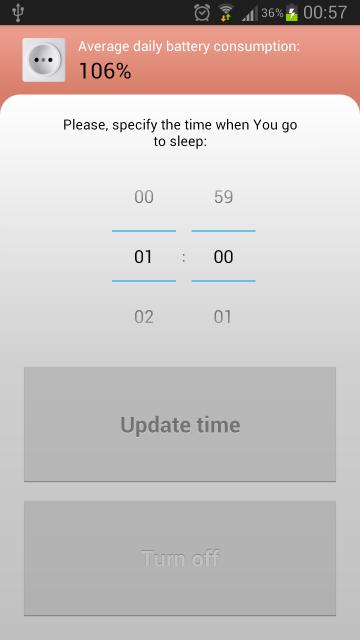
XDA Forum Member shadrmg has developed an application called AC Socket. The concept of this app is quite simple: It is a reminder to charge your device every night. Stock Android (well, not just Android but pretty much any device out there with a battery) will normally start complaining about lack of juice somewhere around the 10-20% battery charge remaining mark. While this app does not actually mess with that, it provides the device with a dedicated app to ensure that you remember to plug in your phone at a specific time, regardless of the charge level present in your phone. While you could potentially accomplish the same by setting up an alarm on your phone, this app also goes a step further and provides you with an average for your daily battery usage. The app also gives the user the opportunity to either disable this notification for a single day or completely.

Again, while this may not be the most novel concept out there, it takes an existing one and adds a bit more functionality. After all, lets face it. How many times have you gone to sleep after a stressful day only to find out that your phone died halfway through the night because you forgot to plug it in? Please take this for a spin and provide any feedback you may have to the dev.

AC Socket is an easy tool to help You not to forget dock-in Your smartphone at night every evening to have fully charged battery each morning.

You can find more information in the original thread.

Want something published in the Portal? Contact any News Writer.

Google+

Via xda-developers.com

More aboutNever Forget to Charge Your Phone Again with AC Socket

Library Repo Thread Helps You Find and Share Useful App Development Libraries

Posted by Unknown on Wednesday, April 24, 2013

Library Repo Thread Helps You Find and Share Useful App Development Libraries

Putting together a killer app is hard enough without having to do everything yourself. That's where external libraries come in really handy. Whether you need to gain root access to run system commands, need help creating a PDF, or are looking at dealing with files; there's a resource that can get you there fast. XDA Senior Member Bassie1995 is maintaining a thread of helpful library repositories.

So far there almost a dozen listed, but I image that word will get around and the list will grow over time. The RootTools repo handles the superuser access that I mentioned earlier. This could be used in conjunction with a couple of different file chooser libraries that would make it a snap to add file and folder selection to your app. On the UI side, there are many different packages in the list which take the guesswork out of making your program look and act like you want it to. StickyListHeaders caught my eye as a way to display which section a user is in as they scroll through long lists. StandOut will help you float windows, and ViewPageIndicator will take care of tab display features.

Head on over to the original thread to view the list. Don't forget to post a reply if there's a repo you think needs to be added.

Google+

Via xda-developers.com

More aboutLibrary Repo Thread Helps You Find and Share Useful App Development Libraries

Goodbye Samsung! Hello HTC! Steve’s Change in OEMs – XDA Developer TV

Posted by Unknown

Goodbye Samsung! Hello HTC! Steve's Change in OEMs – XDA Developer TV

If you've seen XDA Developer TV Producer Steve's video on switching from Windows Phone to Android, you know Steve has no problem sharing his thoughts. He has been reviewing apps on the different operating systems. He has been using Samsung Devices to represent Android and Windows Phone, the Samsung Galaxy Nexus and the Samsung ATIV S, respectively.

However, his satisfaction with his Samsung devices has waned and he is switching to HTC. Steve takes the time to explain why Samsung is not the brand for him. He shares the frustration and quirks he experienced with Samsung. Check this video out.

Be sure to check out other great XDA Developer TV Videos.

Google+

Via xda-developers.com
More aboutGoodbye Samsung! Hello HTC! Steve’s Change in OEMs – XDA Developer TV

Introducing XDA:DevCon – A Conference For Developers By Developers

Posted by Unknown

Introducing XDA:DevCon – A Conference For Developers By Developers

A little over a year ago, a thought began to permeate among some of the staff here at XDA: "Why doesn't XDA create its own conference?" After much exploring and discussion, and maybe even a few group hugs (inside joke), we're pleased to announce the first XDA:DevCon on August 9th to 11th.

We want to offer a conference where developers from across the spectrum can gather, collaborate with other developers, learn something new, and hone their existing skills. So we are bringing in some of the biggest names in the mobile development space to teach on app development, UI/UX design, app security, root apps, Windows Phone development, and more.

As for the location, we wanted a place that was attractive, easy to get in and out of, and relatively inexpensive (in August). The result: beautiful Miami, FL.

The other thing we wanted was a venue that was comfortable, accessible to a lot of great attractions, and reasonably priced. So after some nifty negotiations, we've arranged to have the conference at the Conrad Hilton. Situated just a few blocks from the Bay of Biscayne, and a short drive away from South Beach, it really doesn't get any better than this. The room rates are very competitive, with a really nice breakfast included as well.

We will also have free food, giveaways, and a few more surprises sure to be in store. To find out more about the conference, visit the website at http://www.xda-devcon.com. You can also keep tabs here on the Portal, as we'll continue to keep you up to date.

Despite the size of our community, our ethos still stands strong: to advance the technology we use by means of research and collaboration. We are delighted to see our growth, but we also have a sense of responsibility to give back to the community. All ticket fees (and sponsor contributions) are going back into the conference to make it more fun, valuable, and educational for the attendees. The conference will be capped at just 150 tickets, so please register soon.

Google+

Via xda-developers.com
More aboutIntroducing XDA:DevCon – A Conference For Developers By Developers

Take Control of Multiple Players with Generic Music Controls

Posted by Unknown

Take Control of Multiple Players with Generic Music Controls

There are countless options available for music lovers regarding which application they use for listening to their favourite tracks. If you're anything like I am, you probably have an app for locally stored files, one for your Google Music collection, another for DLNA/UPNP, and we haven't even got to the numerous online streaming or radio apps yet. This of course leads to a plethora of widgets cluttering up one or two different home screens (depending on how attached to cover art you are) and several different notifications, each with their own level of functionality, information, and player controls.

Wouldn't it be great if you could do away with all of those and just use one single… You see where I'm going with this, right? In that case, cue Media Utilities by XDA Forum Member batesapps. This handy little app/widget will allow those running Android 4.0 or above to bring all those different music and streaming apps under one umbrella and do away with that sea of widgets. There are several different styles of widget to suit all tastes, from those who prefer a small and subtle option to those who absolutely want to make sure that everyone within a ten foot radius can see exactly what they are listening to. While Media Utilites is by no means the first application to attempt the unification of all media players on a device, it does intend to be the one that provides you with the most consistent level of meta data and cover art across all apps and services.

This is a public beta, so expect a few bugs for now. However, if this is something that is relevant to your interests, please do test it out with your selection of favourite apps and let the developer know in the application thread.

Google+

Via xda-developers.com
More aboutTake Control of Multiple Players with Generic Music Controls

Zombify Your Friends with Rotten Friends

Posted by Unknown

Zombify Your Friends with Rotten Friends

It's not quite Halloween yet, but that's no reason to not get into the spirit of things 10 months early. XDA Forum Member HellGames has developed a niche little app called Rotten Friends for all those who may be fans of the horror genre.

Rotten Friends is an app that allows you to transform, or zombify if you will, pictures of friends, animals, and the sorts without having to rely on software such as Photoshop. After loading your canvas with a picture, the UI gives multiple elements and images you can overlay onto the original. With a couple of drags and drops, I transformed the default image of a kitten into a horrifying creature straight out of Walking Dead.

The interface consists three main options on the top: the main menu, the graphic elements, and paint and erase. A bar at the bottom correlates with the main option chosen, and in turn, display further actions. You can save, share, and upload images through the main menu. The graphic element contains six main categories of overlays including masks, weapons and surgical tools splashed with blood, and macabre facial elements. Please do bear in mind that the free version only allows for 2 free 'saves' of images through the app, which we do hope will be increased in the future.

Compatible with Android versions 2.1 and newer, Rotten Friends has a limited trial version in the Play store. If you would like to check Rotten Friends out, make sure to head over to the original thread for more details.

Google+

Via xda-developers.com

More aboutZombify Your Friends with Rotten Friends

Set up Ubuntu Inside VirtualBox

Posted by Unknown on Tuesday, April 23, 2013

Set up Ubuntu Inside VirtualBox

The recently launched Application Development Forums are off to a great start, with people posting a wealth of information and tutorials covering everything from advanced topics such as developing apps in C# instead of Java to information for those who are perhaps just getting started. One such guide comes courtesy of XDA Senior Member Thatgrass. It shows you how to set up Ubuntu using VirtualBox.

VirtualBox, in case you aren't already aware, is pretty much exactly what the name suggests. It is a virtual machine that effectively acts as a computer within a computer, allowing you to run another OS of your choice without leaving Windows, OSX, or the Linux-based OS that you use by default. This allows you to set up a development environment without dual booting or replacing your current operating system. The tutorial is still a work in progress, and it will eventually cover building Android from source and setting up an app development environment.

Everything you need to know to get a working installation of Ubuntu up and running via VirtualBox is outlined within the thread. The instructions are accompanied by easy-to-follow screenshots that will have you up and running in no time at all. It's worth mentioning that if you're planning to build from source using a VirtualBox, you'll want to start with a reasonably well powered machine, as one of the downsides is that this new OS is will of course have to share both RAM and disk space with the existing OS. In the case of RAM, you can expect your current amount to be effectively halved and building from source will require a sizeable chunk of your hard drive.

Check out the tutorial thread for more information.

Google+

Via xda-developers.com

More aboutSet up Ubuntu Inside VirtualBox

Xperia Z Joins Its Sibling In the AOSP Mix

Posted by Unknown

Xperia Z Joins Its Sibling In the AOSP Mix

The Android Open Source Project (AOSP) is Google giving the entire community (manufacturers, enthusiasts, developers, etc.)  the necessary building blocks to bring what many refer to as "stock Android" (more accurately "vanilla Android") to a device. The inherent problem with this is that the manufacturers are often the roadblock to such endeavors. Too often manufacturers (like HTC, Samsung, etc.) and suppliers (like Qualcomm) all claim that they can't release certain drivers, and label them as "proprietary" so that no one can use them. Of course, since there's nothing really "new" under the sun, this just serves to hinder innovation and development. And often times manufacturers will claim it's the suppliers who are really hindering things, but who is it that chooses the suppliers? I'll let the obvious rhetorical question be obvious.

In this mix, it's refreshing to see a mainstream company attempt to shuck all of these trends and actually release the AOSP source for a device, with the Xperia S being the first non-Nexus device to be included in the AOSP device tree. This experiment ended on a positive note, with Sony moving the source for the Xperia S into their own managed GitHub repository. But Sony hasn't stopped there.

While companies like Samsung, which used to be rather developer-friendly, now moving away from being open to the community, Sony instead is welcoming them with open arms. Their latest flagship device, the Xperia Z, has joined the Xperia S with having its AOSP source files available on their GitHub. They even posted a lot of information over on their Developer World blog, listing SD Card, WiFi, Bluetooth, GPS, LED light, and sensors working (partially), and they state plans to include NFC in the future. They also have a link to the proprietary Qualcomm binaries needed in order for this to work. You can see the video below, and visit their blog post for more information.

Google+

Via xda-developers.com

More aboutXperia Z Joins Its Sibling In the AOSP Mix

Android App Review: Files Fly with SuperBeam – XDA Developer TV

Posted by Unknown

Android App Review: Files Fly with SuperBeam – XDA Developer TV

For the last two weeks, we've talked about exploring your files. We reviewed the newest version of ES File Explorer.  Just last week, we compared it to Solid Explorer. But what if you want to share files with someone else quickly? NFC can be clunky, but WiFi Direct (for phones that support it) is a good option.

XDA Senior Member majedev has an application to help you share files and makes the setup easy and painless.  In this video, XDA Developer TV Producer TK reviews SuperBeam. TK shows off the application and gives his thoughts, so check out this app review.

Be sure to check out other great XDA Developer TV Videos

Google+

Via xda-developers.com

More aboutAndroid App Review: Files Fly with SuperBeam – XDA Developer TV

Facebook Away from the Facebook App with Fast Home Widgets

Posted by Unknown

Facebook Away from the Facebook App with Fast Home Widgets

Not too long ago, XDA Forum Member taomorpheus released a rather interesting alternative to the current official Facebook app called Fast. The app is essentially a replacement for the original, bringing to the table a far simpler, less bloated, and much lighter client for the the infamous social media site. As good as it is, there is always room for improvement. Since the dev knew this to be the case, he kept on cranking ideas to make the experience of Fast even faster. The result after some months worth of testing, one can now use the app without going into the app thanks to widgets. With that in mind, he embarked on a journey to add as much FB functionality to the home screen launcher as humanly possible. However, this had to be done without compromising the lightness of Fast, which is (after all) what sets it apart from its official counterpart

Fast Home Widgets, much as its name suggests, is a set of widgets (10 to be precise) to do virtually everything you normally do on Facebook, but without actually opening the FB app. As mentioned earlier, the beauty of this pack is that it allows you to do something different with each widget, so you could essentially arrange them and use just the ones with the services that you normally use. For instance, lets just say that the only two things you do on Facebook are update your status and upload pics, but you are not interested in anything else like group chats, instant messaging, or even the news feed. You now have individual widgets dedicated to these two things alone, without having to have extra options that you do not use, effectively reducing the clutter and making the entire experience a more simplified one.

As a quick note, the dev has stated that these are in private beta testing at the moment. If you would like to participate as a tester, to please send him a pm. There is no mention of limit for the beta testing program, so this can only mean that the dev is doing it to have a better pulse on the feedback for the widgets. They will be released in two batches: The first few will be available for testing in the next day or so and the last few towards the end of next month. As it is the case for everything on XDA, please do not ask for ETAs.  If you get on the beta list, please provide any and all feedback for the dev. After all, that is exactly what you are signing up for.

 It's a set of 10 widgets (android 4.0+) created in order to do the basic stuff on Facebook.
The first release will come with 5-6 widgets. I have planned to release the other 4-5 widgets by the end of May.

You can find more information in the original thread.

Google+

Via xda-developers.com

More aboutFacebook Away from the Facebook App with Fast Home Widgets

Not Enough Home Screens? WidgetShade Can Help

Posted by Unknown on Monday, April 22, 2013

Not Enough Home Screens? WidgetShade Can Help

We currently have widgets for practically everything that we do. Our most commonly used apps have small sub-apps that sit comfortably in our home screens and are easily accessible by just pressing the Home button. However, there are times when we are doing other things that may require us to be away from the home screen, such as gaming, browsing the web, or well, pretty much anything in Android. A few devices overcome this by implementing things like multi-window, which came about from Cornerstone as well as the Samsung Galaxy S3/Note2 families, floating mini apps such as those found in Sony's line up, and even with the implementation of side launchers. That said, access to your widgets from within any app can without the need to quit or navigate away can be a rather useful thing. If this is a concept that calls your attention, then you should definitely check out what XDA Forum Member dapaua has just released.

WidgetShade is an app that generates an overlay screen on top of any app you may be running. This overlay can contain multiple widgets that you can freely setup with full functionality. The app can be launched in several different ways, such as an activation area that can be swiped over, a launch button in the notification area, or (if you are in home) the app itself. Interestingly enough, combining this with other apps such as LMT launcher can give you very easy access from anywhere at all by configuring an action (two finger swipe, etc). Please note that this last suggestion is for when the notification bar is hidden by the active app and when you do not feel like using the trigger feature of this app.

Please take this app for a spin and let the dev know if you have any feedback, suggestions, or simply want to report a bug or two. Enjoy!

With WidgetShade you can have your widgets always on hand. Just use the "+" button , or long press any empty space to add a widget. WidgetShade can be called at any moment and will show as an overlay over your active application.

You can find more information in the original thread.

Want something published in the Portal? Contact any News Writer.

Google+

Via xda-developers.com

More aboutNot Enough Home Screens? WidgetShade Can Help

Universal Arduino Serial Adapter will Interface with Android and More

Posted by Unknown

Universal Arduino Serial Adapter will Interface with Android and More

If you're the kind of person who likes to tinker with the lower levels of Android devices, I think you're going to love this project. XDA Senior Member Kemonine96 came up with a design he calls the Universal Arduino Serial Adapter. As the name implies, it uses an Arduino board to connect to a serial interface on your target device. The project is still in its infancy, but this image of the working electronics shows off the LCD screen, joystick, and pair of buttons that make up the interface.

There are several ways to connect the serial adapter to your devices. Kemonine included a micro USB connector so that you can monitor the serial terminal on an Android device, but that's not the only way to patch into a system. He also has an RJ-45 connector (Ethernet jack) that allows him to patch in expansion boards like the one in the photo in order to connect a regular serial cable. Once connected and configured, the rig acts as a bridge between the terminal on your computer and the target device. This displays incoming information on your computer's terminal, and pushes your typed commands back to the device.

A respectable set of features have been built into the design. Possibly the best part is that it is 5V, 3.3V and 1.8V tolerant to work with a wide range of devices. And of course the communication protocol (baud rate, etc.) can be tweaked using the screen and user controls. Right now, there are some character dropping issues when driven at 115200 baud, but it sounds like those can eventually be worked out in the code. After I sent a PM to Kemonine asking for more details he posted a set of unedited demo videos which you might find interesting.

Visit his project thread for more information.

Google+

Via xda-developers.com
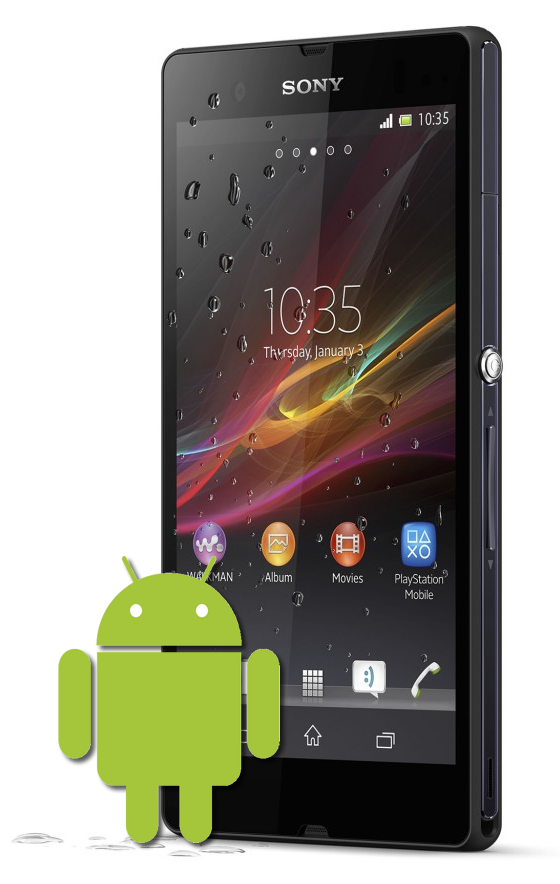
More aboutUniversal Arduino Serial Adapter will Interface with Android and More

Now Playing Beta, a Google Now-Themed Music Player

Posted by Unknown

Now Playing Beta, a Google Now-Themed Music Player

As Holo UI-themed applications are gradually streamlining the Android app market with pleasing aesthetics, it's with no surprise that more app developers are naturally conforming to these standards. XDA Forum Member Jack Underwood has developed Now Playing Beta, a  music app with the design philosophy of Google Now in mind.

Now Playing, for an app still in it's beta, is a well designed and polished music player for Android that bundles an intuitive and minimal interface with the clinical yet fresh and elegant appearance of Google Now. Users navigate through different categories of the music library with horizontally sliding screens displaying albums, artists, and songs, as well as other classifications. The 'now playing' screen again, consist of 3 sliding screens: album art, currently playing playlist, lyrics. Each screen is accompanied by a bar at the bottom with the standard play/pause, previous and next, shuffle and repeat buttons.

However, it's also the little, subtle touches that gives the app that extra finish. Next to each album and artist, there is the associated album art and artist picture that Now Playing draws from the web. Now Playing also has widgets and equalizer support if your device supports it.

If this sounds like something you would like to try out, head over to the original thread for more details and a free download.

Google+

Via xda-developers.com

More aboutNow Playing Beta, a Google Now-Themed Music Player

Record Your Phone Calls with Incall Recorder

Posted by Unknown

Record Your Phone Calls with Incall Recorder

Call recorders are often sought out for a myriad of reasons. However, the phone call recording apps out there are always a hit and miss for certain users, with some reporting desired functionality while others only get a buggy memory placeholder. If you find yourself needing to record a call for whatever reason, maybe give Incall Recorder a go.

Developed by XDA Senior Member zakiancel, Incall Recorder's primary function is to, as inferred from its name, record calls on your Android smartphone as well as doubling up as a voice recorder. The app presents itself with an intuitive user interface that's logical and straightforward. On it's initial start up, Incall Recorder introduces the main features and aspects of the app so to get you familiar with functions and interface. There are a couple of ways to record calls: through a hovering recording button that appears when a call is active, automatically recording all calls, and recording by tapping the notification in the drop-down notification area. Zakiancel claims an hour of recording is encoded to just a 7 MB MP3 file. Playing, searching, renaming, sharing, and deleting recordings is also extremely simple, as Incall Recorder has its handy own record manager.

Again, if you have had a lackluster experience with other call recorders out in the market, the 1.6 MB Incall Recorder is definitely worth a try. If Incall Recorder sounds like an app you would like to try out, check out the original thread for more details. Just be sure to keep in mind that in certain areas, call recording may be illegal. Furthermore, even where it is allowed, you should always inform the other party that they are being recorded out of common courtesy.

Google+

Via xda-developers.com

More aboutRecord Your Phone Calls with Incall Recorder