Android 4.4.1 Source Code Released to the AOSP

Posted by Unknown on Thursday, December 5, 2013

Android 4.4.1 Source Code Released to the AOSP

Earlier today, we saw the release of Android 4.4.1 for the Google Nexus 4, Nexus 5, and Nexus 7 (2013) LTE. Outside of a few significant Nexus 5-specific camera improvements covered earlier, not much is known yet about what exactly has been changed. But as indicated by its minor point revision status, not much is expected to be changed in this new version.

Now, Google has updated the AOSP servers with the source code to Android 4.4.1. This means that your favorite aftermarket developers can start merging the new commits over from Google's repos into their own builds.

Curiously, the revised factory images still have not yet appeared on the Nexus Factory Images page. That said, we can't imagine it will be too long before the complete set of images are available on Google's servers.

Developers looking to start building with the new Android 4.4.1 code can do so by browsing the KitKat MR1 (KOT49E) source  directly on Google's Git. And of course, end users of the aforementioned Nexus devices can download the OTAs directly from Google's update servers by visiting the links below:

_________
Want something on the XDA Portal? Send us a tip!Google+

Via xda-developers.com

More aboutAndroid 4.4.1 Source Code Released to the AOSP

Android 4.4.1 Update for the Google Nexus 5 Now Live, OTA Captured

Posted by Unknown

Android 4.4.1 Update for the Google Nexus 5 Now Live, OTA Captured

Just two days ago, we talked about how Android 4.4.1 was undergoing internal testing at Google. Then earlier today, we received word of some of the new camera improvements that would be coming with the latest version.

Now, the official Android 4.4.1 OTA has started making its way to the Google Nexus 5 in the form of an incremental OTA update. The incremental OTA takes you from the previous Android 4.4 (KRT16M) build to Android 4.4.1 (KOT49E).

Naturally, the OTA will be rolling out over the course of the next few days or weeks, so don't be alarmed if it hasn't yet shown up on your Nexus 5. However, those tired of waiting can get cracking a bit early by manually downloading the incremental OTA update directly from Google's Update Servers. Once downloaded, reboot your device to stock recovery and execute the adb sideload [OTA filename] command to get started.

Naturally, your device must be stock and with stock recovery for this incremental OTA to work. The update is still not yet live on the Nexus Factory Images page, but we can't imagine that it will be too long before the full factory image is posted there as well.

For those of you who have already updated (either manually or via official OTA), how do you like the improved camera performance? Does the camera now live up to your expectations? Feel free to let us know your thoughts in the comments section below!

_________
Want something on the XDA Portal? Send us a tip!Google+

Via xda-developers.com

More aboutAndroid 4.4.1 Update for the Google Nexus 5 Now Live, OTA Captured

Major Update to Google Play Music Brings SD Card Offline Media Storage Support

Posted by Unknown

Major Update to Google Play Music Brings SD Card Offline Media Storage Support

Today, Google released a rather significant update to its Google Play Music app for Android. The update brings a few usability improvements such as the ability to shuffle all songs by an artist in Play Music All Access and an easier method of sharing links to your favorite songs, artists, and albums. While important, these new features pale in comparison to the other new feature that this update brings: SD Card support for offline music storage.

Ever since the arrival of the Nexus S, Google has shown its distaste for external SD cards. While having an external storage expansion slot gives users a bit more flexibility when it comes to managing storage limitations, these card slots also add complexity to casual users who aren't well versed with file management. The removal of Apps2SD support in recent versions of Android also reinforces Google's apparent view on such functionality. This makes it incredibly curious that today's update to 5.3.136M brings external SD card support for offline music storage.

Google Play Store Listing Change Log:

v5.3.1316M

* SD card support for offline music on KitKat (Experimental support on some older devices)

* Added ability to shuffle all songs from an artist in All Access

* Made it easy to share links of songs, artists and albums to your favorite social networks

Make your way over to the Google Play Store listing to get the latest update. But since this is a staged rollout, the update may not be officially available to your device. Luckily, those looking to get in on the update a little early can do so thanks to XDA Senior Member androiduser44 who posted the APK for anyone to download. And for those looking for a themed version with a transparent widget, XDA Senior Member ecs1984 has you covered with his modified offering.

_________
Want something on the XDA Portal? Send us a tip!Google+

Via xda-developers.com

More aboutMajor Update to Google Play Music Brings SD Card Offline Media Storage Support

Android App Review: MacroDroid Automation – XDA Developer TV

Posted by Unknown

Android App Review: MacroDroid Automation – XDA Developer TV

Here at XDA, we like to make things easier in life with the use of technology. That's why we've had numerous videos on automation. We've shown you how to use Tasker, Llama, WEMO switches, and more. However, sometimes you just want a simple and easy-to-use app.

XDA Forum Member UndeadCretin offers an easy-to-use macro automation app. In this video, XDA Developer TV Producer TK reviews MacroDroid. TK shows off the application and gives his thoughts, so check out this app review.

Be sure to check out other great XDA Developer TV Videos

_________
Want something on the XDA Portal? Send us a tip!Google+

Via xda-developers.com

More aboutAndroid App Review: MacroDroid Automation – XDA Developer TV

Themer Adds XDA Theme, Available Now

Posted by Unknown

Themer Adds XDA Theme, Available Now

For those who want a themed Android phone without all the work of configuring widgets, wallpapers, and icons, our friends at MyColorScreen offer a terrific option with their Themer app (available on Google Play). And as of today, those looking to show their love for XDA can do so by applying the XDA theme, which can be found under the "Newest" category in Themer.

This theme features a card-style UI style homescreen design, as well as a direct link to the XDA forums. It also contains clock and battery stats, weather information, music controls, and access to common apps. There's also a slide-out panel with missed message notifications, quick access to search, and even a link to the XDA Portal.

If you want to know more about Themer, here are some helpful videos:

And of course, XDA is home to the official Themer forums where you can exchange themes you've made, offer tips and tricks, and get support.

_________
Want something on the XDA Portal? Send us a tip!Google+

Via xda-developers.com

More aboutThemer Adds XDA Theme, Available Now

Android 4.4.1 to Bring Massive Upgrade to Nexus 5 Camera

Posted by Unknown

Android 4.4.1 to Bring Massive Upgrade to Nexus 5 Camera

Ever since the release of the highly anticipated Google Nexus 5, the device has earned nearly unanimous praise from the tech industry. Much of this has been well deserved, as the Nexus 5 features bleeding-edge internals at a wallet-friendly price. Unfortunately the camera quality, while much improved over its predecessor Nexus devices, still leaves much to be desired. Luckily, however, this is being actively worked on and tested, with a fix right around the corner.

A few days ago, we reported that Android 4.4.1 was undergoing active testing. At the time, there was no indication as to what the update would bring. At the time, we were hopeful that the update would bring some of the new camera modes promised earlier. Unfortunately, it appears as if these features won't be making their way into production builds quite that quickly. However, there's still quite a bit of good news on the Nexus camera front. In a recent interview with The Verge, Director of Engineering for Android Dave Burke detailed several improvements to the Nexus 5′s camera that will make their way to consumer devices with Android 4.4.1.

The update is intended to fix the Nexus 5′s camera performance in five categories. The most immediately noticeable will perhaps be autofocus speed. Due to the added optical image stabilization in the Nexus 5′s camera module, the current camera software allowed itself to take slow shutter shots, even when in good lighting conditions. While this is quite beneficial in lower light conditions, it quickly proves frustrating in good lighting.

In addition to the speed increases thanks to the higher frame rate and image detection, the update will also aim to bring picture quality increases. These will come in the form of changes to the device's autofocus, exposure, and white balance, as well as reduced motion blur. The menu interface will also see a slight streamlining, including a new progress indicator for the HDR+ mode.

As for timing, Burke stated that the update will be rolling out over the next few days. Be sure to check back here at the XDA Portal for captured OTA update links and images. What are your thoughts on these new camera improvements? What do you think of the Nexus 5′s camera overall? Be sure to share your thoughts in the comments below.

[Source: The Verge]

_________
Want something on the XDA Portal? Send us a tip!Google+

Via xda-developers.com

More aboutAndroid 4.4.1 to Bring Massive Upgrade to Nexus 5 Camera

Android 4.3 (Now XXUGMK6) Update Resumes for the International Galaxy S III

Posted by Unknown

Android 4.3 (Now XXUGMK6) Update Resumes for the International Galaxy S III

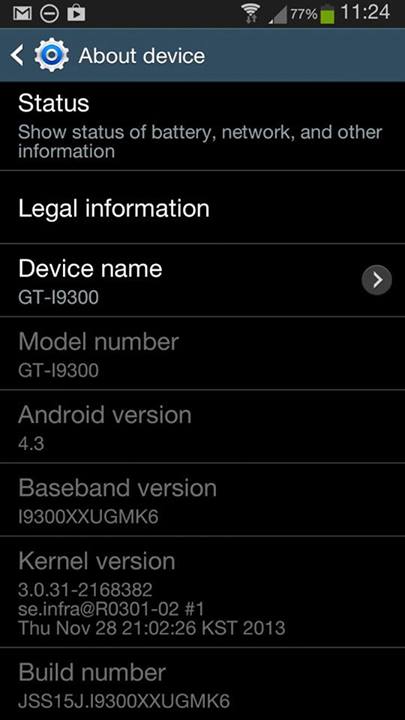
No, it's not Android 4.4 KitKat, but it's a step in the right direction—one that was started a little over a month ago. You may remember that not too long ago Samsung pulled the Android 4.3 that was rolling out to the International Galaxy S III. This was the same XXUGMMJ9 firmware that was initially shared as a leaked build, and then became official two days later. Unfortunately, the previous build had quite a few bugs, including wake up lag, random freezing, battery drain, Bluetooth audio issues, stuttering music playback, freezes, poor multitasking, and WiFi issues. In other words, it was a clear demonstration of Murphy's Law.

Now, the next chapter in the Android 4.3 update saga for the Galaxy S III is here, thanks to the new XXUGMK6 update for the device. The update brings several key improvements such as reduced lag, camera enhancements, improved battery life, and support for Galaxy Gear. And for those wondering, just like the previous official XXUGMJ9 build, this appears to not feature Samsung's KNOX technology.

The update should arrive OTA to stock devices, but it can also be manually installed via Kies. To learn more, visit the Android 4.3 Discussion Thread for the Galaxy S III. The fun starts around page 181, with users sharing their (largely positive) experiences with the new firmware.

[Photo courtesy of Neil Carless on Facebook]

_________
Want something on the XDA Portal? Send us a tip!Google+
Via xda-developers.com

More aboutAndroid 4.3 (Now XXUGMK6) Update Resumes for the International Galaxy S III

The Forgotten Samsung Galaxy Nexus Finally Receives Stable KitKat

Posted by Unknown

The Forgotten Samsung Galaxy Nexus Finally Receives Stable KitKat

The Samsung Galaxy Nexus was the first device to run Android 4.0 Ice Cream Sandwich. It was also the pride of Google and Samsung for a long time, and it still has quite a few stalwart fans. Good technical specification for its era combined with a then-amazing Super AMOLED HD screen equate to a device that is still more than adequate for most tasks. Unfortunately, Google chose to not bestow an official KitKat update on the device, leading many to speculate that this was due to TI's exit from the mobile SoC industry.

A few weeks ago, we wrote about early KitKat releases by the Slim Team and XDA Senior Member Grarak, but a few things still needed to be polished and worked on. After few weeks, the GNex can join the elite team of devices with fully usable KitKat thanks to XDA Recognized Developer PlayfulGod. The build is described as beta mostly due to missing some common CM11 features. However, the only known remaining bug is glitchy screenshot functionality, but this ROM is a great achievement that once again proves that developers on XDA can do the impossible—or at least what OEMs label as such.

If you own a Galaxy Nexus and want some KitKat, head over to the ROM thread and give the newest build a try.

_________
Want something on the XDA Portal? Send us a tip!Google+

Via xda-developers.com

More aboutThe Forgotten Samsung Galaxy Nexus Finally Receives Stable KitKat

Build Apps that React to Google Search Using Xposed

Posted by Unknown

Build Apps that React to Google Search Using Xposed

Just yesterday, we briefly touched upon a Google Search update that brought the ability to search within apps directly from within Google Search. This update, which is gradually being rolled out to end-user devices, has the potential to make Google Search significantly more powerful. Rather than having to open an application to search within the app, Google Search can now act more like global search.

Unfortunately, there are a few limitations with Google's first party offering. First of all, there are only a few apps that are compatible with this new functionality. Some of the biggest partners so far include IMDb, Rotten Tomatoes, Wikipedia, and a few others. However, it'd be difficult to imagine smaller and lesser known applications being granted access to this functionality. Furthermore, the integration still requires users to manually select the desired action from the Google Search results.

Luckily, XDA Senior Member MohammadAG came up with a solution to both of the above issues. The fix comes in the form of a third-party Google Search API that can be installed via XDA Recognized Developer rovo89's Xposed Framework. When installed, the API allows developers to create and run plugins that react to certain searches made in the Google Search app. A practical example demonstrating song lyrics functionality can be found on YouTube.

While MohammadAG's API requires both Xposed Framework and this Xposed module to be installed, it also offers greater freedom and potential to interested app developers. End-users, as well as developers looking to integrate this functionality into their own apps, should head over to the module thread to get started.

_________
Want something on the XDA Portal? Send us a tip!Google+

Via xda-developers.com

More aboutBuild Apps that React to Google Search Using Xposed

US Cellular Moto X Getting Android 4.4 Today, Spring “Coming Soon,” Republic Wireless Early Next Year

Posted by Unknown on Wednesday, December 4, 2013

US Cellular Moto X Getting Android 4.4 Today, Spring

Verizon and Motorola shocked us mid last month with the rather expedient Android 4.4 KitKat update for the Moto X. Three days later, we saw T-Mobile follow suit. Then later that day, AT&T joined the KitKat Moto X party as well. Curiously, we haven't seen an official KitKat update from America's third-largest carrier: Sprint. Now the fifth-largest carrier, US Cellular, has begun its phased roll out to Android 4.4 KitKat on the Moto X.

Just like what we've come to expect from KitKat on other variants of the Moto X, the US Cellular version is only very lightly modified from stock Android. As such, Motorola is largely preserving most Google services, only complementing them when beneficial. This can be seen in the revised calendar app, featuring drag-able exposure controls, and the new "find my phone" feature that we've seen on the other variants.

According to Motorola's Version History page the update is also "coming soon" to the Sprint variant of the device. Unfortunately, no timetable has been given–either by Sprint or by Motorola themselves. That said, we can't see the carrier holding back for too long, especially after every other major US carrier has already begun the rollout.

Finally, the update for Republic Wireless's version of the device is also coming soon. The carrier stated on its official Twitter account that the update is expected in "early 2014." Unfortunately, what exactly constitutes "early" will vary depending on who is asked, and only time will tell when the update will finally come.

Even with the mild delays in certain carrier variants, the KitKat update has made it to most Moto X units in remarkable time—no doubt a testament to Google's influence on the company's operations. Are you a Moto X owner? What are your thoughts on the KitKat update timing? Why do you think Sprint and Republic Wireless are taking so long? Let us know in the comments below.

[Source: Motorola Release Notes for US Cellular Variant, Motorola Version History, Republic Wireless Twitter Account | Via AndroidPolice, Phandroid]

_________
Want something on the XDA Portal? Send us a tip!Google+

Via xda-developers.com

More aboutUS Cellular Moto X Getting Android 4.4 Today, Spring “Coming Soon,” Republic Wireless Early Next Year

Google Search for Android Now Searches within Apps

Posted by Unknown

Google Search for Android Now Searches within Apps

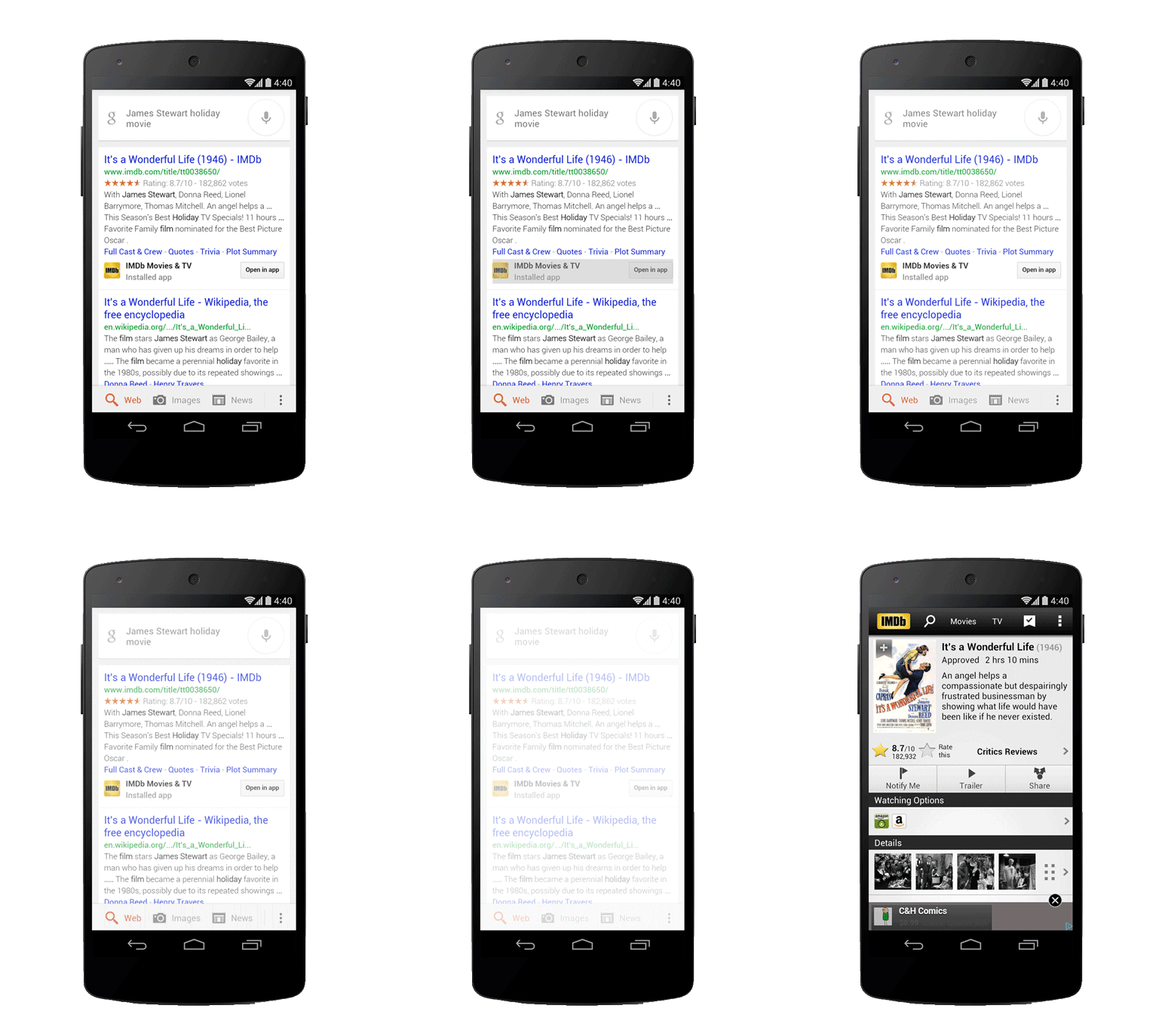
Google Search for Android  is about to become significantly more powerful. And unlike some of the more recent additions to the app's capabilities, this actually does not come in the form of new cards, Easter Eggs, or enhancements to the hidden Google Experience Launcher. Rather, a staged rollout beginning today will extend the power of Google Search to third-party applications.

Previously, in order to search for application-specific information, you'd first have to go to the application and look from there. Now, Google Search will be able to find information from within supported apps directly, without the need to first open an application. A good example of this would be looking up movie information in Google Search, and then immediately jumping into the context-relevant page in your IMDb app.

Additionally, Google Search will now be able to help you find "just the right app." For example, if you search for "downhill ski apps," it will show you mobile apps related to your search query. As stated by Google's Scott Huffman, "This is just one step toward bringing apps and the web together, making it even easier to get the right information, regardless of where it's located."

What do you think of the new Google Search functionality? Are you excited about the upcoming integration, or are you a bit more leery of Google's continuing efforts to wedge itself in every aspect of your life? Share your thoughts in the comments below!

[Source: Google Search Blog, Play Store | Via PocketNow]

_________
Want something on the XDA Portal? Send us a tip!Google+
Via xda-developers.com

More aboutGoogle Search for Android Now Searches within Apps

Google Pulls HushSMS after Flash SMS DoS Info

Posted by Unknown

Google Pulls HushSMS after Flash SMS DoS Info

Not too long ago, we talked about the Flash SMS (class 0) DoS vulnerability affecting the current lineup of Nexus devices. Discovered by Romanian security researcher Bogdan Alec, the vulnerability was such that Flash SMS (class 0) messages sent in rapid succession would cause unexpected behavior on various Nexus devices. Curiously, though, the bug only affected Nexus device owners.

Luckily, the vulnerability was never all that damaging. After all, the worst outcome that has been seen so far is data loss due to a device reboot. That said, the vulnerability certainly opens up users to annoying pranks and spam that can get in the way of essential productivity.

Now, the vulnerability has claimed its first major conquest, though in a somewhat unexpected way. No, there wasn't a malicious attack based on the vulnerability. HushSMS by app developer Michael Mueller has been removed by the Google Play store for being in "violation of the dangerous products provision of the Content Policy and sections 4.3 and 4.4 of the Developer Distribution Agreement." This is for an application that has been available in the Play store for roughly ten months, and one that, "can send messages in accordance to the 3GPP Specification 23.040 'Technical realization of the Short Message Service,' and some other specifications like OMA WAP," as stated by Mueller himself.

While many of us are anticipating an official fix to come in the forthcoming Android 4.4.1, we can't help but think that this is a rather curious "solution" to the problem by Google. For reference, the Google Cached Page for the HushSMS Play Store Listing is still available. More information from the developer can be found in the source link below.

[Source: Softpedia]

_________
Want something on the XDA Portal? Send us a tip!Google+

Via xda-developers.com

More aboutGoogle Pulls HushSMS after Flash SMS DoS Info

Leading Online File Host HotFile Shut Down Permanently

Posted by Unknown

piracy_3HotFile.com is one of the most widely used file sharing companies, and one that has proven popular among various XDA users to distribute development works. Now, it has been shut down permanently, and their owners have to pay $80 milion, as part of a settlement with the Motion Picture Association of America (MPAA).

Hotfile was initially accused of piracy in 2011, when the trial begun. The MPAA requested Hotfile to pay $500 million in compensation to the movie industries affected by warez hosting. After negotiations, both parties decide to lower this amount to $80 million. Now, Hotfile.com is shut down permanently with a following message:

hotfile

The decision of the American Federal Court clearly shows that piracy is forbidden and people should pay for movies, music, or applications. At XDA we protect the developers and their intellectual property, and we would like to remind you that discussing or posting warez is illegal as well.

The shutdown also means that some developers who used to host their file on HotFile will have to change their online hosting providers. XDA has many hosting partners that are fast and free, such as Dev Host, Android File Host, and Goo.im—all of which are available in the private developer-specific forums. Developers can also use DevDB to upload their files. Unfortunately, there is a possibility that other services will share the fate of Hotfile and will be closed down in the future, but this makes it as good of a time as ever to migrate to more development-specific hosting solutions that are much less likely to be closed.

_________
Want something on the XDA Portal? Send us a tip!Google+

Via xda-developers.com

More aboutLeading Online File Host HotFile Shut Down Permanently

How to Root, Install TWRP, and Install OmniROM Nightly on the Oppo N1 – XDA Developer TV

Posted by Unknown

How to Root, Install TWRP, and Install OmniROM Nightly on the Oppo N1 – XDA Developer TV

In this episode, XDA Developer TV Producer Jordan shows you how to root your Oppo N1. The Oppo N1 is hot news in the Android ecosystem. It is the device that is pushing the limit of phone size, and some say even phablet size. This thing is huge. But as usual at XDA, we must root all the things, and the Oppo N1 is no exception!

Jordan presents step-by-step instructions on how to gain root access on your Oppo N1 using tools from the XDA Developers Forums. First, Jordan shows you how to  gain root access using XDA Senior Recognized Developer Jcase's APK root exploit. Then, he installs TWRP and OmniROM. If you wanted to root your Oppo N1, take a moment and check this video out.

Resource Links:

Be sure to check out other great XDA Developer TV Videos.

Check out Jordan's YouTube Channel and Jordan's Gaming YouTube Channel

_________
Want something on the XDA Portal? Send us a tip!Google+

Via xda-developers.com

More aboutHow to Root, Install TWRP, and Install OmniROM Nightly on the Oppo N1 – XDA Developer TV

Create Your Own Magnetic Dock for the Google Nexus 5

Posted by Unknown

Create Your Own Magnetic Dock for the Google Nexus 5

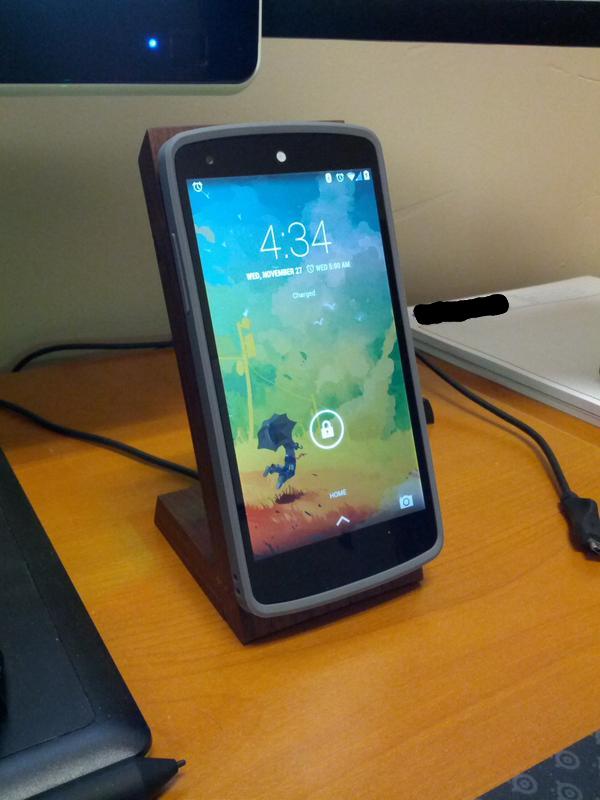
You know those hidden magnets underneath the rear panel of the Google Nexus 5? Well, it was quickly determined that their purpose is to align the phone with the official Qi charger by Google. Unfortunately, however, Google's official Qi charger is rather pricey at $50, close to five times the cost of a generic Qi charging mat. Furthermore, the new charging mat for the Nexus 5 no longer features the useful angled design of its predecessor, the Qi charger for the Nexus 4.

Luckily, XDA Forum Member kidgenius saw this as an opportunity to live up to his username. As such, he created a thread showing off his home-made angled wooden dock, complete with integrated Qi charger. And since he uses four carefully placed magnets, the device is able to suspend itself in place, using only the power of magnets.

This being XDA, the thread would not be complete without thorough and detailed steps on  how to create your own. As such, kidgenius also provided a build log, complete with all the components and steps required to create your own wireless magnetic Qi charger.

We're not going to lie to you. This will take a substantial amount of work, as well as some woodworking expertise. However if successful, your efforts will be rewarded with a one-of-a-kind homemade dock with all the functionality of the official charger, but at a fraction of the price.

If you're curious to learn how this was done, or if you want to follow inn kidgenius's footsteps and create your own, make your way over to the original thread.

_________
Want something on the XDA Portal? Send us a tip!Google+

Via xda-developers.com

More aboutCreate Your Own Magnetic Dock for the Google Nexus 5

Revitalize Your Sony Xperia SP with Speedy Droid

Posted by Unknown

Revitalize Your Sony Xperia SP with Speedy Droid

Smartphones are pretty high maintenance devices. No matter how impressive the spec sheets are, the phone in your hand will inevitably get cluttered and unkempt with daily use, personalization, customization, and modifications. This is why it's a good idea to have a 'spring cleaning' of sorts every once in a while, just to refresh your device.

So for Sony Xperia SP users looking to do so, Speedy Droid may be of interest. Developed by XDA Recognized Developer Divaksh, Speedy Droid is a tool that performs a variety of actions intended to refresh your device as well as a bit more. Running on XDA Recognized Developer amarullz's AROMA installer, Speedy Droid removes bloatware apps and features from stock-derived Sony ROMs (handy after a flash), backs up and restores things like settings and messages, and much more.

Conveniently, Speedy Droid creates backups of apps you've chosen to remove, just in case you find yourself regretting your decision and wanting to restore the removed apps. There are two modes, a 'super' mode that can be assumed to remove all bloatware apps and features, and and a 'custom' mode for those who prefer a bit more flexibility. All this is packed into a neat 5 MB zip file to be flashed via a custom recovery.

So if you own an Xperia SP and would like to give this a go, visit the original thread for more information.

_________
Want something on the XDA Portal? Send us a tip!Google+

Via xda-developers.com

More aboutRevitalize Your Sony Xperia SP with Speedy Droid

A New Android Communications Library: JDroidLib Java

Posted by Unknown on Tuesday, December 3, 2013

A New Android Communications Library: JDroidLib Java

Over a year ago, we talked about AndroidLib, the .NET assembly library written in C# that easily handles communication between a connected Android device and your program. It's a great and innovative project, but it is unfortunately limited to Windows systems, as .NET works only with C#, F#, Visual C++, Visual Basic, Visual C++, and Visual C++, rather than the cross-platform Java.

Inspired by the AndroidLib idea, XDA Senior Member Beatsleigher started a project to rewrite the project in Java. The idea is simple. This project can now be used with Unix-like systems such as Linux or MacOS. So far, this projects allows users to easily install ADB on every supported platform. The same thing can be done with fastboot. It can ease the efforts for some less tech-savvy users, as installing ADB and fastboot manually isn't exactly the easiest task. The developer plans to add tons of handy features, and we wish him good luck with the project.

The binary is not distributed, but it can be compiled from source. More information regarding project can be found in the original thread, so make your way there and give it a try.

_________
Want something on the XDA Portal? Send us a tip!Google+

Via xda-developers.com

More aboutA New Android Communications Library: JDroidLib Java

Android 4.4.1 Now Being Tested by Google on Nexus 4, 5, 7

Posted by Unknown

Android 4.4.1 Now Being Tested by Google on Nexus 4, 5, 7

Android 4.4 KitKat has been available for a little over a month now. Naturally, it was only a matter of time before minor upgrades would be tested internally by the company. Now, it appears that Google may be actively testing 4.4.1 on the Google Nexus 4, Nexus 5, and Nexus 7.

These test builds initially appeared on 9to5Google's website analytics reports, with IP addresses originating from Google. Along the same lines, there's also a rumor that the Google Play edition of the HTC One will also be receiving 4.4.1 (KOT49E) in the "near future."

Unfortunately, nothing is known at this time regarding what 4.4.1 could possibly bring. Previously, Google mentioned that the Android camera app would see some significant upgrades such as RAW capture and burst mode in coming version. However, it may be too soon to expect such major changes in a consumer version of Android. That said, we wouldn't be too surprised if Google finally decided to fix the Flash SMS DoS issue in 4.4.1.

What do you think this new update holds? Let us know in the comments section below!

[Source: 9to5Google, Twitter | Via PocketNow]

_________
Want something on the XDA Portal? Send us a tip!Google+

Via xda-developers.com

More aboutAndroid 4.4.1 Now Being Tested by Google on Nexus 4, 5, 7

Boost Your Visual Working Memory with 12sec

Posted by Unknown

Boost Your Visual Working Memory with 12sec

Not too long ago, we featured an innovative app aimed at helping you never miss urgent text messages by XDA Forum Member CurlyY. The previously covered TeXTe app helped boost productivity by making it a bit easier to stay in touch when necessary. Now the developer is back with an edutainment title aimed at helping you boost your productivity by honing your visual memory.

12sec is a visual working memory training game. The game works by first showing you a picture for 12 seconds (hence the title). Afterward, you are asked a series of questions about various details in the picture. There are two game modes: normal (unlimited time) and time attack. And to boost competitiveness, 12sec allows you to share your scores with your friends to find out who really has the best visual working memory.

Let's face it: Edutainment titles generally fail to live up to their genre's name. Often times, you end up with a game that's either educational but not fun, or fun but not educational. And while 12sec is not exactly poised at becoming the next Angry Birds, it's at least frustrating and enjoyable enough to make you want to keep playing. And the fact that you can challenge your friends… well, that's the icing on the cake.

The game is officially compatible with Android 3.0 and higher, but it may also work with Gingerbread. Make your  way over to the game thread to get started.

_________
Want something on the XDA Portal? Send us a tip!Google+

Via xda-developers.com

More aboutBoost Your Visual Working Memory with 12sec

Official OmniROM Nightlies for the Oppo N1, HTC One, and Xperia T, Z, and ZL

Posted by Unknown

Official OmniROM Nightlies for the Oppo N1, HTC One, and Xperia T, Z, and ZL

A little over a week ago, the open source OmniROM project launched its official nightlies. Included in the list of supported devices were the Oppo Find 5, Nexus 4, Nexus 5, Nexus 7 (2012 and 2013), Galaxy Note and certain variants of the Galaxy S II, S III, and Note 2.

Now, the team has announced that several new devices have been added to the list of officially supported devices. These are the Oppo N1, AT&T HTC One, International HTC One, Xperia T, Xperia Z, and Xperia ZL. With these six new supported devices, 21 different devices now have official OmniROM nightly releases.

Those looking to get in on the official OmniROM nightly action should head over to the official OmniROM downloads page.

[Source: OmniROM Blog]

_________
Want something on the XDA Portal? Send us a tip!Google+

Via xda-developers.com

More aboutOfficial OmniROM Nightlies for the Oppo N1, HTC One, and Xperia T, Z, and ZL

XDA Xposed Tuesday: XHalo Floating Window – XDA Developer TV

Posted by Unknown

XDA Xposed Tuesday: XHalo Floating Window – XDA Developer TV

We've said it before, and we will say it again: XDA Recognized Developer rovo89's Xposed Framework (thread) is a great development, one that now works with KitKat! This framework allows you to pick and choose the customizations you want on your Android device. If someone has taken the time to write a Module, or if you take the time to do so yourself, you can get any feature you want from just about any ROM.

In this episode of XDA Xposed Tuesday, XDA Developer TV Producer TK reviews XHaloFloatingWindow. XDA Senior Member zst123 created this Xposed Module to allow you to get the Paranoid Android Halo multitasking feature on any device. TK shows off the module and gives his thoughts, so check out this app review.

Be sure to check out other great XDA Developer TV Videos

_________
Want something on the XDA Portal? Send us a tip!Google+

Via xda-developers.com

More aboutXDA Xposed Tuesday: XHalo Floating Window – XDA Developer TV

KitKat Now 1% of Android Users, Nearly 75% Running ICS or Greater

Posted by Unknown

KitKat Now 1% of Android Users, Nearly 75% Running ICS or Greater

Over the last six years, we've seen Android mature from an underdog of an operating system to the mobile OS juggernaut that it is today. During the course of its evolution, we've seen quite a few major versions of the OS, with Android 4.4 KitKat being the most recent.

Now thanks to the release of the Google Nexus 5 as well as Motorola and HTC's timely updates, 1.1% of Android users (who have access to Google Play Services) are enjoying the KitKat goods. Also worth noting is how 74.2% of devices are now running Android 4.0 or greater. Unfortunately, Gingerbread still has a stranglehold on older devices that will never see official updates to 4.x, but its influence is now down to just 24.1%.

Along with the platform version stats, Google also released information regarding screen sizes and resolutions. As of yesterday, 8.8% of users have run Small devices, 79.4% of users run Normal devices, 6.9% of users use Large devices, and 4.9% of users have Xlarge devices. This corresponds well with the 22.9% of users running mdpi, 34.2% of users running hdpi, 22.3% of users running xhdpi, and 9.7% of users running xxhdpi. All in all, it shows Android's predominant success on mobile phones, with tablets and super high resolution devices creeping in as well.

To see the charts and graphs yourself, make your way over to the Android Developers website.

[Via AndroidPolice]

_________
Want something on the XDA Portal? Send us a tip!Google+

Via xda-developers.com

More aboutKitKat Now 1% of Android Users, Nearly 75% Running ICS or Greater

Custom ROM Now Available for the Google Chromecast

Posted by Unknown on Monday, December 2, 2013

Custom ROM Now Available for the Google Chromecast

Android is one of the most amazing mobile OSes ever released. The ability to mod and customize the OS so easily gives almost unlimited possibilities. The highly modified and stripped version seem on the Google Chromecast also has some potential. Not too long ago, we presented a custom ROM and recovery for Samsung Galaxy Gear smartwatch. Today we want to show another amusing development: a custom ROM for the Google Chromecast.

For those who don't know what Chromecast is, it is an HDMI media streaming stock. And now, thanks to XDA Senior Member ddggttff3, there is a custom ROM based on the 13300 stock image. It is rooted and even has its own OTA system. Furthermore, it has a dedicated recovery and a custom kernel to enhance the user experience.

If you own a Chromecast and were lucky enough to root before the root-blocking first OTA, head over to the development thread and give PwnedCast ROM a shot.

_________
Want something on the XDA Portal? Send us a tip!Google+

Via xda-developers.com

More aboutCustom ROM Now Available for the Google Chromecast

Remove the Google from CyanogenMod with Freecygn

Posted by Unknown

Remove the Google from CyanogenMod with Freecygn

CyanogenMod is one of the most popular multi-device ROMs. It is also the base for many custom ROMs available here on XDA. It supports a long list of devices, which makes it one of the most recognizable custom ROMs available.

Of course, CyanogenMod is an AOSP-derived  ROM, which means that much of the project comes from source code on Google's Android repos. It is also open source, with sources freely available to anyone looking to build upon the team's work. Unfortunately, not every element of CM is open, as some application and libraries are delivered as proprietary binaries. Those files are mostly taken from Google services and used in CMAccount for example.

Not every user particularly cares for Google's proprietary bits and its tendency to put them everywhere. As such, XDA Senior Member MaR-V-iN has created a script to clear out Google proprietary binaries from all CM10+ ROMs. Freecyngn disassembles the CyanogenMod settings app and replaces Google Analytics library with the free NoAnalytics. The whole process doesn't break the Settings app, and turns your device into one that is Google-free.

Installation is very simple. All you need to do is to copy the file onto the SD card or internal storage of your device. Then, simply flash it via a custom recovery.

Having a Google-free Android is an interesting idea. If you like it, make your way to the original  thread and get the newest version of the script. Also, don't forget to take a look at our earlier series on Saying Sayonara to Google Apps.

_________
Want something on the XDA Portal? Send us a tip!Google+

Via xda-developers.com

More aboutRemove the Google from CyanogenMod with Freecygn

Perfect Your Screenshots with Advanced Screenshot Creator

Posted by Unknown

Perfect Your Screenshots with Advanced Screenshot Creator

Home screen customization is quite important to many users. Most of us like to keep our screens aesthetic. And from time to time, we want to share the look with our friends in real life or here on XDA.

Unfortunately some ROMs don't offer screenshot functionality, so the Android-SDK must be used. It's very inconvenient to download a big package just to make a few screenshots via ddms. XDA Senior Moderator and Recognized Developer Diamondback created a Windows tool, named Advanced Screenshot Creator (ASC), to ease the process of creating screenshots. In addition to its main feature of creating an image of the visible portion of the screen via a custom ADB implementation, ASC can automatically save all screenshots to a user-specified folder and let you manage the already taken screenshots.

The Advanced Screenshot Creator was originally a part of Virtuous Ten Studio, a powerful IDE for reverse engineering on Android. ASC is the second feature, which was released as a standalone application after Advanced Logcat Viewer. There are still more to follow.
If you a Windows user and looking for an advanced utility to manage screenshots, head over to the original thread and give Advanced Screenshot Creator or Virtuous Ten Studio a try.

_________
Want something on the XDA Portal? Send us a tip!Google+

Via xda-developers.com

More aboutPerfect Your Screenshots with Advanced Screenshot Creator

Forum Added for the LG G Flex

Posted by Unknown

Forum Added for the LG G Flex

The recently released LG G Flex is without a doubt a curious device. A close cousin to the much lauded LG G2, the G Flex brings many of the G2′s benefits, while adding a couple of new tricks.

Just like the flagship G2, the G Flex is powered by a quad-core 2.26 GHz Qualcomm Snapdragon 800 processor. The speedy processor is backed by 2 gigs of RAM and 32 gigs of internal storage. And providing the juice, you have a non-removable 3500 mAh Lithium Polymer battery.

Then things start to get a little funny. Rather than the G2′s 5.2″ 1080p IPS display, the G Flex features a 6″ curved OLED panel running at 720p resolution. While the G Flex takes a noticeable hit in resolution and PPI (down to 245 from 424), the screen has been shown to survive being flattened out of its original curved shape. And finally, the G Flex also features a unique self-healing back that is able to recuperate from minor scratches.

Are you excited about the G Flex? Will the device's self healing back win you over or is that screen simply too large for its given resolution? Will it blend? Let us know in the comments below, and don't forget to head over to the newly created LG G Flex Forum to get in on the discussion

_________
Want something on the XDA Portal? Send us a tip!Google+

Via xda-developers.com

More aboutForum Added for the LG G Flex

Android 4.4 Released for HTC One Dev & Unlocked Models, Nexus Devices Vulnerable to SMS DoS Attack! – XDA Developer TV

Posted by Unknown

Android 4.4 Released for HTC One Dev & Unlocked Models, Nexus Devices Vulnerable to SMS DoS Attack! – XDA Developer TV

The HTC One Developer and Unlocked models are now receiving Android 4.4 KitKat! That and much more news is covered by Jordan, as he reviews all the important stories from this weekend. Included in this week's news is the announcement that the Google Nexus line of devices is vulnerable to Denial of Service attacks and that the Xposed Framework is now official on Android 4.4 KitKat!

In other important news, Jordan talks about the legendary HTC HD2 is now running Android 4.4 KitKat. Finally, in case you messed it last week, XDA Senior Recognized Developer AdamOutler showed us how to launch an app with Google Now and TK gave us an Android App Review of Dial2Draw.  Be sure to check out other videos on on XDA Developer TV. Pull up a chair and check out this video.

Links to stories mentioned:

  • HTC One Developer and Unlocked Models Now Receiving Android 4.4 KitKat!
  • KitKat More or Less Working on Legendary HD2
  • Xposed Framework 2.4 Exits Beta, Brings Official KitKat Support and Bug Fixes
  • Google Nexus Devices Vulnerable to DoS Attacks, Protect Yourself with Simple App
  • How to Make an App Launch with Google Now – XDA Developer TV
  • Android App Review: 1-2-3 Draw Your Number with Draw2Dial – XDA Developer TV

Check out Jordan's YouTube Channel and Jordan's Gaming YouTube Channel

_________
Want something on the XDA Portal? Send us a tip!Google+

Via xda-developers.com

More aboutAndroid 4.4 Released for HTC One Dev & Unlocked Models, Nexus Devices Vulnerable to SMS DoS Attack! – XDA Developer TV

Make Android Application Debugging Easier with STrace

Posted by Unknown

Make Android Application Debugging Easier with STrace

Logcat is a powerful diagnostic tool designed to help developers with debugging errors in their applications. Without it, fixing most of applications would be significantly more difficult. However, it appears that logcat is not the only diagnostic tool available to app developers.

Now, there is an alternative tool ported by XDA Senior Member alireza7991. STrace is a debugging utility to monitor a program's system calls or signals it receives. Unlike logcat, Strace can be used to monitor a single application, so it's much easier to find abnormal behavior. This tool can then be used to find causes for crashes or anomalies.

Using STrace is really simple. All you need to do is to push the bin file to /system/bin/ on your device and set the correct permissions with chmod. Then, you can run it from terminal emulator or ADB shell.

If you are interested in a new piece of debugging software, make your way to the utility thread and learn more about STrace.

_________
Want something on the XDA Portal? Send us a tip!Google+

Via xda-developers.com

More aboutMake Android Application Debugging Easier with STrace

Android Users Will Soon Be Able to Install Sailfish OS

Posted by Unknown on Sunday, December 1, 2013

Android Users Will Soon Be Able to Install Sailfish OS

When the Jolla phone was announced back in May of 2013 along with Sailfish OS, plenty of us were genuinely interested in the Meego successor. This is probably due to its simplistic and customizable hardware, its ability to run Android apps, and our interest in how Jolla will do things differently. This is evident from the feedback received from the XDA community on the original article, with plenty of comments and discussions.

Fast forward half a year, and the Jolla phone was made available to the European market on the 27 of November, giving people the first taste of Sailfish OS. If you've been glancing your eyes towards the new OS with interest, but find yourself comfortable with your current Android device, there's good news.

The company's CEO Tomi Pienimäki recently stated in an interview that Jolla is planning to bring the Sailfish experience over to Android owners, and that the process will be quite easy, as indicated with:

"That is the plan. We are on device business and OS business. It is fairly easy to install the OS on Android devices"

As Pienimäki continues:

"There is no such culture in these parts of the world [Finland], but there are people that are installing new operating systems on their devices. In China it is mainstream. About half of the smartphone buyers are upgrading their older or cheaper devices with a better version of Android."

"For us it is a possibility to distribute our operating system especially in China. There are websites that already distribute [OS] software and the Chinese customers are doing it ¬so we don't have to teach them. We just have to get Sailfish to those websites – and to make sure that Sailfish will run on different kind of Android devices."

One consideration when deciding to give Sailfish a whirl on your Android device is LTE compatibility. Although the Jolla phone has LTE components, Sailfish OS does not have LTE compatibility. However, development on LTE support is underway according to Jolla, which probably means by the time Sailfish does make its way over to Android, LTE will no longer be an issue.

Pienimäki did not provide any in depth details on a possible plan and distribution schedule, but we can infer that the plan is still in its early stages, much like Jolla and Sailfish themselves. Despite its infancy, it'll be great to see this plan develop into actuality.

Are you looking forward to giving Sailfish a try? And if you have your own Jolla phone already, what are your thoughts and impressions? Share them with us below.

[Via Talouselama]

_________
Want something on the XDA Portal? Send us a tip!Google+

Via xda-developers.com

More aboutAndroid Users Will Soon Be Able to Install Sailfish OS

Write to SMS Content Provider in KitKat without Being Default SMS App

Posted by Unknown

Write to SMS Content Provider in KitKat without Being Default SMS App

Alongside the various user-facing and security-related changes introduced Android 4.4 KitKat, Google also significantly modified how the SMS Content Provider works. In Android 4.4, users can now select a default SMS app from within Settings -> Wireless & Networks. Then, two intent broadcasts are sent: one for all SMS apps (SMS_RECEIVED_ACTION) and one for only the default SMS app (SMS_DELIVER_ACTION). Thus, non-default SMS apps are able to receive incoming SMS messages, but they are not able to do certain things such as abort the broadcast.

Despite the positive effect on software modularity afforded by being able to select a default SMS app, the change also brings a few limitations. Namely, in order to delete (or restore) an SMS message, your app must temporarily become the default app if it isn't already. This is problematic from a UX standpoint because there will be two mandatory prompts, where the user must select the default SMS app: one to select your app and one to revert.

Thankfully, XDA Senior Member stepic came up with a workaround that allows app developers to write to the SMS Content Provider in KitKat without being the default SMS app. Stepic made his discovery by looking in the Android source code and finding a special permission: OP_WRITE_SMS. Unfortunately, this workaround either requires user interaction or root access. However, this is only a one-time affair, rather than two prompts for user input every time a non-default SMS app needs to perform certain tasks.

If you're an app developer looking to make an SMS app for KitKat, head over to the guide thread to learn more about this workaround.

_________
Want something on the XDA Portal? Send us a tip!Google+

Via xda-developers.com

More aboutWrite to SMS Content Provider in KitKat without Being Default SMS App

Online PIT Analysis Tool and Library

Posted by Unknown

Online PIT Analysis Tool and Library

About a year ago, we covered a tool by XDA Recognized Developer lyriquidperfection that allows users to create, modify, and analyze Samsung PIT (Partition Information Tables ) files. For those who aren't familiar with PIT files, they contain all of the relevant information for each partition such as partition id, partition name, flash filename, block size, block range, partition description, and more.

Some time ago, XDA Recognized Developer Benjamin Dobell created a Java-based library for Samsung PIT files, as part of the Heimdall project. Then to further development, Benjamin relinquished copyright over to XDA Senior Recognized Developer AdamOutler, who relicensed the project under GPL, with source available over on GitHub.

Now, Adam has released an online PIT analysis tool and associated library that allows you to obtain a human-readable analysis of a PIT file easily, either through his online web-app, or directly on your local computer with a provided library. What makes Adam's tool unique is that it that thanks to work by Adam, as well as Recognized Developer Ralekdev and Senior Recognized Developer Rebellos, the tool can identify every part of the PIT file. As stated by Adam:

I'm happy to announce that we have 100% identification of all parts of the PIT files as they stand today. We are no longer working on identifying variables thanks to Ralekdev, Rebellos and Benjamin's work. We can read, and write and integrate PIT files into our Java Applications.

Make your way over to the original thread to learn more!

_________
Want something on the XDA Portal? Send us a tip!Google+

Via xda-developers.com

More aboutOnline PIT Analysis Tool and Library

KitKat More or Less Working on Legendary HD2

Posted by Unknown

KitKat More or Less Working on Legendary HD2

Just a few days ago, we talked about how the Google Nexus One received an unofficial port of Android 4.4 KitKat. While not everything worked quite perfectly, the ROM was quite usable overall. In fact, other than a few issues with graphics and camera functionality, many people found the build usable as a daily driver. We then knew that it was only a matter of time before the KitKat love made its way over to its hardware cousin, the legendary HTC HD2.

That day is now here, as XDA Senior Member chautruongthinh managed to port Google's latest and greatest to the venerable HD2. As you would expect, not everything works properly. In fact, this is not quite anywhere near daily driver status, as the build suffers from a lack of mobile data, broken WiFi and SD Card, and some graphical glitches. However, the basics do work, allowing for a fun experiment, even if you do have to go back to your daily driver ROM when you're done playing.

Make your way over to the ROM thread to get started. Just make sure that you have a working Nandroid backup before proceeding, since you're almost certainly going to want to revert once you're done experimenting. Will this phone ever die? Probably not any time soon!

_________
Want something on the XDA Portal? Send us a tip!Google+

Via xda-developers.com

More aboutKitKat More or Less Working on Legendary HD2

Repartition Your Galaxy S II for More App or Media Storage

Posted by Unknown

Repartition Your Galaxy S II for More App or Media Storage

Say what you will about the inherent inconveniences in /data/media devices, but they also have their advantages. While USB Mass Storage mode is generally considered to be more power user friendly with direct disk operations and more reliable for large data transfers, MTP devices allow for a single /data partition to handle both media and application storage. Having media and application storage both housed within one partition means that you can never run out of application storage space while having many gigs free on your internal SD card.

Older devices like the Samsung Galaxy S II generally use separate mount points for application and media storage. This can potentially lead to storage space problems for those with a disproportionately large number of installed apps or lots of media. Upon encountering the problem on his SGS2, XDA Senior Member metalgearhathaway decided to fix the problem by repartitioning his internal storage to free up additional application storage space at the expense of media storage. And rather than simply fixing the problem for himself, he also shared the solution on the forums.

The fix comes in the form of various PIT files containing new partition information that can be applied via Odin. There are several different PIT files available, allowing you to tailor your storage breakdown to your own needs. For example, if you have lots of apps but don't need much in the way of media storage, you can allocate up to 12 gigs for apps. On the other hand, if you don't have many apps and would rather have as much space for media, you can devote as little as 1 gig to apps.

Naturally, any repartition will carry significant inherent risk. Furthermore, you will obviously lose all data stored on your device. However, if you follow the steps properly, the rewards may well be worth the risk and hassle. Head over to the original thread to get started.

_________
Want something on the XDA Portal? Send us a tip!Google+

Via xda-developers.com

More aboutRepartition Your Galaxy S II for More App or Media Storage

Xposed Framework 2.4 Exits Beta, Brings Official KitKat Support and Bug Fixes

Posted by Unknown on Saturday, November 30, 2013

Xposed Framework 2.4 Exits Beta, Brings Official KitKat Support and Bug Fixes

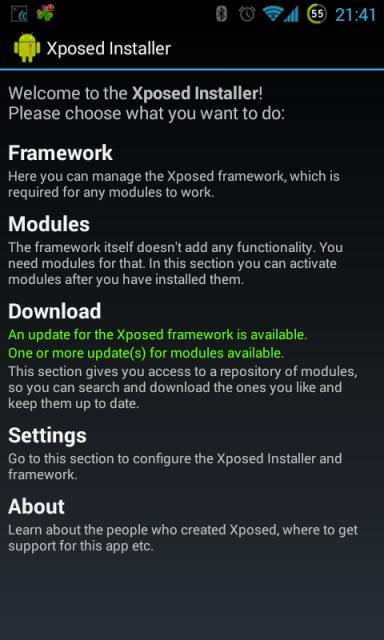
A little under a week ago, we covered the release of Xposed Framework 2.4 beta. For those just tuning in, 2.4 beta brought one very major change: support for Android 4.4 KitKat. Now just a few days later, XDA Recognized Developer rovo89 has taken 2.4 out of beta and into official circulation.

In addition to bringing official support for Android 4.4, Xposed 2.4 final also brings a few other improvements and bug fixes. Perhaps the most noticeable will be significantly improved framework performance. The UI also received a revamp, as there is now a debug log viewer and diagnostics to verify that Xposed is active and working.

It is important to note that even in version 2.4 final, Xposed is not compatible with the new ART compiler. And at this time, it is unclear if it will ever be made compatible, as it would require a major rewrite if it is even possible at all. So in order to prevent boot loops, the Xposed framework automatically resets you to Dalvik if you accidentally enable ART. And if you do wish to try ART, you will first have to disable the framework entirely.

To get started, simply head over to the application thread. And to learn more about version 2.4, head over to this post detailing all of the changes.

_________
Want something on the XDA Portal? Send us a tip!Google+

Via xda-developers.com

More aboutXposed Framework 2.4 Exits Beta, Brings Official KitKat Support and Bug Fixes

Read XDA Portal Like a Boss with Unofficial XDA Reader

Posted by Unknown

Read XDA Portal Like a Boss with Unofficial XDA Reader

The XDA Portal is a place where you can find some of the latest mobile development news. Our team spends hours searching for topics and letting you know about what's going on here at XDA. This is why we are delighted to present an application to more easily access all of the Portal news on your Android device.

XDA Recognized Developer EatHeat wrote a handy application to read the news feed from the XDA Portal. This app is light, fast, and offers a lot of features such as loading an image and text in both the list and the detailed views, showing the 10 latest posts from the Portal, and the ability to swipe from within detail view to proceed to the next news item.

The unofficial XDA Reader app features the ubiquitous Holo UI, so the app's visuals are top notch. The app can also be themed with one of four built-in themes, allowing you to change the look within seconds. Themes can even be previewed without restarting the application. With this app, reading the XDA Portal will be more enjoyable and you won't miss anything important.

If you are looking for an application to read our work, make your way to the original thread and give XDA Reader a shot.

_________
Want something on the XDA Portal? Send us a tip!Google+

Via xda-developers.com

More aboutRead XDA Portal Like a Boss with Unofficial XDA Reader

Google Nexus Devices Vulnerable to DoS Attacks, Protect Yourself with Simple App

Posted by Unknown

Google Nexus Devices Vulnerable to DoS Attacks, Protect Yourself with Simple App

Due to their expedient updates and lack of potentially vulnerable carrier and OEM addons, Nexus devices are considered to be among the safest Android devices. Being certified by Google mean a lot, but everything has some vulnerabilities, and newest Nexus devices are no exemption.

According to Romanian security researcher Bogdan Alecu, the Nexus lineup is vulnerable to a denial-of-service attacks based on a special type of SMS. This attack relies on Flash SMS, short messages displayed on the screen without being stored in the inbox. These are most often seen in pre-paid contract plans, used by a carrier to send messages with recent costs.

As it turns out, Flash SMS messages sent in rapid succession can cause some unexpected behavior like freezing, crashing, or even rebooting. The newest Nexus phones will reboot after approximately 30 messages sent in a short time. Users won't be able to realize that they device was attacked without looking at the screen. Sometimes some data loss occur, so many important calls can be missed because of this.

Alecu claims that Google was alerted about this problem about a year ago and promised to fix it in Android 4.3. Unfortunately, they didn't fulfill their promise, and the issue is still present in KitKat on the Nexus 5. The situation is even more abnormal, as non-Nexus device are unaffected. The security researcher claims that he tested almost 20 various devices, and only Nexus devices were vulnerable.

The Google Play Store offers plenty of apps that can send Flash SMS messages, including one made by Bogdan Alecu himself. Luckily, Alecu was kind enough to release a proof of concept application that protects Nexus devices from these attacks as well.

These DoS attacks that are described by Bogdan Alecu are not the most malicious and dangerous. An attacker can't control your device. However, the potential for data loss, pranking, and even stalking may make this a rather annoying glitch. Hopefully, Google will look into this issue and fix it as soon as possible.

[Thanks to XDA Recognized Contributor D™ for the tip]

_________
Want something on the XDA Portal? Send us a tip!Google+

Via xda-developers.com

More aboutGoogle Nexus Devices Vulnerable to DoS Attacks, Protect Yourself with Simple App

HTC One Developer and Unlocked Models Now Receiving Android 4.4 KitKat!

Posted by Unknown

HTC One Developer and Unlocked Models Now Receiving Android 4.4 KitKat!

Although it may seem like only yesterday, Android 4.4 KitKat was officially launched an entire month ago, alongside the release of the highly anticipated Google Nexus 5. Since then, we've seen copious amounts of work to bring these KitKat goodies over to older devices. Most of this effort has come in the form of unofficial ports, but the new Google-owned Motorola shocked us all by delivering Android 4.4 to the Moto X in record time, beating out both Google Play edition devices in the process.

Motorola's fast turnaround time is certainly quite an impressive feat, and one that bodes well for the future of the company. That said, we shouldn't expect much different from a Google subsidiary. Furthermore, the Moto X is pretty much as close to vanilla Android as you can get in a phone nowadays, outside of the Nexus lineup and Google Play edition devices.

Now, HTC is leading the pack with its Android 4.4 rollout for the HTC One. The update is now being rolled out to all developer edition devices, as well as unlocked units not purchased from carriers. While this says nothing about carrier-branded devices, we can't imagine that carriers will enjoy the bad publicity of lagging far behind the unlocked variants.

Naturally, this update to KitKat also features HTC Sense 5.5. This comes as the first official Android 4.4 update to any truly OEM-skinned device, demonstrating that OEM customizations do not necessarily have to result in Android firmware update delays.

Readers, what are your thoughts on HTC's impressive update turnaround time? Let us know in the comments below!

Good work, HTC. We hope other manufacturers can follow in your footsteps.

[Source: HTC Twitter Account]

_________
Want something on the XDA Portal? Send us a tip!Google+

Via xda-developers.com

More aboutHTC One Developer and Unlocked Models Now Receiving Android 4.4 KitKat!

Add Screen Recording to Your KitKat Project ROM

Posted by Unknown

Add Screen Recording to Your KitKat Project ROM

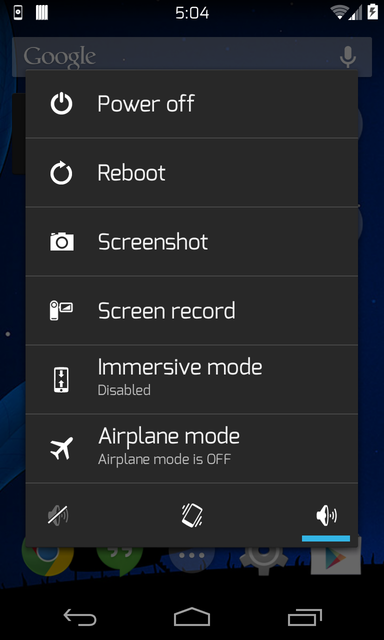
Native screen recording is one of the new features of Android 4.4. Google finally decided to give its users the ability to capture a video of the contents of their screens. This is very useful in various situations, such as presenting a new feature or simply demonstration some instructions.

Unfortunately, the ADB command to do this is not the most convenient solution, as screen recording is limited to 30 seconds only. Luckily, this amazing feature can be added to almost every source-built ROM, thanks to XDA Senior Member 0xD34D, who decided to share his commits from ChameleonOS.

We won't lie to you; it's not easy-peasy. You need to know how to build a ROM and use GitHub, as those commits need to be cherry-picked from the original repo. But it's really worth it to try to build your own ROM, especially when there are plenty of good guides for using GitHub and ROM building. When the feature is added, it can be triggered by pressing volume up and power button.

If you are interested in adding this feature to your personal ROM project or simply wish to add it to one of the more popular ROMs, make your way to the original thread and learn more.

_________
Want something on the XDA Portal? Send us a tip!Google+

Via xda-developers.com

More aboutAdd Screen Recording to Your KitKat Project ROM

Updates to Virtuous Ten Studio and Remote Theme Injector

Posted by Unknown on Friday, November 29, 2013

Updates to Virtuous Ten Studio and Remote Theme Injector

Well over a year ago now, we brought you news of a tool that solved the problem of users not being able to distribute themes for paid apps. Remote Theme Injector did exactly as its name suggests and "injects" the necessary themed elements into an APK, thereby allowing themers to make their work on paid apps available without distributing warez. The tool was often updated by its developer, XDA Senior Moderator and Recognized Developer Diamondback, whose name you might recognise from another project, Virtuous Ten Studio.

The Remote Theme Injector has since been incorporated into VTS, adding yet another useful feature into an already incredibly versatile piece of software for a variety of Android projects. VTS itself is essentially an IDE and a whole lot more, aimed at everyone from ROM developers to smali gurus, and now themers. It is capable of not only decompiling, modifying, and recompiling applications, but also modifying the m10 files that are a major component of HTC's Sense UI, as well as the unpacking/repacking of boot images. That's barely scratching the surface of what VTS is capable of, and I highly recommend checking out the VTS home page and XDA forum thread for more information.

The updated RTI bundled with VTS takes advantage of these features, and now allows for smali modifications to be included as part of the application themes. For a perfect example of just what is possible with RTI, check out the most recent batch of TapaTalk Pro/Free themes by XDA Recognized Developer and Themer Whiskey103. Whether you have the compulsive desire to ensure that all your installed apps maintain a strict theme or just fancy giving TapaTalk a quick makeover, this is definitely something worth looking into.

_________
Want something on the XDA Portal? Send us a tip!Google+

Via xda-developers.com

More aboutUpdates to Virtuous Ten Studio and Remote Theme Injector

Floating Music Controls with Beat Player

Posted by Unknown

Floating Music Controls with Beat Player

A device's music player is one of the most important apps for almost everyone. This is because most of us love music and listen to it on various mobile devices and in various places. However, finding a good, free player is not an easy task. And finding a free and innovative player is almost impossible.

XDA Senior Member dakdroid came up with some interesting ideas and created an innovative player: Beat. The application uses floating controls similar to Facebook Chat Heads. Because of this, a small control panel is always visible, no matter which application is opened in the foreground.

The floating control panel is not its only unique function. In the era of cloud services, many of our songs are kept on Dropbox or Google Drive. Beat can stream the music directly from the above. Furthermore, not all free players have equalizers and visualizations. Beat has them, and allows you to select or create a preset to get the most out of your favorite music. The application uses Metro-styled tiles, which are fully customizable. Different list styles, colors, and sizes can also be selected.

Make your way to the application thread and give it a shot. Don't forget to provide your feedback in the thread.

_________
Want something on the XDA Portal? Send us a tip!Google+

Via xda-developers.com

More aboutFloating Music Controls with Beat Player

Bring Back Battery Statistics on KitKat with Xposed Module

Posted by Unknown

Bring Back Battery Statistics on KitKat with Xposed Module

Android 4.4 has been quite a hot topic for the last four weeks. Many of you already have it on your devices in the form of an official update or unofficial port. It brought a lot of improvements, but also made few previous features unavailable. One of these was the ability for non-system applications to access battery statistics.

Previously, external applications were able to access battery statistics to show how much our applications and games affected battery life. Luckily, XDA Forum Member gsamtan wrote an Xposed module to restore this ability in aftermarket battery monitors.

According to the author, this module uses the Xposed framework to provide an alternate implementation of the com.android.server.am.BatteryStatsService.getStatistics() method, which doesn't enforce that the calling application has the BATTERY_STATS permission. It sounds a bit tricky, but the installation process is very simple. Naturally, this requires both root access and for Xposed Framework to be installed. The module is safe and won't do any harm to your device. And with it, you will be able to control your applications the old fashioned way.

If your favorite battery stats app stopped working after updating to KitKat, head over to the module thread and learn how to bring the functionality back.

_________
Want something on the XDA Portal? Send us a tip!Google+

Via xda-developers.com

More aboutBring Back Battery Statistics on KitKat with Xposed Module

HTC One & Galaxy S4 GPe Get Android 4.4 KitKat, Android Getting RAW Imaging?! – XDA Developer TV

Posted by Unknown

HTC One & Galaxy S4 GPe Get Android 4.4 KitKat, Android Getting RAW Imaging?! – XDA Developer TV

The Google Play Edition of the HTC One was updated to Android 4.4 KitKat. Then, the Samsung Galaxy S 4 Google Play Edition got official KitKat too! That and much more news is covered by Jordan, as he reviews all the important stories from this week. Included in this week's news is the announcement that kernel source for the previously mentioned KitKat devices are available, and how KitKat was also ported to the Google Nexus One. That's not all that covered in today's video!

Jordan talks about other videos released this week on XDA Developer TV. XDA Developer TV Producer TK released an Xposed Tuesday video for BootManager, XDA Senior Recognized Developer AdamOutler showed us how to launch an app with Google Now, and TK gave us an Android App Review of Dial2Draw. Pull up a chair and check out this video.

Links to stories mentioned:

  • HTC One Google Play Editions Joins KitKat Team, OTA Available to Download
  • Galaxy S 4 GPe Joins HTC One GPe, Receives KitKat OTA
  • Kernel Source for the HTC One and Samsung Galaxy S 4 Google Play Editions Running KitKat
  • Android 4.3 Returns to the AT&T Galaxy S 4, OTAs Captured
  • Android 4.3 (M919UVUEMK2) Rolling out to the T-Mobile Galaxy S 4
  • Legendary Google Nexus One Gets Android 4.4 and Joins Its Younger Brothers
  • Google Confirms Android Will Get RAW Imaging and Burst Mode
  • CyanogenMod Installer Pulled from Play Store, Lives On in Open Source Glory
  • OmniROM Nightlies Launched: 15 Devices, New Features
  • XDA Xposed Tuesday: App Startup Control with BootManager – XDA Developer TV
  • How to Make an App Launch with Google Now – XDA Developer TV
  • Android App Review: 1-2-3 Draw Your Number with Draw2Dial – XDA Developer TV

Check out Jordan's YouTube Channel and Jordan's Gaming YouTube Channel

_________
Want something on the XDA Portal? Send us a tip!Google+

Via xda-developers.com

More aboutHTC One & Galaxy S4 GPe Get Android 4.4 KitKat, Android Getting RAW Imaging?! – XDA Developer TV

Give Your Battery Some Extra Life with OnePowerGuard Pro

Posted by Unknown

Give Your Battery Some Extra Life with OnePowerGuard Pro

Since the beginning of Android, hardware changes have been easy to notice. Quad- and octa-core devices are nothing unusual now, and RAM and storage capacities make phones as powerful as some traditional PCs in certain respects. Unfortunately, they all have one major weakness: battery life. Even the biggest batteries still last a day or two of intensive use on phones and maybe few days on tablets.

Aftermarket kernel improvements can save a bit more of battery, which is a good beginning. Luckily, XDA Senior Member onexuan wrote an application to optimize battery usage in many ways. OnePowerGuard Pro gives users a chance to conserve the battery in six predefined modes, which turn on or off selected services depending on day time, usage, or other personal preferences.

Onexuan states that his application tweaks the phone on kernel-level and optimizes many of factors that can cause battery drain for an overall reduction of 70-80%. Naturally, the app requires your phone or tablet to be rooted. It's easy to say that something does wonders, but the best way to verify it is trying.

If your battery seems to let you down, you may want to give OnePowerGuard Pro a shot by visiting the application thread for additional details.

_________
Want something on the XDA Portal? Send us a tip!Google+

Via xda-developers.com

More aboutGive Your Battery Some Extra Life with OnePowerGuard Pro

Get News Fast with NewsJet

Posted by Unknown on Thursday, November 28, 2013

Get News Fast with NewsJet

The tempo of life is incredibly fast nowadays. Having to keep pace and an overall lack of time are main reasons why people use news feed readers. Information needs to be extremely fast and reliable… fast like a jet.

Many of you browse various news sites to get information about politics, technology, and sports. Browsing when mobile, however, can become difficult when connection speeds are less than ideal and pages are relatively heavy. In these situations, a good old-fashioned RSS reader is still one of best way to get information. Luckily, there are quite a few Android apps designed to read your news feed. One of them, NewsJet, was recently made by XDA Forum Member nikanorov.

The main purpose of NewsJet is to serve you news feed from popular services like BazQux, Feedly, InoReader, and The Old Reader. To use NewsJet, you need to have an account on at least one of these services. The application simply retrieves data from the service and presents it in the nice and aesthetic way. It's the perfect way to keep in touch with all the recent events, without using a PC or fast Internet connection.

If you are looking for solid and fast RSS reader, visit the application thread and give NewsJet a shot.

_________
Want something on the XDA Portal? Send us a tip!Google+

Via xda-developers.com

More aboutGet News Fast with NewsJet

Countdown to Your Favorite Events with this Simple Countdown App

Posted by Unknown

Countdown to Your Favorite Events with this Simple Countdown App

Big events in life hold a strong meaning to us. And when we plan such events, we start counting the days and minutes.

You may remember XDA Senior Member  MOST2K2's application APPoint. Now, he brings us another productivity tool—this time in the form of a simple, yet customizable countdown widget that can be placed on your home screens.

As stated by the developer:

A simple countdown widget to never miss an important meeting, birthday, vacation.
You can add more than one event at the same time of course!

This app is a great way to stay focused on upcoming events. The app itself is available in both lite and premium versions, and is compatible with Android 2.2 or higher.

If you've been looking for a simple, home screen countdown widget, make your way over to the application thread for more information and download links.

_________
Want something on the XDA Portal? Send us a tip!Google+

Via xda-developers.com

More aboutCountdown to Your Favorite Events with this Simple Countdown App

Android App Review: 1-2-3 Draw Your Number with Draw2Dial – XDA Developer TV

Posted by Unknown

Android App Review: 1-2-3 Draw Your Number with Draw2Dial – XDA Developer TV

Smartphones are smart because they are more than just phones, but let us not forget that they are indeed phones. You can use them to make calls. If you are the type of person who makes a lot of calls to a certain group of contacts or you just want to dial with swag, we have a solution for you.

XDA Forum Member FanKryations offers gesture-based dialer. In this video, XDA Developer TV Producer TK reviews Draw2Dial. TK shows off the application and gives his thoughts, so check out this app review.

Be sure to check out other great XDA Developer TV Videos

_________
Want something on the XDA Portal? Send us a tip!Google+

Via xda-developers.com

More aboutAndroid App Review: 1-2-3 Draw Your Number with Draw2Dial – XDA Developer TV

Google Play Store Now Highlights Chromecast Apps… All Seven

Posted by Unknown

Google Play Store Now Highlights Chromecast Apps… All Seven

Despite its flaws, the $35 Google Chromecast is a great little device for the price. While it has loads of untapped potential for those of you lucky enough to have root access, many of us are quick to forget about the device's default functionality.

Google is now perhaps hoping to remind us of the device's functionality by highlighting Chromecast-enabled applications in the mobile Google Play Store app. Strangely, this option isn't very visible. To view it on your device, head over to the Apps section of the Play Store. Next to Games and Editor's Choice, you will see a new Chromecast tab. However, most devices need to be tilted to landscape mode in order to see the option.

Currently, there isn't too much in the way of officially supported applications. So far, these include HBO Go, Pandora, Hulu Plus, Netflix, YouTube, Google Play Movies & TV, and Google Play Music. That said, the Google Cast SDK is launching soon, so we can expect the list to grow somewhat in the near future.

Were you one of the lucky few to achieve root before the almost unavoidable OTA? Are you happy with your Chromecast and its default functionality? Feel free to let us know in the comments below!

[Via Google Operating System Blog]

_________
Want something on the XDA Portal? Send us a tip!Google+

Via xda-developers.com

More aboutGoogle Play Store Now Highlights Chromecast Apps… All Seven

Happy Thanksgiving from XDA-Developers!

Posted by Unknown

Happy Thanksgiving from XDA-Developers!

For those of you celebrating, we here at XDA-Developers would like to take a minute to wish you a Happy Thanksgiving! Whether you're spending the Holiday with a large group of friends and family or you're relishing the company of a select few, we hope you have a grand time full of ROMs, kernels, device hacking… oh and of course, food.

Now as tonight's evening binge fest quickly approaches, it's a great opportunity to remember the reasons why we're thankful. So we now turn it over to all of you: What mobile device-related "thing" are you most thankful for this year? Is it a particular device, a developer, or some mobile innovation? Finally, we have one more question for you all. Are you planning on waking up early and doing any Black Friday and/or Cyber Monday shopping? If so, what's caught your fancy? We'd love to hear from you in the comments below!

_________
Want something on the XDA Portal? Send us a tip!Google+

Via xda-developers.com

More aboutHappy Thanksgiving from XDA-Developers!

OmniROM Nightlies Launched: 15 Devices, New Features

Posted by Unknown

OmniROM Nightlies Launched: 15 Devices, New Features

At this year's Big Android Barbeque, a new player in the multi-device custom ROM world was announced. This was of course OmniROM, an open source project created by some of the greats in the Android development world such as XDA Senior Recognized Developers Xplodwild, Chainfire, Dees_Troy, and others.

Over the last few weeks, we've seen Android 4.4-based OmniROM builds appear for several devices. Now, the experience is about to get even more exciting, as nightlies are now available for 15 popular devices! The full list, along with links to their download pages can be found at the end of this post.

Along with the nightlies, there are exciting new features in OmniROM. These include a new non-intrusive incoming call notification, improvements to DSP Manager, per-app permission settings, and ActiveDisplay.

To get started, visit the official OmniROM Downloads Page (or the direct links below). And if you're looking to learn more about the new features, head over to the official OmniROM blog.

_________
Want something on the XDA Portal? Send us a tip!Google+

Via xda-developers.com

More aboutOmniROM Nightlies Launched: 15 Devices, New Features